
LV06-目录页的rewrite模式
一、catalogue插件导入
在vitepress-plugin-catalogue/src/index.ts这样导入:
export default function VitePluginVitePressCatalogue(option: CatalogueOption = {}): Plugin & { name: string } {
  let isExecute = false;

  return {
    name: "vite-plugin-vitepress-catalogue",
    //...
      const {
        site: { themeConfig },
        srcDir,
        rewrites,
        cleanUrls,
      } = config.vitepress;
      //...
      themeConfig.catalogues = finalCatalogues;
    },
  };
}我们上面引入,然后得到的数据是这样的。包含map和inv两部分。
{
  map: {
    '01.指南/01.简介/01.简介.md': 'guide/intro/docs/intro.md',
    '01.指南/01.简介/10.快速开始.md': 'guide/intro/docs/quickstart.md',
    '01.指南/10.使用/05.Markdown 拓展.md': 'guide/use/docs/markdown.md',
    '01.指南/10.使用/10.摘要与封面.md': 'guide/use/docs/summary.md',
    '01.指南/目录.md': 'guide/docs/catalog.md',
    '15.主题开发/01.开发思路.md': 'develop/docs/intro.md',
    '15.主题开发/10.主题配置.md': 'develop/docs/config.md',
    '20.资源/05.案例.md': 'resources/docs/case.md',
    '20.资源/10.功能拓展/01.简介.md': 'resources/expand/docs/intro.md',
    '20.资源/10.功能拓展/05.导航栏图标.md': 'resources/expand/docs/nav-icon.md',
    '@pages/archivesPage.md': 'archives.md',
    '@pages/articleOverviewPage.md': 'articleOverview.md',
    '@pages/categoriesPage.md': 'categories.md',
    '@pages/loginPage.md': 'login.md',
    '@pages/riskLinkPage.md': 'risk-link.md',
    '@pages/tagsPage.md': 'tags.md',
    'examples/articlePage/aside.md': 'iframe/articlePage/aside.md',
    'examples/articlePage/doc.md': 'iframe/articlePage/doc.md'
  },
  inv: {
    'guide/intro/docs/intro.md': '01.指南/01.简介/01.简介.md',
    'guide/intro/docs/quickstart.md': '01.指南/01.简介/10.快速开始.md',
    'guide/use/docs/markdown.md': '01.指南/10.使用/05.Markdown 拓展.md',
    'guide/use/docs/summary.md': '01.指南/10.使用/10.摘要与封面.md',
    'guide/docs/catalog.md': '01.指南/目录.md',
    'develop/docs/intro.md': '15.主题开发/01.开发思路.md',
    'develop/docs/config.md': '15.主题开发/10.主题配置.md',
    'resources/docs/case.md': '20.资源/05.案例.md',
    'resources/expand/docs/intro.md': '20.资源/10.功能拓展/01.简介.md',
    'resources/expand/docs/nav-icon.md': '20.资源/10.功能拓展/05.导航栏图标.md',
    'archives.md': '@pages/archivesPage.md',
    'articleOverview.md': '@pages/articleOverviewPage.md',
    'categories.md': '@pages/categoriesPage.md',
    'login.md': '@pages/loginPage.md',
    'risk-link.md': '@pages/riskLinkPage.md',
    'tags.md': '@pages/tagsPage.md',
    'iframe/articlePage/aside.md': 'examples/articlePage/aside.md',
    'iframe/articlePage/doc.md': 'examples/articlePage/doc.md'
  }
}根据函数调用情况,后面使用的是map部分数据:
const catalogues = createCatalogues({ ...option, path: baseDir }, { rewrites: rewrites.map, cleanUrls });二、详细处理过程示例
为了更清楚地理解处理过程,我们以部分具体数据为例,详细描述每一步的处理过程。
1. 初始数据
要使用的的 rewrite 数据:
{
  "01.指南/01.简介/01.简介.md": "guide/intro/docs/intro.md",
  "01.指南/01.简介/10.快速开始.md": "guide/intro/docs/quickstart.md",
  "01.指南/10.使用/05.Markdown 拓展.md": "guide/use/docs/markdown.md",
  "01.指南/10.使用/10.摘要与封面.md": "guide/use/docs/summary.md",
  "01.指南/目录.md": "guide/docs/catalog.md"
}2. 第一步:扫描包含catalogue的md文件
scannerMdFile 函数会递归扫描指定目录下所有的 md 文件,查找包含 catalogue 和 path frontmatter 的文件。假设我们在 01.指南/目录.md 文件中添加了以下 frontmatter:
---
catalogue: true
path: "guide/docs/catalog"
---

# 目录页

这是目录页内容...当插件扫描到这个文件时,会执行以下操作:
- 读取文件内容并解析 frontmatter
- 检查是否存在
catalogue和path字段 - 如果存在,则调用
createCatalogueList函数生成目录数据
3. 第二步:生成目录数据
createCatalogueList 函数会扫描指定路径下的文件和目录,生成目录数据:
const createCatalogueList = (
  root: string,
  option: CatalogueOption,
  prefix = "/",
  vitepressConfig: VitePressConfig = {}
): CatalogueItem[] => {
  // ...
  dirOrFilenames.forEach(dirOrFilename => {
    // ...
    if (statSync(fileAbsolutePath).isDirectory()) {
      // 处理目录
    } else {
      // 处理文件
      if (!isMarkdownFile(dirOrFilename)) return [];
      if (ignoreIndexMd && ["index.md", "index.MD"].includes(dirOrFilename)) return [];

      const content = readFileSync(fileAbsolutePath, "utf-8");
      // 解析出 frontmatter 数据
      const { data: frontmatter = {}, content: mdContent } = matter(content, {});
      const { title: frontmatterTitle, catalogue, inCatalogue = true } = frontmatter;

      // 不扫描目录页和 inCatalogue 为 false 的文档
      if (catalogue || !inCatalogue) return [];

      // title 获取顺序:md 文件 frontmatter.title > md 文件一级标题 > md 文件名
      const mdTitle = titleFormMd ? getTitleFromMarkdown(mdContent) : "";
      const finalTitle = frontmatterTitle || mdTitle || title;
      const filePath = prefix + name;

      const { rewrites = {}, cleanUrls } = vitepressConfig;

      const catalogueItem = {
        title: finalTitle,
        url:
          (removeMarkdownExt(rewrites[`${filePath.replace(/^\//, "")}.md`]) || filePath) + (cleanUrls ? "" : ".html"),
        frontmatter,
      };

      if (isIllegalIndex(index)) catalogueItemListNoIndex.push(catalogueItem);
      else catalogueItemList[index] = catalogueItem;
    }
  });
  // ...
};对于我们的示例数据,处理过程如下:
(1)扫描 guide/docs/catalog 目录下的文件
(2)处理 01.简介.md 文件:
- 解析文件名得到 index=1, title="简介"
- 读取文件内容,获取标题
- 查找 rewrites 映射中的
01.指南/01.简介/01.简介.md键 - 找到对应的值
guide/intro/docs/intro.md - 生成 URL:
/guide/intro/docs/intro.html - 创建目录项:{ title: "简介", url: "/guide/intro/docs/intro.html", frontmatter:
(3)处理 10.快速开始.md 文件:
- 解析文件名得到 index=10, title="快速开始"
- 读取文件内容,获取标题
- 查找 rewrites 映射中的
01.指南/01.简介/10.快速开始.md键 - 找到对应的值
guide/intro/docs/quickstart.md - 生成 URL:
/guide/intro/docs/quickstart.html - 创建目录项:
{ title: "快速开始", url: "/guide/intro/docs/quickstart.html", frontmatter: {} }
(4)处理 05.Markdown 拓展.md 文件:
- 解析文件名得到 index=5, title="Markdown 拓展"
- 读取文件内容,获取标题
- 查找 rewrites 映射中的
01.指南/10.使用/05.Markdown 拓展.md键 - 找到对应的值
guide/use/docs/markdown.md - 生成 URL:
/guide/use/docs/markdown.html - 创建目录项:
{ title: "Markdown 拓展", url: "/guide/use/docs/markdown.html", frontmatter: {} }
(5)处理 10.摘要与封面.md 文件:
- 解析文件名得到 index=10, title="摘要与封面"
- 读取文件内容,获取标题
- 查找 rewrites 映射中的
01.指南/10.使用/10.摘要与封面.md键 - 找到对应的值
guide/use/docs/summary.md - 生成 URL:
/guide/use/docs/summary.html - 创建目录项:
{ title: "摘要与封面", url: "/guide/use/docs/summary.html", frontmatter: {} }
4. 第三步:合并和排序目录项
将处理好的项按索引排序:
(1)"01.简介.md" 文件项 (index=1)
(2)"10.快速开始.md" 文件项 (index=10)
最终生成的目录数据:
[
  {
    "title": "简介",
    "url": "/guide/intro/docs/intro.html",
    "frontmatter": {}
  },
  {
    "title": "快速开始",
    "url": "/guide/intro/docs/quickstart.html",
    "frontmatter": {}
  }
]三、示例:生成最终的目录数据结构
基于提供的 rewrites 数据,最终生成的目录数据结构如下:
{
  "arr": [
    {
      "filePath": "/guide/intro/docs/intro",
      "path": "guide/intro/docs/intro",
      "catalogues": [
        {
          "title": "简介",
          "url": "/guide/intro/docs/intro.html",
          "frontmatter": {}
        },
        {
          "title": "快速开始",
          "url": "/guide/intro/docs/quickstart.html",
          "frontmatter": {}
        }
      ]
    },
    {
      "filePath": "/guide/use/docs/markdown",
      "path": "guide/use/docs/markdown",
      "catalogues": [
        {
          "title": "Markdown 拓展",
          "url": "/guide/use/docs/markdown.html",
          "frontmatter": {}
        },
        {
          "title": "摘要与封面",
          "url": "/guide/use/docs/summary.html",
          "frontmatter": {}
        }
      ]
    },
    {
      "filePath": "/guide/docs/catalog",
      "path": "guide/docs/catalog",
      "catalogues": [
        {
          "title": "简介",
          "url": "/guide/intro/docs/intro.html",
          "frontmatter": {}
        },
        {
          "title": "快速开始",
          "url": "/guide/intro/docs/quickstart.html",
          "frontmatter": {}
        },
        {
          "title": "Markdown 拓展",
          "url": "/guide/use/docs/markdown.html",
          "frontmatter": {}
        },
        {
          "title": "摘要与封面",
          "url": "/guide/use/docs/summary.html",
          "frontmatter": {}
        }
      ]
    }
  ],
  "map": {
    "/guide/intro/docs/intro": {
      "url": "/guide/intro/docs/intro.html",
      "path": "guide/intro/docs/intro",
      "catalogues": [
        {
          "title": "简介",
          "url": "/guide/intro/docs/intro.html",
          "frontmatter": {}
        },
        {
          "title": "快速开始",
          "url": "/guide/intro/docs/quickstart.html",
          "frontmatter": {}
        }
      ]
    },
    "/guide/use/docs/markdown": {
      "url": "/guide/use/docs/markdown.html",
      "path": "guide/use/docs/markdown",
      "catalogues": [
        {
          "title": "Markdown 拓展",
          "url": "/guide/use/docs/markdown.html",
          "frontmatter": {}
        },
        {
          "title": "摘要与封面",
          "url": "/guide/use/docs/summary.html",
          "frontmatter": {}
        }
      ]
    },
    "/guide/docs/catalog": {
      "url": "/guide/docs/catalog.html",
      "path": "guide/docs/catalog",
      "catalogues": [
        {
          "title": "简介",
          "url": "/guide/intro/docs/intro.html",
          "frontmatter": {}
        },
        {
          "title": "快速开始",
          "url": "/guide/intro/docs/quickstart.html",
          "frontmatter": {}
        },
        {
          "title": "Markdown 拓展",
          "url": "/guide/use/docs/markdown.html",
          "frontmatter": {}
        },
        {
          "title": "摘要与封面",
          "url": "/guide/use/docs/summary.html",
          "frontmatter": {}
        }
      ]
    }
  },
  "inv": {
    "guide/intro/docs/intro": {
      "url": "/guide/intro/docs/intro.html",
      "filePath": "/guide/intro/docs/intro",
      "catalogues": [
        {
          "title": "简介",
          "url": "/guide/intro/docs/intro.html",
          "frontmatter": {}
        },
        {
          "title": "快速开始",
          "url": "/guide/intro/docs/quickstart.html",
          "frontmatter": {}
        }
      ]
    },
    "guide/use/docs/markdown": {
      "url": "/guide/use/docs/markdown.html",
      "filePath": "/guide/use/docs/markdown",
      "catalogues": [
        {
          "title": "Markdown 拓展",
          "url": "/guide/use/docs/markdown.html",
          "frontmatter": {}
        },
        {
          "title": "摘要与封面",
          "url": "/guide/use/docs/summary.html",
          "frontmatter": {}
        }
      ]
    },
    "guide/docs/catalog": {
      "url": "/guide/docs/catalog.html",
      "filePath": "/guide/docs/catalog",
      "catalogues": [
        {
          "title": "简介",
          "url": "/guide/intro/docs/intro.html",
          "frontmatter": {}
        },
        {
          "title": "快速开始",
          "url": "/guide/intro/docs/quickstart.html",
          "frontmatter": {}
        },
        {
          "title": "Markdown 拓展",
          "url": "/guide/use/docs/markdown.html",
          "frontmatter": {}
        },
        {
          "title": "摘要与封面",
          "url": "/guide/use/docs/summary.html",
          "frontmatter": {}
        }
      ]
    }
  }
}注意:
(1)目录项按照文件名中的序号进行排序(01, 05, 10...)
(2)URL路径通过rewrites映射生成
(3)catalogues数组包含指定路径下的所有文档项
四、CataloguePage
CataloguePage 组件用于展示目录页面。它会根据 Markdown 文件中的 catalogue 和 path frontmatter 生成目录数据,并将这些数据注入到 VitePress 的主题配置中。组件通过读取这些数据来渲染目录项,并为每个项生成跳转链接。
1. 数据使用
CataloguePage 组件通过以下方式使用目录数据:
(1)获取数据:组件使用 useData() 钩子获取 theme 和 frontmatter 对象。然后,它通过 theme.value.catalogues?.inv[frontmatter.value.path]?.catalogues 获取当前页面的目录数据。
(2)渲染目录项:组件使用 v-for 指令遍历 catalogues 数组,并为每个项目渲染一个 CatalogueItem 组件。
2. 跳转链接组成
跳转链接的组成过程如下:
(1)URL 生成:在 vitepress-plugin-catalogue 插件中,当扫描目录下的文件时,会根据 VitePress 的 rewrites 配置生成 URL。具体逻辑在 plugins\vitepress-plugin-catalogue\src\helper.ts文件:
url:
(removeMarkdownExt(rewrites[`${filePath.replace(/^\//, "")}.md`]) || filePath) + (cleanUrls ? "" : ".html"),这里,filePath 是文件的路径(相对于源目录),rewrites 是从 VitePress 配置中获取的重写映射。它会查找 rewrites 中是否存在对应文件的映射,如果存在,则使用映射后的路径作为 URL,否则使用原始路径。最后,根据 cleanUrls 配置决定是否添加 .html 后缀。
(2)链接渲染:在 CatalogueItem 组件中,对于非目录项(即具体的文档项),它会渲染一个 <a> 标签。
<a v-if="!item.children" :href="item.url && withBase(item.url)" :aria-label="`${index}. ${item.title}`">
  {{ index }}.
  <span v-html="item.title" />
  <!-- ... -->
</a>:href="item.url && withBase(item.url)" 这行代码将 item.url 作为跳转链接。withBase 是 VitePress 提供的函数,用于将相对路径转换为带 base 路径的绝对路径。
3. 实例
假设我们的网站部署在 http://localhost:5173/,并且有以下目录结构和 rewrites 配置:
docs
├── 01.指南
│   ├── 目录.md
│   ├── 01.简介
│   │   ├── 01.简介.md
│   │   └── 10.快速开始.md
│   └── 10.使用
│       ├── 05.Markdown 拓展.md
│ └── 10.摘要与封面.md// rewrites 配置
{
"01.指南/目录.md": "guide/docs/catalog.md",
"01.指南/01.简介/01.简介.md": "guide/intro/docs/intro.md",
"01.指南/01.简介/10.快速开始.md": "guide/intro/docs/quickstart.md",
"01.指南/10.使用/05.Markdown 拓展.md": "guide/use/docs/markdown.md",
"01.指南/10.使用/10.摘要与封面.md": "guide/use/docs/summary.md"
}在 docs/01.指南/目录.md 文件中,我们添加了以下 frontmatter:
---
catalogue: true
path: "guide/docs/catalog"
---数据生成:插件会扫描 guide/docs/catalog 目录,并为其中的文件生成目录数据。例如,对于 01.简介.md 文件,它会执行以下步骤来生成 URL:
(1)获取文件的相对路径:01.指南/01.简介/01.简介.md。 (2)在 rewrites 配置中查找映射:找到 "01.指南/01.简介/01.简介.md": "guide/intro/docs/intro.md"。 (3)生成相对 URL:/guide/intro/docs/intro.md。 (4)移除 Markdown 扩展名:/guide/intro/docs/intro。 (5)根据 cleanUrls 配置添加 .html 后缀(假设 cleanUrls 为 false):/guide/intro/docs/intro.html。
最终生成的数据如下:
{
  "title": "简介",
  "url": "/guide/intro/docs/intro.html",
  "frontmatter": {}
}组件渲染与链接生成:CataloguePage 组件获取到这些数据后,会渲染出一个链接。在 CatalogueItem 组件中,链接通过 :href="item.url && withBase(item.url)" 生成。withBase 函数会将相对路径转换为带 base 路径的绝对路径。
假设 VitePress 的 base 配置为 /,那么 withBase("/guide/intro/docs/intro.html") 会返回 /guide/intro/docs/intro.html。
最终生成的 HTML 链接如下:
<a href="/guide/intro/docs/intro.html" aria-label="1. 简介">
  1.
  <span>简介</span>
</a>当用户访问 http://localhost:5173/guide/docs/catalog.html 页面时,点击这个链接将会跳转到 http://localhost:5173/guide/intro/docs/intro.html。
通过这种方式,CataloguePage 组件能够动态地根据目录结构和 rewrites 配置生成跳转链接,为用户提供便捷的导航。
五、问题分析
按照上面的数据,产生了一个问题,就是,上面我们可以得到这样的一个目录页:
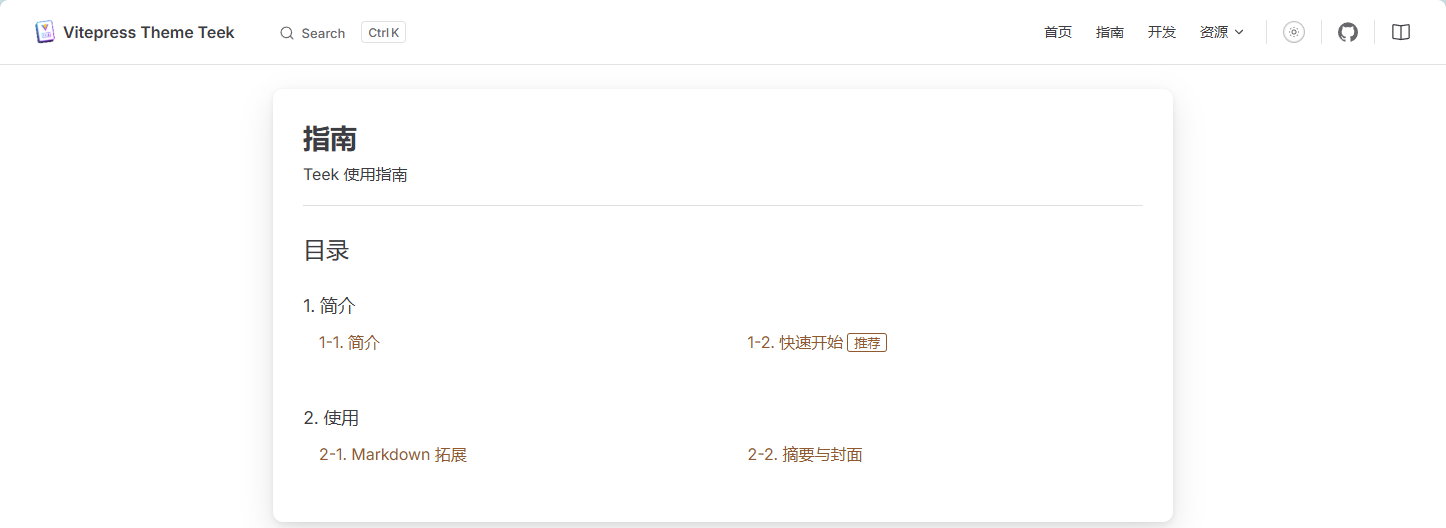
根据前面的目录数据的生成,这个数据是对的,但是将会得到这样的跳转链接:
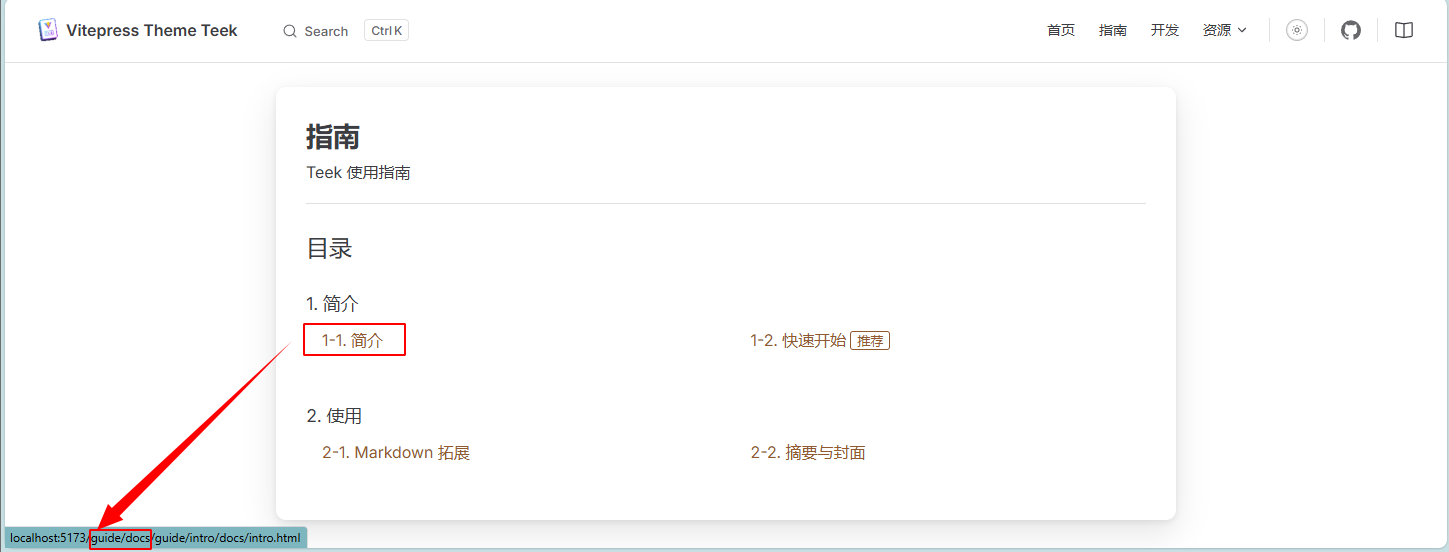
这里多了一段,原本跳转链接应该是 http://localhost:5173/guide/intro/docs/intro.html才对,我们加点打印信息在packages/components/theme/CataloguePage/src/CatalogueItem.vue中:
   <a v-if="!item.children" :href="item.url && withBase(item.url)" :aria-label="`${index}. ${item.title}`">
      {{ index }}.
      <span v-html="item.title" />
      <TkTitleTag
        v-if="item.frontmatter?.titleTag"
        :text="item.frontmatter?.titleTag"
        position="right"
        size="small"
        :aria-label="item.frontmatter?.titleTag"
      />
    </a>

    <!-- 调试信息 -->
    <div v-if="!item.children" style="margin-top: 8px; font-size: 12px; color: #666; background: #f5f5f5; padding: 8px; border-radius: 4px;">
      <div><strong>原始数据:</strong></div>
      <div>item.url: <code>{{ item.url }}</code></div>
      <div>withBase(item.url): <code>{{ withBase(item.url) }}</code></div>
      <div>item.url && withBase(item.url): <code>{{ item.url && withBase(item.url) }}</code></div>
      <div><strong>实际使用:</strong></div>
      <div>a标签href属性值: <code>{{ item.url && withBase(item.url) }}</code></div>
</div>然后就会发现:
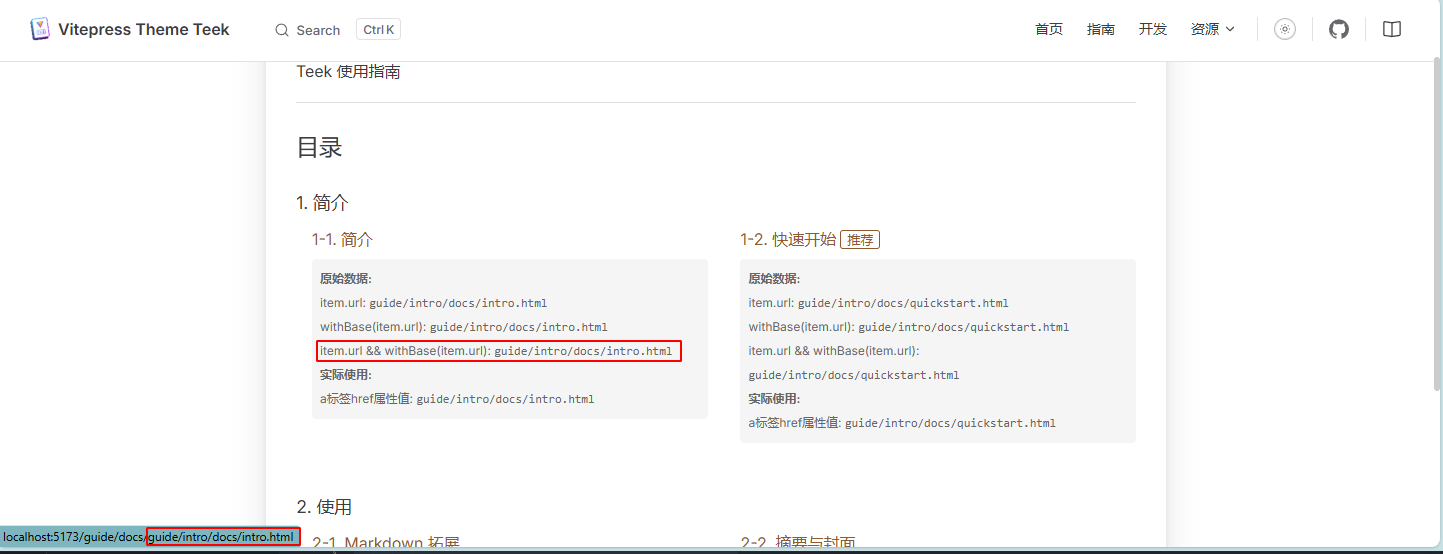
得到路径是正常的,但是多添加了当前路径,因为目录页刚好就在http://localhost:5173/guide/docs/catalog.html,这又是为什么?这个其实我并没有找到原因,但是有种方案就是,生成目录页链接时直接用绝对路径,例如,修改vitepress-plugin-catalogue/src/helper.ts中
const createCatalogueList = (
  root: string,
  option: CatalogueOption,
  prefix = "/",
  vitepressConfig: VitePressConfig = {}
): CatalogueItem[] => {
  if (!existsSync(root)) {
    console.warn(`'${root}' 路径不存在,将忽略该目录页的生成`);
    return [];
  }

  //...
      const catalogueItem = {
        title: finalTitle,
        url:
          "/" + (removeMarkdownExt(rewrites[`${filePath.replace(/^\//, "")}.md`]) || filePath.replace(/^\//, "")) + (cleanUrls ? "" : ".html"),
        frontmatter,
      };

      if (isIllegalIndex(index)) catalogueItemListNoIndex.push(catalogueItem);
      else catalogueItemList[index] = catalogueItem;
    }
  });
  //...
  return catalogueItemResolved?.(data) ?? data;
};在生成catalogueItem的时候直接加上/的绝对路径,这个时候就正常了:
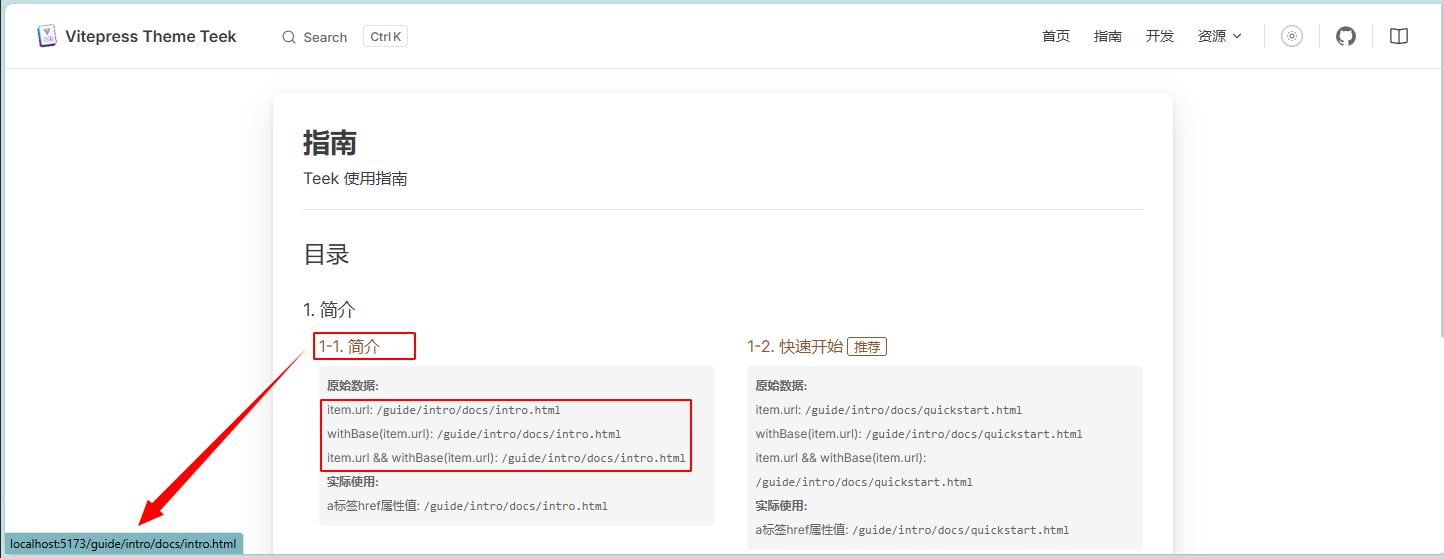
反正到最后也不是很理解为什么,后面有机会搞明白了再补充。