
LV010-无名管道
本文主要是进程通信——管道的相关笔记,若笔记中有错误或者不合适的地方,欢迎批评指正😃。
一、无名管道
1. 无名管道创建
1.1 pipe()
1.1.1 函数说明
在linux下可以使用man pipe命令查看该函数的帮助手册。
/* 需包含的头文件 */
#include <unistd.h>

/* 函数声明 */
int pipe(int pipefd[2]);【函数说明】该函数创建一个无名管道,创建之后会产生两个文件描述符,就相当于直接打开了可以直接使用,使用完毕后会自动销毁。
【函数参数】
pipefd[2]:int类型,是一个大小为2的数组,pipefd[0]和pipefd[1]表示两个文件描述符,分别代表管道的两端,一般代表含义如下:
| pipefd[0] | 管道读端 |
| pipefd[1] | 管道写端 |
【返回值】int类型,成功返回0,失败返回-1,并设置errno。
【使用格式】一般情况下基本使用格式如下:
/* 需要包含的头文件 */
#include <unistd.h>

/* 至少应该有的语句 */
int pfd[2];
pipe(pfd);【注意事项】创建的匿名管道是特殊的文件,只存在于内存,不存于文件系统中。
1.1.2 使用实例
#include <stdio.h>
#include <unistd.h>

int main(int argc, char *argv[])
{
	int ret = 0;
	/* 定义读写管道数组 */
	int pfd[2];

	/* 1. 创建管道 */
	ret = pipe(pfd);
	if(ret < 0)
	{
		perror("pipe");
		return -1;
	}
	printf("pfd[0]=%d,pfd[1]=%d\n",pfd[0],pfd[1]);
	return 0;
}在终端执行以下命令编译程序:
gcc test.c -Wall # 生成可执行文件 a.out
./a.out # 执行可执行程序然后,终端会有以下信息显示:
pfd[0]=3,pfd[1]=42. 无名管道读写
2.1 read()
2.1.1 函数说明
在linux下可以使用man 2 read命令查看该函数的帮助手册。
/* 需包含的头文件 */
#include <unistd.h>

/* 函数声明 */
ssize_t read(int fd, void *buf, size_t count);【函数说明】该函数从文件描述符指向的文件中读指定字节数据。
【函数参数】
fd:int类型,表示文件描述符。buf:void *类型,表示接收数据的缓冲区。count:size_t类型,为需要读取的字节数,不应超过buf的长度。
【返回值】ssize_t类型,成功返回读取的字节数;失败返回-1, 错误代码存入errno 中, 而文件读写位置则无法预期;读到文件末尾时或者count为0时,将返回0。
【使用格式】一般情况下基本使用格式如下:
/* 需要包含的头文件 */
#include <unistd.h>

/* 至少应该有的语句 */
char buf[20] = {0};
int pfd[2];

pipe(pfd);
read(pfd[0], buf, sizeof(buf)/sizeof(char));【注意事项】
(1)读取过程中,未读完count字节时,若遇到换行,则会一起读取。
(2)对于⼀个数组,总是要自动分配⼀个\0作为结束,所以实际有效的buf长度就成为sizeof(buf) - 1了,最好就是在读取完成后自己加上一个\0,以防止后边打印出现乱码的情况。
(3)文件读写位置会随读取到的字节移动。
2.1.2 使用实例
暂无。
2.2 write()
2.2.1 函数说明
在linux下可以使用man 3 write命令查看该函数的帮助手册。
/* 需包含的头文件 */
#include <unistd.h>

/* 函数声明 */
ssize_t write(int fd, const void *buf, size_t count);【函数说明】该函数会将指定字节数据写入到文件描述符所指向的文件中去。
【函数参数】
fd:int类型,表示文件描述符。buf:void *类型,表示要写入数据的缓冲区。count:size_t类型,为需要读取的字节数。
【返回值】ssize_t类型,成功返回实际写入字节数,失败返回-1, 错误代码存入errno 中。
【使用格式】一般情况下基本使用格式如下:
/* 需要包含的头文件 */
#include <unistd.h>

/* 至少应该有的语句 */
char buf[20] = {0};
int pfd[2];

pipe(pfd);
strcpy(buf,"fanhua!");
write(pfd[1], buf, strlen(buf));【注意事项】数据写入完毕后,文件指针指向文件尾部,此时直接读取文件,则什么也读不到,可以使用后边的函数移动指针,再进行读取。
2.2.2 使用实例
暂无。
2.3 管道读写实例
#include <stdio.h>  /* perror */
#include <unistd.h> /* sleep  pipe read write close*/
#include <string.h> /* strcpy strlen */

#define READPIPE 0  /* 管道读 */
#define WRITEPIPE 1 /* 管道写 */


/* 主函数 */
int main(int argc, char *argv[])
{
	int pfd[2];/* 定义读写管道数组 */
	char buff[20] = {0};
	int ret = 0;
	/* 1. 创建管道 */
	ret = pipe(pfd);
	if(ret < 0)
	{
		perror("pipe");
		return -1;
	}
	printf("pfd[READPIPE]=%d,pfd[WRITEPIPE]=%d\n",pfd[READPIPE],pfd[WRITEPIPE]);

	while(1)
	{

		strcpy(buff,"fanhua!");/* 拷贝字符串到字符数组 */

		ret = write(pfd[WRITEPIPE], buff, strlen(buff));
		printf("Write %d Byte!\n", ret);

		ret = read(pfd[READPIPE], buff, sizeof(buff)/sizeof(char));
		if(ret > 0)
		{
			printf("read pipe=%s, ret = %d\n", buff, ret);
		}
		sleep(1);
	}
	return 0;
}在终端执行以下命令编译程序:
gcc test.c -Wall # 生成可执行文件 a.out
./a.out # 执行可执行程序然后,终端会有以下信息显示:
pfd[READPIPE]=3,pfd[WRITEPIPE]=4
Write 9 Byte!
read pipe=fanhua!, ret = 9
Write 9 Byte!
read pipe=fanhua!, ret = 9
# 后边都是循环的了......【注意事项】这里老师讲的时候好像说一个进程不能既写又读,但是自己测试的时候貌似既可以写又可以读。
3. 父子进程通信
上边我们已经创建了一个管道了,所谓的管道,其实就是内核里面的一串缓存。从管道的一段写入的数据,实际上是缓存在内核中的,另一端读取,也就是从内核中读取这段数据。另外,管道传输的数据是无格式的流且大小受限。
3.1 父进程创建管道
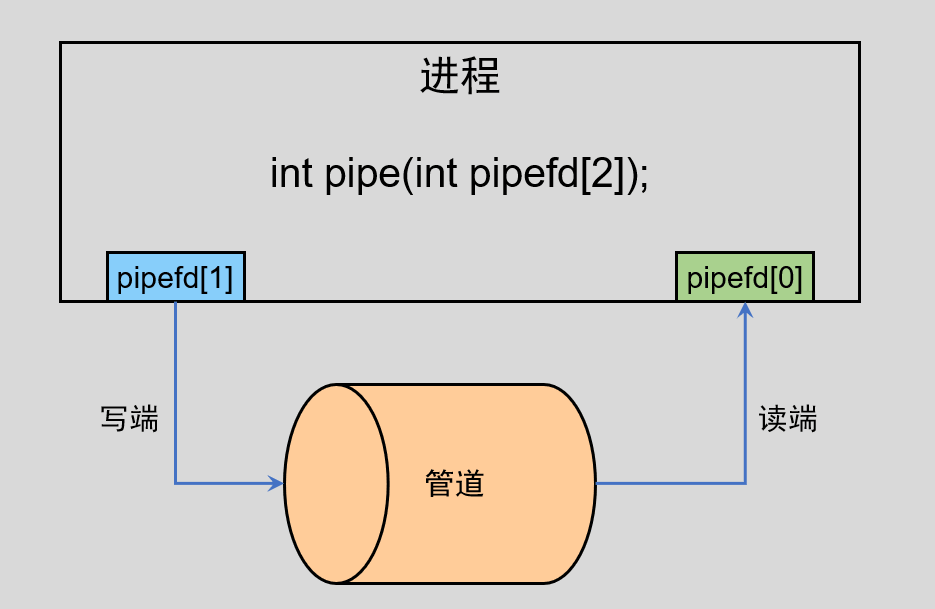
我们在一个进程中创建一个无名管道,会产生两个文件描述符,分别代表读写,如上图所示,并且是单向通信的,只能从写端写入,然后从读端读取,遵循先进先出的原则。
3.2 fork 出子进程
上边在父进程创建管道,那么再创建子进程的时候会变成什么样子呢?
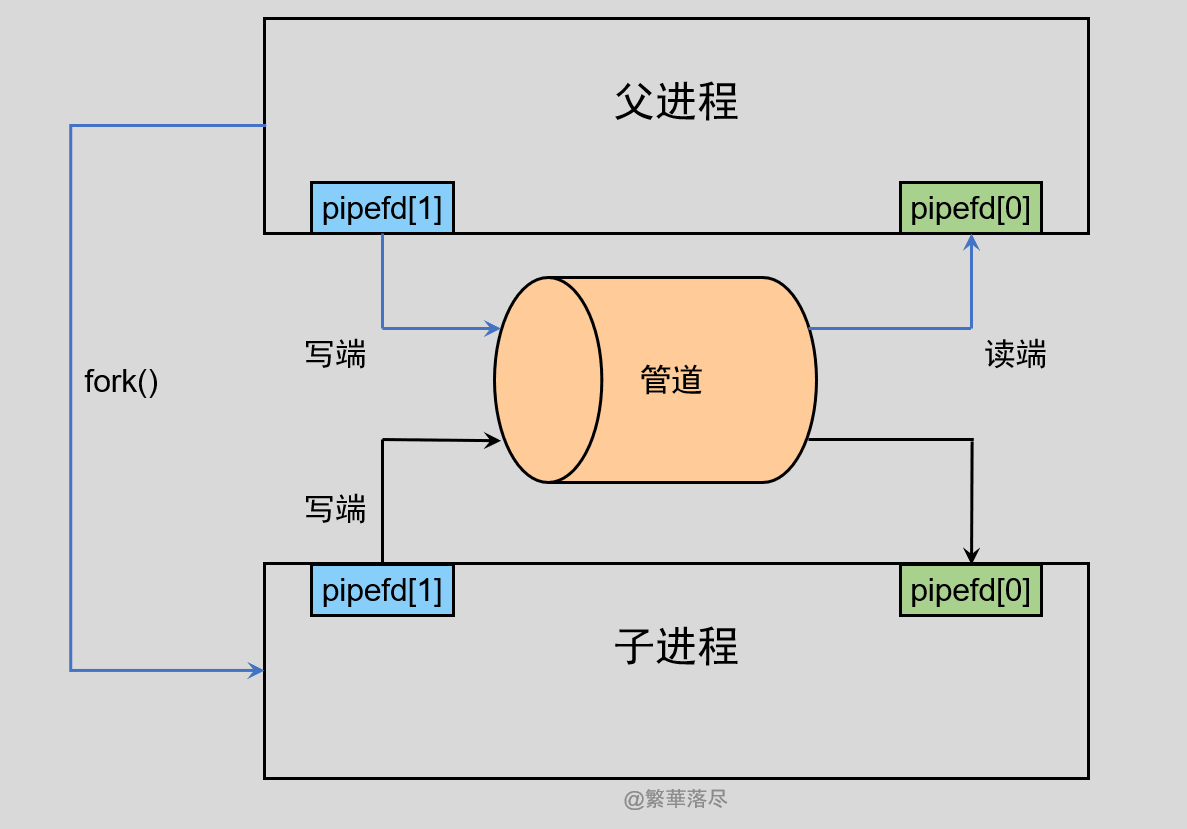
前边学习进程的创建的时候,知道子进程会获得父进程所有文件描述符的副本,所以在创建子进程后,会出出现上图的情况。
3.3 混乱避免
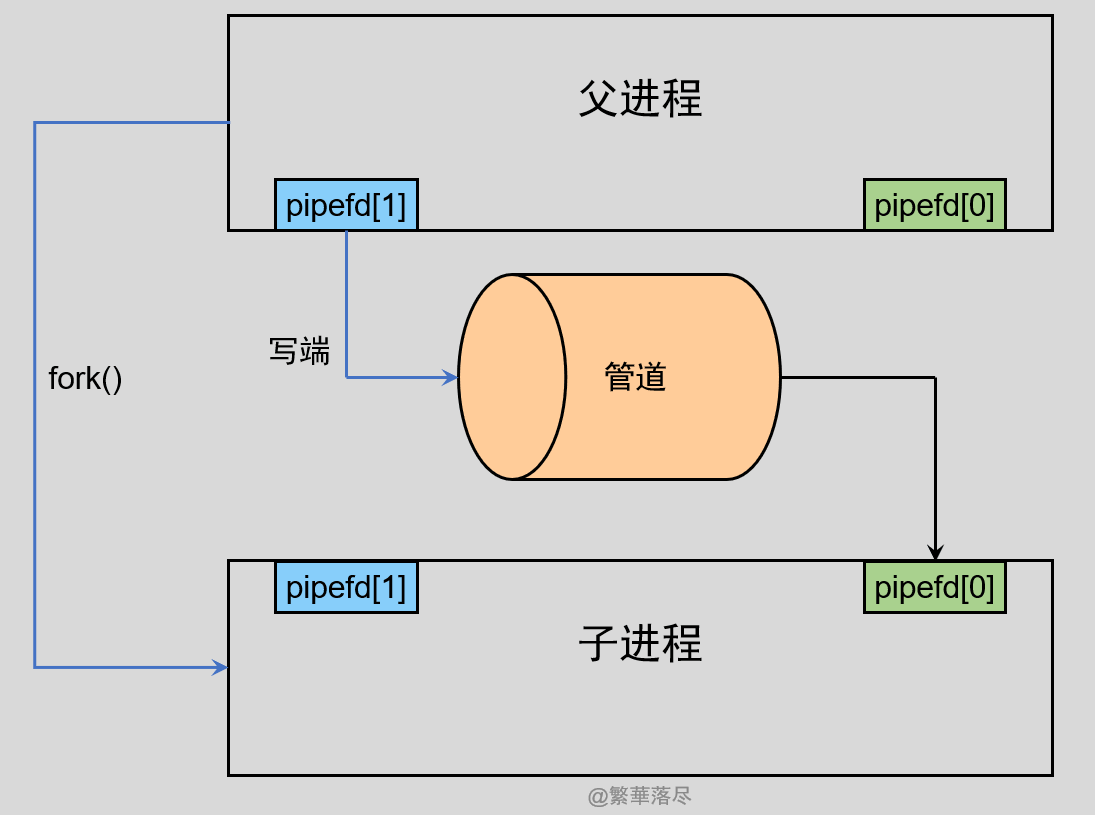
可是上边的子进程和父进程共享文件描述后,在对管道读写的时候会出现混乱的,管道只能一端写入,另一端读出,而父进程和子进程都可以同时写入,也都可以读出。那么,为了避免这种情况,通常的做法是,一个进程用来写入,那么久关闭它的读端,另一个进程用来读取数据,那么就关闭它的写端,于是就会出现下边的情况:
3.4 使用实例
3.4.1 实例1
这个实例是一个父进程一个子进程之间通过无名管道通信。
#include <stdio.h>  /* perror */
#include <unistd.h> /* sleep fork pipe read write close*/
#include <string.h> /* strcpy strlen */

/* 主函数 */
int main(int argc, char *argv[])
{
	int ret = 0;
	char buff[20] = {0};
	/* 定义一个 pid_t 类型变量用于保存进程号*/
	pid_t pid;
	/* 定义读写管道数组 */
	int pfd[2];

	/* 1. 创建管道 */
	ret = pipe(pfd);
	if(ret < 0)
	{
		perror("pipe");
		return -1;
	}
	printf("pfd[0]=%d,pfd[1]=%d\n",pfd[0],pfd[1]);

	/* 2. 创建一个父子进程 */
	pid = fork();
	/* 3. 父子进程区分执行不同内容 */
	/* 进程创建错误 */
	if(pid < 0)
	{
		perror("fork");
		return -1;
	}
	/* 父进程 */
	else if(pid > 0)
	{
		/* 关闭父进程中管道读取端 */
		close(pfd[0]);
		while(1)
		{
			/* 拷贝字符串到字符数组 */
			strcpy(buff,"fanhua");
			/* 向字符数组写入数据 */
			ret = write(pfd[1], buff, strlen(buff));
			if(ret > 0)
			{
				printf("Father process write pipe=%s\n", buff);
			}
			/* 休眠1s */
			sleep(1);
		}
	}
	/* 子进程 */
	else
	{
		/* 关闭子进程中管道的写入端 */
		close(pfd[1]);
		while(1)
		{
			/* 从字符数组中读取数据 */
			ret = read(pfd[0] , buff, sizeof(buff)/sizeof(char));
			if(ret > 0)
			{
				printf("Child process read pipe=%s\n", buff);
			}
		}
	}

	return 0;
}在终端执行以下命令编译程序:
gcc test.c -Wall # 生成可执行文件 a.out
./a.out # 执行可执行程序然后,终端会有以下信息显示:
pfd[0]=3,pfd[1]=4
Father process write pipe=fanhua
Child process read pipe=fanhua
Father process write pipe=fanhua
Child process read pipe=fanhua
Father process write pipe=fanhua
Child process read pipe=fanhua
Father process write pipe=fanhua
Child process read pipe=fanhua
Father process write pipe=fanhua3.4.2 实例2
这个实例是一个父进程两个子进程之间通过无名管道通信。
#include <stdio.h>  /* perror */
#include <unistd.h> /* sleep fork pipe read write close*/
#include <string.h> /* strcpy strlen */

#define READPIPE 0  /* 管道读 */
#define WRITEPIPE 1 /* 管道写 */

/* 主函数 */
int main(int argc, char *argv[])
{
	int i = 0;
	int ret = 0;
	char buff[40] = {0};
	/* 定义一个 pid_t 类型变量用于保存进程号*/
	pid_t pid;
	/* 定义读写管道数组 */
	int pfd[2];

	/* 1. 创建管道 */
	ret = pipe(pfd);
	if(ret < 0)
	{
		perror("pipe");
		return -1;
	}
	printf("pfd[READPIPE]=%d,pfd[WRITEPIPE]=%d\n",pfd[READPIPE],pfd[WRITEPIPE]);

	/* 2. 创建一个父进程两个子进程 A->B A->C */
	for(i = 0; i<2; i++)
	{
		pid = fork();/* 注意父子进程后续都会执行该句下边的所有程序 */
		/* 3. 父子进程区分执行不同内容 */
		/* 进程创建错误 */
		if(pid < 0)
		{
			perror("fork");
			return -1;
		}
		/* 父进程 */
		else if(pid > 0)
		{

		}
		/* 子进程 */
		else
		{
			break;
		}
	}
	if(i == 0)/* 第一个子进程创建完成,执行到这里 */
	{
		/* 关闭管道读取端 */
		close(pfd[READPIPE]);
		while(1)
		{
			/* 拷贝字符串到字符数组 */
			strcpy(buff,"This is 1 process!");
			/* 向字符数组写入数据 */
			write(pfd[WRITEPIPE], buff, strlen(buff));
			/* 休眠 */
			sleep(1);
		}
		return 0;
	}
	if(i == 1)/* 第二个子进程创建完成,执行到这里 */
	{
		/* 关闭管道读取端 */
		close(pfd[READPIPE]);
		while(1)
		{
			/* 拷贝字符串到字符数组 */
			strcpy(buff,"This is 2 process!");
			/* 向字符数组写入数据 */
			write(pfd[WRITEPIPE], buff, strlen(buff));
			/* 休眠 900 ms */
			usleep(900000);
		}
		return 0;
	}
	if(i == 2)/* 父进程,执行到这里 */
	{
		/* 关闭管道写入端 */
		close(pfd[WRITEPIPE]);
		while(1)
		{
			/* 读之前先清空 */
			memset(buff, 0, sizeof(buff)/sizeof(char));
			/* 从字符数组中读取数据 */
			ret = read(pfd[READPIPE], buff, sizeof(buff)/sizeof(char));
			if(ret > 0)
			{
				printf("father read pipe=%s\n",buff);
			}
		}
		return 0;
	}

}在终端执行以下命令编译程序:
gcc test.c -Wall # 生成可执行文件 a.out
./a.out # 执行可执行程序然后,终端会有以下信息显示:
pfd[READPIPE]=3,pfd[WRITEPIPE]=4
father read pipe=This is 2 process!
father read pipe=This is 1 process!
father read pipe=This is 2 process!
father read pipe=This is 1 process!
father read pipe=This is 2 process!
father read pipe=This is 1 process!
father read pipe=This is 2 process!可以发现,两个子进程向管道写入数据,都会被父进程读取出来。
4. 管道的大小
4.1 最多写多少字节?
在前边记录Linux管道一节的时候,提到过管道的大小,记得有一个疑问就是一个4k一个16页,是什么意思,管道到底有多大,我们可以写一个测试程序测试一下:
#include <stdio.h>  /* perror */
#include <unistd.h> /* sleep fork pipe read write close*/
#include <string.h> /* strcpy strlen */

/* 主函数 */
int main(int argc, char *argv[])
{
	int ret = 0;
	int count = 0;
	/* 定义一个 pid_t 类型变量用于保存进程号*/
	pid_t pid;
	/* 定义读写管道数组 */
	int pfd[2];

	/* 1. 创建管道 */
	ret = pipe(pfd);
	if(ret < 0)
	{
		perror("pipe");
		return -1;
	}
	printf("pfd[0]=%d,pfd[1]=%d\n",pfd[0],pfd[1]);

	/* 2. 创建一个父子进程 */
	pid = fork();
	/* 3. 父子进程区分执行不同内容 */
	/* 进程创建错误 */
	if(pid < 0)
	{
		perror("fork");
		return -1;
	}
	/* 父进程 */
	else if(pid > 0)
	{
		/* 关闭父进程中管道读取端 */
		close(pfd[0]);
		while(1)
		{
			printf("count=%d\n", count++);
			/* 向字符数组写入数据 */
			ret = write(pfd[1], "a", 1);/* 每次写入一个字节数据 */
		}
	}
	/* 子进程 */
	else
	{
		/* 关闭子进程中管道的写入端 */
		close(pfd[1]);
		while(1)
		{
			sleep(100);
		}
	}

	return 0;
}在终端执行以下命令编译程序:
gcc test.c -Wall # 生成可执行文件 a.out
./a.out # 执行可执行程序然后,终端会有以下信息显示:
pfd[0]=3,pfd[1]=4
count=0
count=1
count=2
# 中间的省略 ... ...
count=65534
count=65535
count=65536可以发现,当我们只写不读的时候且count=65536的时候进程就会阻塞等待,这个时候就是管道已经被写满了,我们知道count=0的时候写入第一个字节数据,count=65535的时候写入最后一个数据,大小一共是65536/1024=64K。
【结论】我使用的环境是Ubuntu21.04的64位版本,测试结果表明,最多可写入64K字节的数据。
4.2 读4k-1个字节?
我后来有了这样一个疑问,当管道写满的时候,我读4k个字节以内数据吗,是不是就可以再写入相同数量个字节数据呢?(为啥是4K为分界,可以看本篇笔记的Linux管道——管道大小查看一小节。
#include <stdio.h>  /* perror */
#include <unistd.h> /* sleep fork pipe read write close*/
#include <string.h> /* strcpy strlen */

/* 主函数 */
int main(int argc, char *argv[])
{
	int ret = 0;
	int count = 0;
	/* 定义一个 pid_t 类型变量用于保存进程号*/
	pid_t pid;
	/* 定义读写管道数组 */
	int pfd[2];

	/* 1. 创建管道 */
	ret = pipe(pfd);
	if(ret < 0)
	{
		perror("pipe");
		return -1;
	}
	printf("pfd[0]=%d,pfd[1]=%d\n",pfd[0],pfd[1]);

	/* 2. 创建一个父子进程 */
	pid = fork();
	/* 3. 父子进程区分执行不同内容 */
	/* 进程创建错误 */
	if(pid < 0)
	{
		perror("fork");
		return -1;
	}
	/* 父进程 */
	else if(pid > 0)
	{
		/* 关闭父进程中管道读取端 */
		close(pfd[0]);
		while(1)
		{
			printf("count=%d\n", count++);
			/* 向字符数组写入数据 */
			ret = write(pfd[1], "a", 1);/* 每次写入一个字节数据 */
			printf("Write %d Byte!\n", ret);
		}
	}
	/* 子进程 */
	else
	{
		/* 关闭子进程中管道的写入端 */
		close(pfd[1]);

		char buff[4*1024-1] = {0}; /* 尝试从管道读取数据为 1Byte*/
        sleep(10);
		ret = read(pfd[0], buff, sizeof(buff)/sizeof(char));
		if(ret > 0)
		{
			printf("child read pipe=%s\n",buff);
		}
		sleep(200);
	}

	return 0;
}在终端执行以下命令编译程序:
gcc test.c -Wall # 生成可执行文件 a.out
./a.out # 执行可执行程序然后,终端会有以下信息显示:
pfd[0]=3,pfd[1]=4
count=0
Write 1 Byte!
count=1
Write 1 Byte!
# 中间的省略 ... ...
Write 1 Byte!
count=65535
Write 1 Byte!
count=65536
# 10s后新增 ... ... 省略一部分
child read pipe=a... ... # (后边的省略)可以发现,还是之前的样子,写入到第65536个字节数据的时候,程序阻塞,等过10s后,子进程运行,读取4k-1个字节的数据,但是程序之后继续阻塞,并未有数据写入。
【结论】管道写满的时候,读取4k以内个字节并不能结束父进程阻塞,依然无法继续写入。
4.3 读4K个字节?
我后来有了这样一个疑问,当管道写满的时候,我读4k个字节数据呢?(为啥是4K为分界,可以看本篇笔记的 Linux管道——管道大小查看一小节)
#include <stdio.h>  /* perror */
#include <unistd.h> /* sleep fork pipe read write close*/
#include <string.h> /* strcpy strlen */

/* 主函数 */
int main(int argc, char *argv[])
{
	int ret = 0;
	int count = 0;
	/* 定义一个 pid_t 类型变量用于保存进程号*/
	pid_t pid;
	/* 定义读写管道数组 */
	int pfd[2];

	/* 1. 创建管道 */
	ret = pipe(pfd);
	if(ret < 0)
	{
		perror("pipe");
		return -1;
	}
	printf("pfd[0]=%d,pfd[1]=%d\n",pfd[0],pfd[1]);

	/* 2. 创建一个父子进程 */
	pid = fork();
	/* 3. 父子进程区分执行不同内容 */
	/* 进程创建错误 */
	if(pid < 0)
	{
		perror("fork");
		return -1;
	}
	/* 父进程 */
	else if(pid > 0)
	{
		/* 关闭父进程中管道读取端 */
		close(pfd[0]);
		while(1)
		{
			printf("count=%d\n", count++);
			/* 向字符数组写入数据 */
			ret = write(pfd[1], "a", 1);/* 每次写入一个字节数据 */
			printf("Write %d Byte!\n", ret);
		}
	}
	/* 子进程 */
	else
	{
		/* 关闭子进程中管道的写入端 */
		close(pfd[1]);

		char buff[4*1024] = {0}; /* 尝试从管道读取数据为 1Byte*/
        sleep(10);
        // 子进程读数据,但是没有打印读的什么,测试的时候可以吧读的打印出来
		ret = read(pfd[0], buff, sizeof(buff)/sizeof(char));
		if(ret > 0)
		{
			printf("child read pipe=%s\n",buff);
		}
		sleep(200);
	}

	return 0;
}在终端执行以下命令编译程序:
gcc test.c -Wall # 生成可执行文件 a.out
./a.out # 执行可执行程序然后,终端会有以下信息显示:
pfd[0]=3,pfd[1]=4
count=0
Write 1 Byte!
count=1
Write 1 Byte!
# 中间的省略 ... ...
Write 1 Byte!
count=65535
Write 1 Byte!
count=65536
# 10s后新增 ... ... 省略一部分
child read pipe=a... ... # (后边的省略)
# 中间省略 ... ...
Write 1 Byte!
count=69631
Write 1 Byte!
count=69632可以发现,还是之前的样子,写入到第65536个字节数据的时候,程序阻塞,等过10s后,子进程运行,读取4k个字节的数据,程序之后继续写入到第69632个数据时继续阻塞,这中间写入了69631-65535=4096也就是4k个字节数据。
【结论】读取数据大于等于4k时,管道才能继续写入相应字节数据。
5. 无名管道特性
5.1 读写端固定
5.1.1 说明
无名管道的读写段端是固定的:
| pipefd[0] | 管道读端 |
| pipefd[1] | 管道写端 |
| 管道写端 | 管道读端 | 出现的情况 |
| pipefd[0](读) | pipefd[0](读) | 读端写,读端读,会阻塞(若管道之前有数据,那么是可以正常被读出来的,但是读完之后会阻塞) |
| pipefd[0](读) | pipefd[1](写) | 读端写,写端读,会阻塞 |
| pipefd[1](写) | pipefd[0](读) | 写端写,读端读,可以正常读写 |
| pipefd[1](写) | pipefd[1](写) | 写端写,写端读,会一直写入数据,但是无法读取 |
(1)管道中有数据才能读,否则读取就会阻塞,所以我们下边需要保证先写入,后读取,下边是一个示例程序,直接修改测试即可。
(2)由于读写端的固定,这也导致了数据只能单向传输。
5.1.2 测试实例
#include <stdio.h>  /* perror */
#include <unistd.h> /* sleep pipe read write close*/
#include <string.h> /* strcpy strlen */

/* 主函数 */
int main(int argc, char *argv[])
{
	int ret = 0;
	char buff[20] = {0};
	/* 定义读写管道数组 */
	int pfd[2];
	/* 1. 创建管道 */
	ret = pipe(pfd);
	if(ret < 0)
	{
		perror("pipe");
		return -1;
	}
	printf("pfd[0]=%d,pfd[1]=%d\n",pfd[0],pfd[1]);
	while(1)
	{
		/* 拷贝字符串到字符数组 */
		strcpy(buff,"fanhua");
		/* 向字符数组写入数据 */
		ret = write(pfd[1], buff, strlen(buff));
		if(ret > 0)
		{
			printf("write pipe=%s\n", buff);
		}
		/* 从字符数组中读取数据 */
		ret = read(pfd[0], buff, sizeof(buff)/sizeof(char));
		if(ret > 0)
		{
			printf("read pipe=%s\n", buff);
		}
		/* 休眠1s */
		sleep(1);
	}
	return 0;
}在终端执行以下命令编译程序:
gcc test.c -Wall # 生成可执行文件 a.out
./a.out # 执行可执行程序然后,查看终端信息显示即可。
5.2 读管道特性
5.2.1 说明
这一部分主要是通过实例来得出结论,实例会放在后边,这里先给出结论。对于读管道的特性有两种情况:
- 管道中有数据
read将返回实际读到的字节数。
- 管道中无数据
(1)管道写端被全部关闭时,read返回0 (好像读到文件结尾一样)。
(2)写端没有全部被关闭时,read阻塞等待(不久的将来可能有数据递达,此时会让出cpu)
5.2.2 使用实例
上边两种情况的验证,可以看下边的实例。
#include <stdio.h>  /* perror */
#include <unistd.h> /* sleep fork pipe read write close*/
#include <string.h> /* strcpy strlen */

#define READPIPE 0  /* 管道读 */
#define WRITEPIPE 1 /* 管道写 */

/* 注意写端关闭则无法写入数据 */
#define F_WRITE_PFD 0   /* 0,不关闭父进程写端,1,关闭父进程写端 */
#define F_WRITE_DATA 1  /* 0,父进程不写入数据,1,父进程5s写入一次数据 */


/* 主函数 */
int main(int argc, char *argv[])
{
	int ret = 0;
	int i = 0;
	char buff[20] = {0};
	pid_t pid;  /* 定义一个 pid_t 类型变量用于保存进程号*/
	int pfd[2]; /* 定义读写管道数组 */
	/* 1. 创建管道 */
	ret = pipe(pfd);
	if(ret < 0)
	{
		perror("pipe");
		return -1;
	}
	printf("pfd[READPIPE]=%d,pfd[WRITEPIPE]=%d\n",pfd[READPIPE],pfd[WRITEPIPE]);
	/* 2. 创建一个父子进程 */
	pid = fork();
	/* 3. 父子进程区分执行不同内容 */
	if(pid < 0)/* 进程创建错误 */
	{
		perror("fork");
		return -1;
	}
	else if(pid > 0)/* 父进程 */
	{
		close(pfd[READPIPE]); /* 关闭父进程中管道读取端 */
#if F_WRITE_PFD == 1
		close(pfd[WRITEPIPE]);/* 关闭父进程中管道写入端 */
#endif
		while(1)
		{
			printf("i = %d\n", ++i);
			strcpy(buff,"fanhua"); /* 拷贝字符串到字符数组 */
#if F_WRITE_DATA == 1
			if(i%5 == 0)
				write(pfd[WRITEPIPE], buff, strlen(buff));/* 向字符数组写入数据 */
#endif
			sleep(1);/* 休眠1s */
		}
	}
	/* 子进程 */
	else
	{

		close(pfd[WRITEPIPE]);/* 关闭子进程中管道的写入端 */
		while(1)
		{
			/* 从字符数组中读取数据 */
			ret = read(pfd[READPIPE], buff, sizeof(buff)/sizeof(char));
			if(ret > 0)
			{
				printf("child read pipe=%s, ret = %d\n", buff, ret);
			}
			else if(ret == 0)
			{
				printf(" ret = %d\n", ret);
			}
		}
	}

	return 0;
}上面有两个宏定义,分别代表的含义如下:
| F_WRITE_PFD | 0,不关闭父进程写端,1,关闭父进程写端 |
| F_WRITE_DATA | 0,父进程不写入数据,1,父进程5s写入一次数据 |
宏F_WRITE_PFD就决定父进程是否关闭自己的写入端,选择关闭时,整个管道的写入端关闭,无法再写入数据。
宏F_WRITE_DATA决定了父进程中是否写入数据,但是当写端全部关闭时,即便在父进程中开启了数据写入,也不会有数据写到管道中。
【结论的验证与宏的对应情况】
- 管道中有数据
read将返回实际读到的字节数。此条结论对应宏的情况如下:
#define F_WRITE_PFD 0   /* 0,不关闭父进程写端,1,关闭父进程写端 */
#define F_WRITE_DATA 1 /* 0,父进程不写入数据,1,父进程5s写入一次数据 */- 管道中无数据
(1)管道写端被全部关闭时,read返回0 (好像读到文件结尾一样)。此条结论对应宏的情况如下:
#define F_WRITE_PFD 1   /* 0,不关闭父进程写端,1,关闭父进程写端 */
#define F_WRITE_DATA 0 /* 0,父进程不写入数据,1,父进程5s写入一次数据 */这种情况下,F_WRITE_DATA的值并没有什么意义,因为写端已经关闭了,不管是否有写入数据的部分,管道中都不会有数据写入。
(2)写端没有全部被关闭时,read阻塞等待(不久的将来可能有数据递达,此时会让出cpu)。此条结论对应宏的情况如下:
#define F_WRITE_PFD 0   /* 0,不关闭父进程写端,1,关闭父进程写端 */
#define F_WRITE_DATA 0 /* 0,父进程不写入数据,1,父进程5s写入一次数据 */F_WRITE_DATA为0时,将会一直等待读取,而为1时,只要有数据写入就会被读取。
5.3 写管道特性
5.3.1 说明
对于写管道的特性有两种情况:
- 管道读端全部被关闭
进程异常终止(也可使用捕捉SIGPIPE信号,使进程不终止)。
- 管道读端没有全部关闭
(1)管道已满,write阻塞。(管道大小64K,不过也不一定,也可以使用相关命令查看,本篇笔记前边的管道数据大小查看有提过)
(2)管道未满,write将数据写入,并返回实际写入的字节数。
5.3.2 使用实例
上边两种情况的验证,可以看下边的实例。
#include <stdio.h>  /* perror */
#include <unistd.h> /* sleep fork pipe read write close*/
#include <string.h> /* strcpy strlen */
#include <stdlib.h> /* exit */

#define READPIPE 0  /* 管道读 */
#define WRITEPIPE 1 /* 管道写 */


#define C_READ_PFD 0  /* 0,不关闭子进程读端,1,关闭子进程读端 */
#define PIPE_FULL 0   /* 0,不将管道写满,1,将管道写满 */

/* 主函数 */
int main(int argc, char *argv[])
{
#if PIPE_FULL == 1
	int i = 0;
	int j = 1;
#endif
	int ret = 0;
	char buff[20] = {0};
	pid_t pid;/* 定义一个 pid_t 类型变量用于保存进程号*/
	int pfd[2];/* 定义读写管道数组 */

	/* 1. 创建管道 */
	ret = pipe(pfd);
	if(ret < 0)
	{
		perror("pipe");
		return -1;
	}
	printf("pfd[READPIPE]=%d,pfd[WRITEPIPE]=%d\n",pfd[READPIPE],pfd[WRITEPIPE]);

	/* 2. 创建一个父子进程 */
	pid = fork();
	if(pid < 0)/* 进程创建错误 */
	{
		perror("fork");
		return -1;
	}
	else if(pid > 0)/* 父进程 */
	{
		close(pfd[READPIPE]); /* 关闭父进程中管道读取端 */
		while(1)
		{

			strcpy(buff,"fanhua!");/* 拷贝字符串到字符数组 */
#if PIPE_FULL == 1
			for(i = 0; i<1000; i++)/* 向字符数组写入数据(写满) */
			{
				write(pfd[WRITEPIPE], buff, strlen(buff));
			}
			printf("Write %d times!\n", j);
			j++;
#else
			ret = write(pfd[WRITEPIPE], buff, strlen(buff));
			printf("Write %d Byte!\n", ret);
#endif

			/* 休眠1s */
			sleep(1);
		}
	}
	else/* 子进程 */
	{

		close(pfd[WRITEPIPE]);/* 关闭子进程中管道的写入端 */
#if C_READ_PFD == 1
		close(pfd[READPIPE]); /* 关闭子进程中管道读取端 */
		sleep(3);
		exit(0);
#else
		while(1)
		{
			ret = read(pfd[READPIPE], buff, sizeof(buff)/sizeof(char));
			if(ret > 0)
			{
				printf("child read pipe=%s, ret = %d\n", buff, ret);
			}
		}
#endif
	}

	return 0;
}上面有两个宏定义,分别代表的含义如下:
| C_READ_PFD | 0,不关闭子进程读端,1,关闭子进程读端 |
| PIPE_FULL | 0,不将管道写满,1,将管道写满 |
在父子进程中,子进程用于读取数据,所以子进程原本就关闭了自己的管道写入端,还剩下管道读取端;父进程用于写入数据,所以父进程原本就关闭了自己的读取端,还剩下管道写入端。
宏C_READ_PFD就决定子进程是否关闭自己的读取端,选择关闭时,整个管道的读取端关闭,无法再读取数据。
宏PIPE_FULL决定了父进程中是否写入数据直到管道写满。
【结论的验证与宏的对应情况】
- 管道读端全部被关闭
进程异常终止(也可使用捕捉SIGPIPE信号,使进程不终止)。此条结论对应宏的情况如下:
#define C_READ_PFD 1  /* 0,不关闭子进程读端,1,关闭子进程读端 */
#define PIPE_FULL 0 /* 0,不将管道写满,1,将管道写满 */这种情况下,程序在写入一次后就终止了。
- 管道读端没有全部关闭
(1)管道已满,write阻塞。(管道大小64K,不过也不一定,也可以使用相关命令查看,本篇笔记前边的管道数据大小查看有提过)
此条结论对应宏的情况如下:
#define C_READ_PFD 0  /* 0,不关闭子进程读端,1,关闭子进程读端 */
#define PIPE_FULL 1 /* 0,不将管道写满,1,将管道写满 */这种情况下其实与上边测试管道大小的的时候是一样的,管道只写不读,当管道写满后程序开始阻塞。若想继续写入,则需要读取管道中至少4k字节的数据才能写入。
(2)管道未满,write将数据写入,并返回实际写入的字节数。此条结论对应宏的情况如下:
#define C_READ_PFD 0  /* 0,不关闭子进程读端,1,关闭子进程读端 */
#define PIPE_FULL 0 /* 0,不将管道写满,1,将管道写满 */这种情况下,就是正常的写入读取操作。