
LV040-JPEG中的Exif格式
上面已经大概了解了Exif的文件格式,接下来就来详细学习一下Exif文件格式。
一、JPEG format and Marker
复习一下JPEG的文件格式和标记:每个JPEG文件从二进制值'0xFFD8'开始,以二进制值'0xFFD9'结束。JPEG数据中有一些二进制0xFFXX数据,它们被称为“Marker”,是JPEG数据段的标识。0xFFD8表示SOI(图像开始),0xFFD9表示EOI(图像结束)。这两个特殊的marker后面没有数据,其他的marker后面有数据。Marker的基本格式如下:
0xFF+Marker Number(1 byte)+Data size(2 bytes)+Data(n bytes)在JPEG格式中,由一些标记描述数据,例如,SOS表示数据流的开始,SOS标记后面,JPEG图像流开始并由EOI标记终止。
| SOI Marker | Marker XX size=SSSS | Marker YY size=TTTT | SOS Marker size=UUUU | Image stream | EOI Marker | ||||||
| FFD8 | FFXX | SSSS | DDDD...... | FFYY | TTTT | DDDD...... | FFDA | UUUU | DDDD.... | I I I I.... | FFD9 |
这里面各个段这里就不详细学习了,除了APP1与JFIF相差较大,其他的段都是一样的。后面详细来学习APP1段。
二、Exif data structure
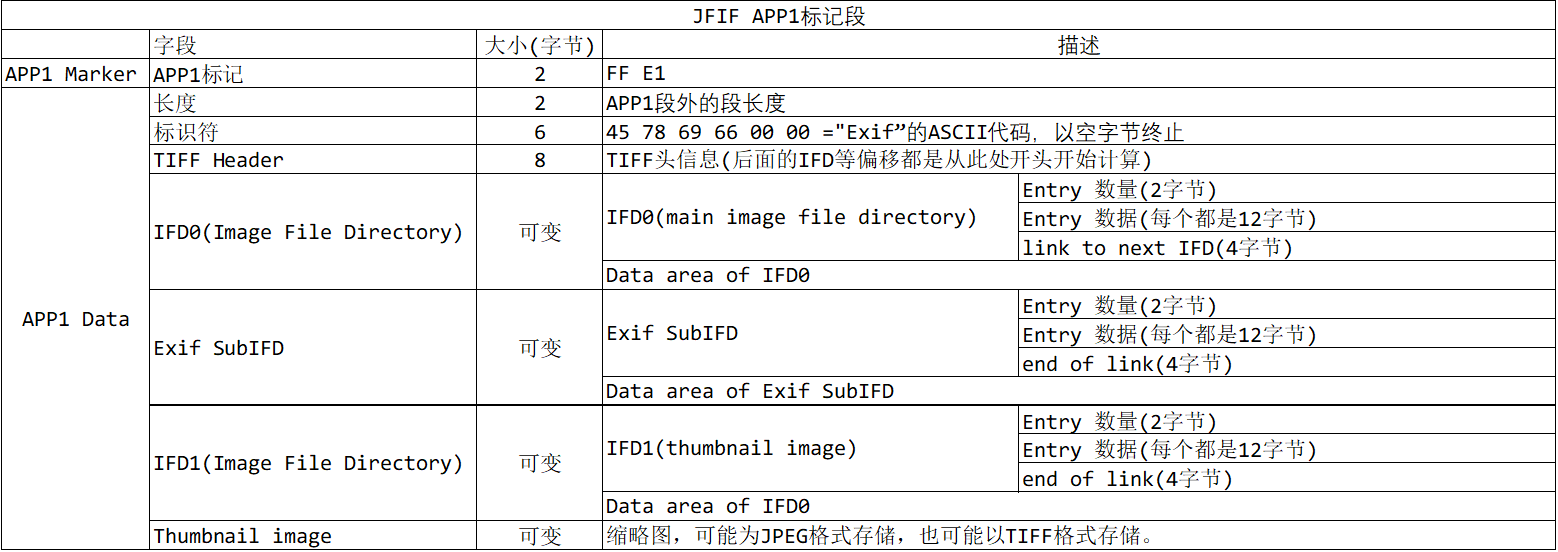
Exif数据(APP1)的大致结构如下:
| FFE1 | APP1 Marker | ||
| SSSS | APP1 Data | APP1 Data Size | |
| 45786966 0000 | Exif Header | ||
| 49492A00 08000000 | TIFF Header | ||
| XXXX. . . . | IFD0 (main image) | Directory | |
| LLLLLLLL | Link to IFD1 | ||
| XXXX. . . . | Data area of IFD0 | ||
| XXXX. . . . | Exif SubIFD | Directory | |
| 00000000 | End of Link | ||
| XXXX. . . . | Data area of Exif SubIFD | ||
| XXXX. . . . | IFD1(thumbnail image) | Directory | |
| 00000000 | End of Link | ||
| XXXX. . . . | Data area of IFD1 | ||
| FFD8XXXX. . . XXXXFFD9 | Thumbnail image | ||
其实就是这张表:
1. APP1标记
APP1的标记就是 FF E1,占2个字节。
2. APP1段长度
APP1这个段的长度占2个字节,不包含APP1标记。
3. 标识符
接着是6个字节的Exif标识,就是 E、 x、 i、 f 的ASCII码。
4. TIFF Header
接下来是8个字节的TIFF头,它的结构如下:

- Byte align
最开始的2个字节定义了 TIFF 数据的字节序。 如果这个值是 0x4949="I I"的话, 就表示按照 "Intel" 的字节序(Little Endian,小端存储) 来排列数据. 如果是 0x4d4d="MM", 则说明按照 "Motorola" 的字节序(Big Endian,大端存储)来排列数据。
例如, 这个值是'305,419,896' (注意:16进制值为0x12345678). 在 Motorola 的 字节序中, 数据存储时的排列顺序为 0x12, 0x34, 0x56, 0x78 。而用 Intel 的字节序的话, 它就是按照 0x78, 0x56, 0x34, 0x12 来排序数据。
几乎所有的数字相机都是使用 Intel 的字节序。不过 Ricoh 使用的是 Motorola 的。Sony 使用的是 Intel 字节序(除了 D700)。 Kodak 的DC200/210/240 使用的是 Motorola 字节序, 但是 DC220/260 使用的是 Intel的, 尽管它们都是使用在 PowerPC的平台上! 因此当我们需要使用 Exif 数据的值的时候, 我们必须每次都要检查它的字节序。 尽管 JPEG 数据仅仅是使用 Motorola 字节序, 但 Exif 却是允许这两种字节序存在的。
注意:字节序直接影响到数据内容,所以在解析Exif数据前必须检查文件的Byte align
- TAG Mark
随后的两个字节是一个2字节长度的固定值 0x002a. 如果数据使用 Intel 字节序, 则这两个 字节的数据排列为 "0x2a, 0x00". 如果是Motorola 的, 则是 "0x00, 0x2a"。
- offset to first IFD
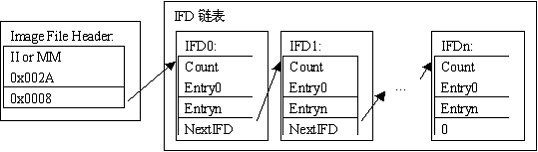
TIFF头的最后的 4个字节是到第一个 IFD(Image File Directory,图像文件目录)的偏移量,这里的第一个IFD其实就是IFD0。这个偏移量是指从TIFF头("II" 或者 "MM")开始,包含自己偏移量值的本身, 到下一个IFD为止,长度的字节数(这三句其实说的有点绕,简单说就是,这个偏移是从TIFF头开始的位置计算的)。通常地第一个 IFD 是紧挨着 TIFF 头出现的, 因此这个偏移量的值是 0x00000008。
IFD是一个链表结构,如下图所示。在每个IFD的末尾包含一个指向下一个IFD的偏移量(同样是从TIFF Header算起),如果这个偏移量为0,则表示已经到了链表的末尾。
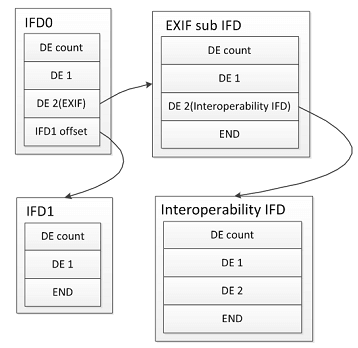
在Exif格式中,只有两个标准IFD。第一个IFD 是IFD0(主图像IFD), 然后它连接到IFD1(缩略图IFD) ,并且IFD 连接在此结束。IFD0/IFD1 不包含任何的数字相机的信息,例如快门速度, 焦距等。
在IFD0中除了自己的DE(Directory Entry)外,还包括了EXIF自定义的EXIF Sub IFD、GPS IFD,而EXIF sub IFD中又进一步包括了Interoperability IFD(简称IOP)和MakerNote IFD。EXIF自定义IFD的结构与标准TIFF IFD相同,但不是记录于TIFF的IFD链表中,而是 作为TIFF IFD的子链表形式存在(因为扩展IFD里定义了不同于TIFF标准的Tag,这样为了与标准的TIFF格式区分),使得原来的TIFF IFD链表结构变成了树形结构 。(这里的TIFF文件结构就没有去详细学习了,见的也不多,这里大概能理解就行了)
5. IFD——Image File Directory
5.1 格式说明
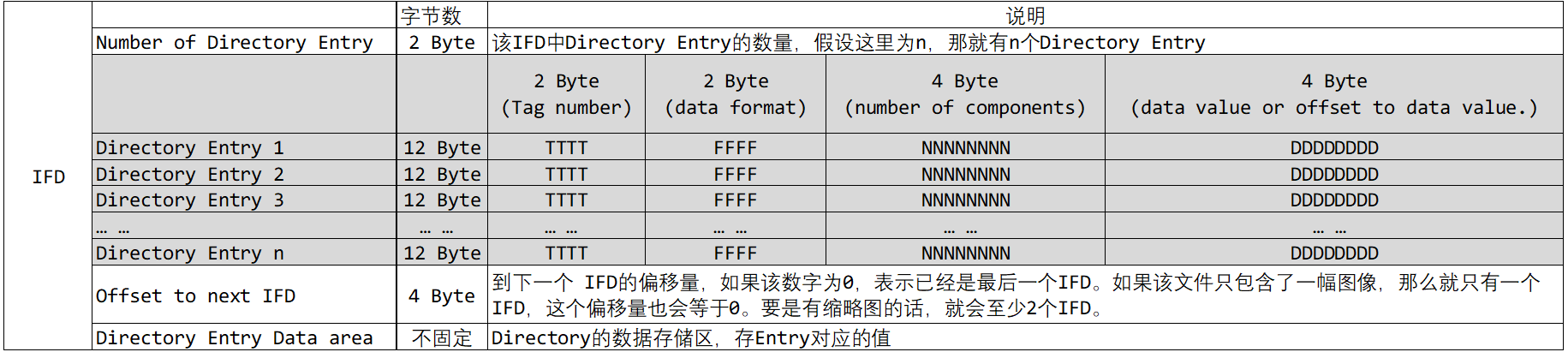
根据 TIFF Header 的后四个字节,我们可以找到第一个 IFD(Image File Directory)。IFD的数据结构如下表所示。每个IFD结构中存在多个Directory Entry,每个Entry记录着图片的一条属性信息,比如拍摄时间、拍摄机器、图片尺寸等等。
- Number of Directory Entry
IFD结构的头两个字节存储 entry 的个数。
- Directory Entry n
每一个 Directory Entry 的长度固定为12个字节,分为4个部分:
(1)两个字节 TTTT 对应的内容为 Tag number。
(2)紧接着的两个字节 FFFF 对应的内容为 Directory Entry存储内容的类型(Component Type),其实应该说是数据格式才对,就是这一个组件的类型,不同的类型占不同的字节数。
(3)后面四个字节 NNNNNNNN 存储的是 Directory Entry 对应的Component的数量,再通过每个组件的数据格式,就可以知道这个Directory Entry数据占多少个字节了。
(4)最后的四个字节 DDDDDDDD 存储的可能是Directory Entry对应的值也可能是偏移地址,当Entry对应的值的长度超过四个字节,那么 DDDDDDDD 存储的是对应的值的偏移地址(该偏移寻址的基址也是TIFF HEADER的起始位置)。
总长度计算公式 总长度 = Component 数量 x 每个Component的字节数
- offset to next IFD
占4个字节,表示到下一个IFD的偏移量,当是最后一个IFD时,这里为0。
- Directory Entry Data area
这里存放的是Directory Entry的值,根据前面的数据长度和偏移地址可以找到每一个Directory Entry的数据。
5.2 data format
| Value | 1 | 2 | 3 | 4 | 5 | 6 |
| Format | unsigned byte | ascii strings | unsigned short | unsigned long | unsigned rational | signed byte |
| Bytes/component | 1 | 1 | 2 | 4 | 8 | 1 |
| Value | 7 | 8 | 9 | 10 | 11 | 12 |
| Format | undefined | signed short | signed long | signed rational | single float | double float |
| Bytes/component | 1 | 2 | 4 | 8 | 4 | 8 |
5.3 Tag number
5.3.1 IFD0中常见的Tags
| Tag No. | Tag Name | Format | CompoNo | Desc. |
| 0x010e | ImageDescription | ascii string | Describes image | |
| 0x010f | Make | ascii string | Shows manufacturer of digicam | |
| 0x0110 | Model | ascii string | Shows model number of digicam | |
| 0x0112 | Orientation | unsigned short | 1 | The orientation of the camera relative to the scene, when the image was captured. The start point of stored data is, '1' means upper left, '3' lower right, '6' upper right, '8' lower left, '9' undefined. |
| 0x011a | XResolution | unsigned rational | 1 | Display/Print resolution of image. Large number of digicam uses 1/72inch, but it has no mean because personal computer doesn't use this value to display/print out. |
| 0x011b | YResolution | unsigned rational | 1 | |
| 0x0128 | ResolutionUnit | unsigned short | 1 | Unit of XResolution(0x011a)/YResolution(0x011b). |
| 0x0131 | Software | ascii string | Shows firmware(internal software of digicam) version number. | |
| 0x0132 | DateTime | ascii string | 20 | Date/Time of image was last modified. Data format is "YYYY:MM:DD HH:MM:SS"+0x00, total 20bytes. In usual, it has the same value of DateTimeOriginal(0x9003) |
| 0x013e | WhitePoint | unsigned rational | 2 | Defines chromaticity of white point of the image. If the image uses CIE Standard Illumination D65(known as international standard of 'daylight'), the values are '3127/10000,3290/10000'. |
| 0x013f | PrimaryChromaticities | unsigned rational | 6 | Defines chromaticity of the primaries of the image. If the image uses CCIR Recommendation 709 primearies, values are '640/1000,330/1000,300/1000,600/1000,150/1000,0/1000'. |
| 0x0211 | YCbCrCoefficients | unsigned rational | 3 | When image format is YCbCr, this value shows a constant to translate it to RGB format. In usual, values are '0.299/0.587/0.114'. |
| 0x0213 | YCbCrPositioning | unsigned short | 1 | When image format is YCbCr and uses 'Subsampling'(cropping of chroma data, all the digicam do that), defines the chroma sample point of subsampling pixel array. '1' means the center of pixel array, '2' means the datum point. |
| 0x0214 | ReferenceBlackWhite | unsigned rational | 6 | Shows reference value of black point/white point. In case of YCbCr format, first 2 show black/white of Y, next 2 are Cb, last 2 are Cr. In case of RGB format, first 2 show black/white of R, next 2 are G, last 2 are B. |
| 0x8298 | Copyright | ascii string | Shows copyright information | |
| 0x8769 | ExifOffset | unsigned long | 1 | Offset to Exif Sub IFD |
5.3.2 Exif SubIFD中常见的Tags
| Tag No. | Tag Name | Format | CompoNo | Desc. |
| 0x829a | ExposureTime | unsigned rational | 1 | Exposure time (reciprocal of shutter speed). Unit is second. |
| 0x829d | FNumber | unsigned rational | 1 | The actual F-number(F-stop) of lens when the image was taken. |
| 0x8822 | ExposureProgram | unsigned short | 1 | Exposure program that the camera used when image was taken. '1' means manual control, '2' program normal, '3' aperture priority, '4' shutter priority, '5' program creative (slow program), '6' program action(high-speed program), '7' portrait mode, '8' landscape mode. |
| 0x8827 | ISOSpeedRatings | unsigned short | 2 | CCD sensitivity equivalent to Ag-Hr film speedrate. |
| 0x9000 | ExifVersion | undefined | 4 | Exif version number. Stored as 4bytes of ASCII character (like "0210") |
| 0x9003 | DateTimeOriginal | ascii string | 20 | Date/Time of original image taken. This value should not be modified by user program. |
| 0x9004 | DateTimeDigitized | ascii string | 20 | Date/Time of image digitized. Usually, it contains the same value of DateTimeOriginal(0x9003). |
| 0x9101 | ComponentConfiguration | undefined | Unknown. It seems value 0x00,0x01,0x02,0x03 always. | |
| 0x9102 | CompressedBitsPerPixel | unsigned rational | 1 | The average compression ratio of JPEG. |
| 0x9201 | ShutterSpeedValue | signed rational | 1 | Shutter speed. To convert this value to ordinary 'Shutter Speed'; calculate this value's power of 2, then reciprocal. For example, if value is '4', shutter speed is 1/(2^4)=1/16 second. |
| 0x9202 | ApertureValue | unsigned rational | 1 | The actual aperture value of lens when the image was taken. To convert this value to ordinary F-number(F-stop), calculate this value's power of root 2 (=1.4142). For example, if value is '5', F-number is 1.4142^5 = F5.6. |
| 0x9203 | BrightnessValue | signed rational | 1 | Brightness of taken subject, unit is EV. |
| 0x9204 | ExposureBiasValue | signed rational | 1 | Exposure bias value of taking picture. Unit is EV. |
| 0x9205 | MaxApertureValue | unsigned rational | 1 | Maximum aperture value of lens. You can convert to F-number by calculating power of root 2 (same process of ApertureValue(0x9202). |
| 0x9206 | SubjectDistance | signed rational | 1 | Distance to focus point, unit is meter. |
| 0x9207 | MeteringMode | unsigned short | 1 | Exposure metering method. '1' means average, '2' center weighted average, '3' spot, '4' multi-spot, '5' multi-segment. |
| 0x9208 | LightSource | unsigned short | 1 | Light source, actually this means white balance setting. '0' means auto, '1' daylight, '2' fluorescent, '3' tungsten, '10' flash. |
| 0x9209 | Flash | unsigned short | 1 | '1' means flash was used, '0' means not used. |
| 0x920a | FocalLength | unsigned rational | 1 | Focal length of lens used to take image. Unit is millimeter. |
| 0x927c | MakerNote | undefined | Maker dependent internal data. Some of maker such as Olympus/Nikon/Sanyo etc. uses IFD format for this area. | |
| 0x9286 | UserComment | undefined | Stores user comment. | |
| 0xa000 | FlashPixVersion | undefined | 4 | Stores FlashPix version. Unknown but 4bytes of ASCII characters "0100"exists. |
| 0xa001 | ColorSpace | unsigned short | 1 | Unknown, value is '1'. |
| 0xa002 | ExifImageWidth | unsigned | 1 | Size of main image. |
| 0xa003 | ExifImageHeight | unsigned | 1 | |
| 0xa004 | RelatedSoundFile | ascii string | If this digicam can record audio data with image, shows name of audio data. | |
| 0xa005 | ExifInteroperabilityOffset | unsigned long | 1 | Extension of "ExifR98", detail is unknown. This value is offset to IFD format data. Currently there are 2 directory entries, first one is Tag0x0001, value is "R98", next is Tag0x0002, value is "0100". |
| 0xa20e | FocalPlaneXResolution | unsigned rational | 1 | CCD's pixel density. |
| 0xa20f | FocalPlaneYResolution | unsigned rational | 1 | |
| 0xa210 | FocalPlaneResolutionUnit | unsigned short | 1 | Unit of FocalPlaneXResoluton/FocalPlaneYResolution. |
| 0xa217 | SensingMethod | unsigned short | 1 | Shows type of image sensor unit. '2' means 1 chip color area sensor, most of all digicam use this type. |
| 0xa300 | FileSource | undefined | 1 | Unknown but value is '3'. |
| 0xa301 | SceneType | undefined | 1 | Unknown but value is '1'. |
5.3.3 IFD1中常见的tags
| Tag No. | Tag Name | Format | CompoNo | Desc. |
| 0x0100 | ImageWidth | unsigned | 1 | Shows size of thumbnail image. |
| 0x0101 | ImageLength | unsigned | 1 | |
| 0x0102 | BitsPerSample | unsigned short | 3 | When image format is no compression, this value shows the number of bits per component for each pixel. Usually this value is '8,8,8' |
| 0x0103 | Compression | unsigned short | 1 | Shows compression method. '1' means no compression, '6' means JPEG compression. |
| 0x0106 | PhotometricInterpretation | unsigned short | 1 | Shows the color space of the image data components. '1' means monochrome, '2' means RGB, '6' means YCbCr. |
| 0x0111 | StripOffsets | unsigned | When image format is no compression, this value shows offset to image data. In some case image data is striped and this value is plural. | |
| 0x0115 | SamplesPerPixel | unsigned short | 1 | When image format is no compression, this value shows the number of components stored for each pixel. At color image, this value is '3'. |
| 0x0116 | RowsPerStrip | unsigned short | 1 | When image format is no compression and image has stored as strip, this value shows how many rows stored to each strip. If image has not striped, this value is the same as ImageLength(0x0101). |
| 0x0117 | StripByteConunts | unsigned | When image format is no compression and stored as strip, this value shows how many bytes used for each strip and this value is plural. If image has not stripped, this value is single and means whole data size of image. | |
| 0x011a | XResolution | unsigned rational | 1 | Display/Print resolution of image. Large number of digicam uses 1/72inch, but it has no mean because personal computer doesn't use this value to display/print out. |
| 0x011b | YResolution | unsigned rational | 1 | |
| 0x011c | PlanarConfiguration | unsigned short | 1 | When image format is no compression YCbCr, this value shows byte aligns of YCbCr data. If value is '1', Y/Cb/Cr value is chunky format, contiguous for each subsampling pixel. If value is '2', Y/Cb/Cr value is separated and stored to Y plane/Cb plane/Cr plane format. |
| 0x0128 | ResolutionUnit | unsigned short | 1 | Unit of XResolution(0x011a)/YResolution(0x011b). '1' means inch, '2' means centimeter. |
| 0x0201 | JpegIFOffset | unsigned long | 1 | When image format is JPEG, this value show offset to JPEG data stored. |
| 0x0202 | JpegIFByteCount | unsigned long | 1 | When image format is JPEG, this value shows data size of JPEG image. |
| 0x0211 | YCbCrCoefficients | unsigned rational | 3 | When image format is YCbCr, this value shows constants to translate it to RGB format. In usual, '0.299/0.587/0.114' are used. |
| 0x0212 | YCbCrSubSampling | unsigned short | 2 | When image format is YCbCr and uses subsampling(cropping of chroma data, all the digicam do that), this value shows how many chroma data subsampled. First value shows horizontal, next value shows vertical subsample rate. |
| 0x0213 | YCbCrPositioning | unsigned short | 1 | When image format is YCbCr and uses 'Subsampling'(cropping of chroma data, all the digicam do that), this value defines the chroma sample point of subsampled pixel array. '1' means the center of pixel array, '2' means the datum point(0,0). |
| 0x0214 | ReferenceBlackWhite | unsigned rational | 6 | Shows reference value of black point/white point. In case of YCbCr format, first 2 show black/white of Y, next 2 are Cb, last 2 are Cr. In case of RGB format, first 2 show black/white of R, next 2 are G, last 2 are B. |
5.3.4 Misc Tags
| Tag No. | Tag Name | Format | CompoNo | Desc. |
| 0x00fe | NewSubfileType | unsigned long | 1 | |
| 0x00ff | SubfileType | unsigned short | 1 | |
| 0x012d | TransferFunction | unsigned short | 3 | |
| 0x013b | Artist | ascii string | ||
| 0x013d | Predictor | unsigned short | 1 | |
| 0x0142 | TileWidth | unsigned short | 1 | |
| 0x0143 | TileLength | unsigned short | 1 | |
| 0x0144 | TileOffsets | unsigned long | ||
| 0x0145 | TileByteCounts | unsigned short | ||
| 0x014a | SubIFDs | unsigned long | ||
| 0x015b | JPEGTables | undefined | ||
| 0x828d | CFARepeatPatternDim | unsigned short | 2 | |
| 0x828e | CFAPattern | unsigned byte | ||
| 0x828f | BatteryLevel | unsigned rational | 1 | |
| 0x83bb | IPTC/NAA | unsigned long | ||
| 0x8773 | InterColorProfile | undefined | ||
| 0x8824 | SpectralSensitivity | ascii string | ||
| 0x8825 | GPSInfo | unsigned long | 1 | |
| 0x8828 | OECF | undefined | ||
| 0x8829 | Interlace | unsigned short | 1 | |
| 0x882a | TimeZoneOffset | signed short | 1 | |
| 0x882b | SelfTimerMode | unsigned short | 1 | |
| 0x920b | FlashEnergy | unsigned rational | 1 | |
| 0x920c | SpatialFrequencyResponse | undefined | ||
| 0x920d | Noise | undefined | ||
| 0x9211 | ImageNumber | unsigned long | 1 | |
| 0x9212 | SecurityClassification | ascii string | 1 | |
| 0x9213 | ImageHistory | ascii string | ||
| 0x9214 | SubjectLocation | unsigned short | 4 | |
| 0x9215 | ExposureIndex | unsigned rational | 1 | |
| 0x9216 | TIFF/EPStandardID | unsigned byte | 4 | |
| 0x9290 | SubSecTime | ascii string | ||
| 0x9291 | SubSecTimeOriginal | ascii string | ||
| 0x9292 | SubSecTimeDigitized | ascii string | ||
| 0xa20b | FlashEnergy | unsigned rational | 1 | |
| 0xa20c | SpatialFrequencyResponse | unsigned short | 1 | |
| 0xa214 | SubjectLocation | unsigned short | 1 | |
| 0xa215 | ExposureIndex | unsigned rational | 1 | |
| 0xa302 | CFAPattern | undefined | 1 | |
5.4 一个简单的实例
在Exif格式中, 第一个IFD 是IFD0(主图像IFD),然后它连接到IFD1(缩略图IFD) 并且IFD 连接在此结束。但是 IFD0/IFD1 不包含任何的数字相机的信息例如快门速度, 焦距等。
IFD0 总是包含一个特殊的标签 Exif偏移量(0x8769),它表示到 Exif子IFD 的偏移量。 Exif子IFD 也是一个IFD 格式化的数据, 它包含了数字相机的信息。在扩展Exif格式(Exif2.1/DCF)中, Exif子IFD还包含了特殊的标签 Exif Interoperability Offset (0xa005)。 这个偏移量也指向Interoperability IFD。根据 DCF 规格, 这个标签是必须的并且子IFD (主图像 IFD) 和 IFD1 (缩略图 IFD) 中可能也会包含Interoperability IFD。通常, 仅仅主图像仅仅有这个标签。 另外一些数字相机也为Makernote(制造商注释)使用 IFD 数据格式,这是生产商特定的魔数(magic number)区域。判断makernote 是否是IFD 格式是非常困难的, 必须仔细的编程。
       0  1  2  3  4  5  6  7  8  9  a  b  c  d  e  f
0000: 49 49 2A 00 08 00 00 00 02 00 1A 01 05 00 01 00
0010: 00 00 26 00 00 00 69 87 04 00 01 00 00 00 11 02
0020: 00 00 40 00 00 00 48 00 00 00 01 00 00 00上面的是TIFF数据的开头部分, 对它的解读如下;
- 前两个字节是 "I I", 所以字节序是 'Intel'.
- 在地址0x0004~0x0007处存放的值是 0x08000000, 因此IFD0 从地址 '0x0008'开始
- 在地址0x0008~0x0009处存放的值是 0x0200, 则表示IFD0有 '2' 个目录项.
- 在地址0x000a~0x000b处存放的值是 0x1A01, 它意味着这是一个 XResolution(0x011A) 标签, 表示这是图像的水平分辨率.
- 地址0x000c~0x000d处存放的值为 0x0500, 说明数据的格式是一个 unsigned rational(0x0005).
- 地址0x000e~0x0011处存放的值是 0x01000000, 说明组件的数据只有 '1'个. Unsigned rational的数据大小是8字节(组件的大小), 因此数据的总长度是 1x8=8字节.
- 总数居长度比4字节大了, 因此它后面的4个字节里面存放的是一个指向实际数据的偏移量地址.
- 地址0x0012~0x0015处存放的是 0x26000000, 表示XResolution(水平分辨率) 数据的存储地址是0x0026
- 地址0x0026~0x0029处存放的数据是 0x48000000, 说明分子的值为 72, 而地址0x002a~0x002d 处存放的是0x0100000000, 说明分母为 '1'. 因此XResoultion 的值是 72/1.
- 地址0x0016~0x0017处存放的数据为0x6987, 表示下一个标签是 ExifOffset(0x8769). 这就是 指向 Exif子IFD的偏移量
- 而它的数据格式是 0x0004, 即是一个无符号的长整形(unsigned long integer).
- 这个标签只有一个组件. 无符号长整形的数据大小是4字节, 因此总数据长度为4字节.
- 总数据长度是 4字节, 则说明下一个4字节的数据中存放的是Exif子IFD的偏移量.
- 地址0x001e~0x0021处存放的是 0x11020000, 则说明Exif子IFD的开始地址是 '0x0211'.
- 这是最后一个目录项, 接下来的4个字节存放的是下一个IFD的偏移地址.
- 地址0x0022~0x0025处存放的是 0x40000000, 就可以知道下一个IFD的开始地址为 '0x0040'
6. Thumbnail image
Exif格式中包含缩略图像(除了Ricoh RDC-300Z)。通常它被放到IFD1的后面。
缩略图有 3 种格式:JPEG 格式(JPEG 使用YCbCr),RGB TIFF 格式, YCbCr TIFF 格式。 其中JPEG形式和RGB的TIFF格式可以直接查看,而YCbCr的TIFF格式需要进行颜色空间的转换后才能正常查看。
在Exif2.1之后推荐使用JPEG 格式和160x120像素的尺寸。 根据 DCF 规格, 缩略图像必须 使用JPEG 格式以及图像的尺寸 固定为160x120 像素。
缩略图的信息存储在 APP Data标记段的最后部分,缩略图的存储格式、起始地址和缩略图长度是由IFD1部分中Directory Entry的值来决定。
缩略图的存储格式由IFD1中的Tag number为0x0103(含义为Compression) 的Directory Entry的值来决定。
6.1 JPEG格式的缩略图
- Compression = 6时表示缩略图是以JPEG格式存储。几乎所有的 Exif图像中缩略图都使用JPEG 格式。
(1)起始的偏移地址由IFD1段的Tag number为0x0201(JpegIFOffset)的决定;
(2)缩略图的长度由IFD1中的Tag number为0x0202(JpegIFByteCount)来决定。
在这种情况下, 我们能从IFD1的JpegIFOffset(0x0201) 标签中得到缩略图的偏移量, 从标签JpegIFByteCount(0x0202)中得到缩略图的大小。数据格式则是普通的 JPEG 格式, 也就是从0xFFD8处开始在0xFFD9处结束。
6.2 TIFF格式缩略图
- Compression = 1时表示缩略图是以为TIFF格式存储的,这种缩略图的格式是没有经过压缩的。这里涉及到的Entry有三个Tag number分别是:
(1)0x0111(StripOffset) 表示缩略图偏移位置;
(2)0x0117(StripByteCounts) 表示缩略图长度;
(3)0x0106(PhotometricInterpretation),值为1时是RGB形式的TIFF格式存储;值为6时,是YCbCr形式的TIFF格式存储。
缩略图数据的开始点是标签 StripOffset(0x0111) , 缩略图的尺寸就是标签 StripByteCounts(0x0117) 之和。
如果缩略图使用非压缩格式并且IFD1中的标签 PhotometricInterpretation(0x0106) 是 '2', 则缩略图使用了 RGB 格式。 在这种情况下, 我们只要简单的把数据拷贝到计算机的RGB格式文件中就能看到缩略图了(如 BMP 格式, 或者拷贝到 VRAM 目录下)。 Kodak DC-210/220/260 就使用 这个格式。注意TIFF中存储的像素数据是'RGB' 顺序的, 而 BMP 里的存储顺序则是 'BGR' 。
如果这个标签的值是 '6', 缩略图使用 YCbCr 格式. 如果想要看到缩略图的话, 必须把它 转换成 RGB 格式的。Ricoh RDC4200/4300, Fuji DS-7/300 和 DX-5/7/9 使用的是这种格式 (较新的 RDC5000/MX-X00 系列使用的是 JPEG)。
三、一个小工具
前面我们知道可以用JPEGsnoop工具来分析JPEG图片信息,Exif这种格式的当然也不例外,我在学习的时候自己写代码解析了部分的Exif信息,源码在这里:LV18_LCD_DEVICE/04_jpeg_exif_analyze/jpeg_analyze.c · 苏木/imx6ull-app-demo - 码云 - 开源中国 (gitee.com)。里面有Makefile文件,直接使用make命令编译即可,这个是使用gcc直接编译,在ubuntu中跑。找一张Exif格式的图片,可以有如下打印信息:
sumu@sumu-virtual-machine:~/1sharedfiles/linux_develop/imx6ull-app-demo/LV18_LCD_DEVICE/04_jpeg_exif_analyze$ ./app_demo 20240929195259MEDIA_CH0_ID001_EXIF.jpg
jpegFileName=20240929195259MEDIA_CH0_ID001_EXIF.jpg, open success, size is 907342, pJpegAddr=0x7fe308f36010!sizeof(uint8_t)=1 sizeof(uint16_t)=2 sizeof(uint32_t)=4
==================== APP1 ====================
段标识:ff e1
段长度:14 7c (5244)
标识符:45 78 69 66 00 00
[relative addr]TIFF Head = 0x0000000c,TIFF Head Addr = 0x7fe308f3601c, JPEG start Addr = 0x7fe308f36010,  idx = 0x0000000a(+0x00000002=0x0000000c)
TIFF头:4d 4d 00 2a 00 00 00 08
       4d 4d (MM)       字节序,II为intel字节序,即小端字节序,MM为Motorola字节序,即大端字节序
       00 2a            Tag Mark,Intel字节序,则对应的存储值为 0x2a00,Motorola 的字节序,则存储值为 0x002a
       00 00 00 08 (8)  到IFD0的偏移,从TIFF头起始位置开始计算
[relative addr]IFD0=0x00000014
IFD0  :00 09 (9 个Entry, IFD0 relative addr=0x00000014)
      | TAG  | TYPE  |  LENGTH   |   OFFSET  |
      |01 0f | 00 02 |00 00 00 08|00 00 00 7a|                            Model [0x00000086]
      |01 10 | 00 02 |00 00 00 08|00 00 00 82|                            Model [0x0000008e]
      |01 1a | 00 05 |00 00 00 01|00 00 00 8a|                      XResolution [0x00000096]
      |01 1b | 00 05 |00 00 00 01|00 00 00 92|                      YResolution [0x0000009e]
      |01 28 | 00 03 |00 00 00 01|00 02 00 00|                   ResolutionUnit [2]
      |01 32 | 00 02 |00 00 00 14|00 00 00 9a|                         DateTime [0x000000a6]
      |02 13 | 00 03 |00 00 00 01|00 01 00 00|                 YCbCrPositioning [1]
      |87 69 | 00 04 |00 00 00 01|00 00 00 ae|                       ExifOffset [174]
      |88 25 | 00 04 |00 00 00 01|00 00 02 92|                          GPSInfo [658]
      00 00 02 98 (到下一个IFD的偏移为 664,为0时表示这是最后一个IFD)
[relative addr]IFD1=0x000002a4
IFD1  :00 06 (6 个Entry)
      | TAG  | TYPE  |  LENGTH   |   OFFSET  |
      |01 03 | 00 03 |00 00 00 01|00 06 00 00|                      Compression [6]
      |01 1a | 00 05 |00 00 00 01|00 00 02 e6|                      XResolution [0x000002f2]
      |01 1b | 00 05 |00 00 00 01|00 00 02 ee|                      YResolution [0x000002fa]
      |01 28 | 00 03 |00 00 00 01|00 02 00 00|                   ResolutionUnit [2]
      |02 01 | 00 04 |00 00 00 01|00 00 02 f6|                     JpegIFOffset [758]
      |02 02 | 00 04 |00 00 00 01|00 00 11 7e|                  JpegIFByteCount [4478]
      00 00 00 00 (到下一个IFD的偏移为 0,为0时表示这是最后一个IFD)
[relative addr]thumbnail=0x00000302
缩略图:ff d8 ff db
APP1只解析了重要内容
==============================================
==================== SOF0 ====================
段标识:ff c0
段长度:00 11 (17)
精度  :08
高度  :05 e8 (1512)
宽度  :0a 80 (2688)
组件数:03
组件ID:01 采样系数:22 量化表号:00
组件ID:02 采样系数:11 量化表号:01
组件ID:03 采样系数:11 量化表号:01
SOF0解析完毕,共解析19字节(包含了段标识,段长度为17字节)
==============================================
read end!readIdx=907340上面解析的图可以去网盘里下载。
网盘链接:https://pan.baidu.com/s/1PoqFzRNGMUFT-HbFeIrYWQ?pwd=g691 复制这段内容打开「百度网盘APP 即可获取」
参考资料:
JPEG文件格式解析(一) Exif 与 JFIF-腾讯云开发者社区-腾讯云 (tencent.com)
JPEG/Exif/TIFF格式解读(2):图片元数据保存及EXIF详解-腾讯云开发者社区-腾讯云 (tencent.com)
JPEG/Exif/TIFF格式解读(3):TIFF与JPEG里面EXIF信息存储原理解读-腾讯云开发者社区-腾讯云 (tencent.com)