
LV040-文件属性与目录
本文主要是C语言——文件属性与目录的基本操作的相关笔记,若笔记中有错误或者不合适的地方,欢迎批评指正😃。
一、目录访问
1. 两个结构体
1.1 DIR
DIR 结构体与 FILE 类似,只是 DIR 存放的是目录相关信息的成员,它的结构,说实话,我只找到了它在 dirent.h 头文件中的声明,详细的结构还是网上搜到的:
struct __dirstream
{
    void *__fd;
    char *__data;
    int __entry_data;
    char *__ptr;
    int __entry_ptr;
    size_t __allocation;
    size_t __size;
    __libc_lock_define (, __lock)
};
typedef struct __dirstream DIR;1.2 dirent
dirent 结构体不仅仅指向目录,还可以指向目录中的具体文件。直接 man 看不到它的定义,使用 man readdir 时可以看到这个结构体定义:
struct dirent
{
    ino_t          d_ino;       /* Inode number 索引节点号*/
    off_t          d_off;       /* Not an offset; see below */
    unsigned short d_reclen;    /* Length of this record */
    unsigned char  d_type;      /* Type of file; not supported by all filesystem types */
    char           d_name[256]; /* Null-terminated filename 文件名,最长255字符*/
};2. 基本函数
2.1 opendir()
在 linux 下可以使用 man 3 opendir 命令查看该函数的帮助手册。
/* 需包含的头文件 */
#include <sys/types.h>
#include <dirent.h>

/* 函数声明 */
DIR *opendir(const char *name);【函数说明】该函数打开参数 name 指定的目录, 并返回 DIR* 形态的目录流,。
【函数参数】
- name :需要打开的目录名称(可包括路径名)。
【返回值】返回值是 DIR * 类型,成功时返回目录流指针;出错时返回 NULL 。
【使用格式】一般情况下基本使用格式如下:
/* 需要包含的头文件 */
#include <sys/types.h>
#include <dirent.h>

/* 至少应该有的语句 */
DIR * dp;
dp=opendir("/home/hk");【注意事项】 none
2.2 readdir()
在 linux 下可以使用 man 3 readdir 命令查看该函数的帮助手册。
/* 需包含的头文件 */
#include <dirent.h>

/* 函数声明 */
struct dirent *readdir(DIR *dirp);【函数说明】该函数读取目录流中的内容。
【函数参数】
- dirp :已打开目录的目录流指针变量。
【返回值】返回值是 struct dirent * 类型, struct dirent 是用来描述目录流中一个目录项的结构体类型。成功时返回目录流 dirp 中的下一个目录项(下个目录进入点);出错或到末尾时返回 NULL 。
【使用格式】一般情况下基本使用格式如下:
/* 需要包含的头文件 */
#include <dirent.h>

/* 至少应该有的语句 */
DIR * dp;
struct dirent *dt;
dp=opendir("/home/hk");
dt = readdir(dp);
printf("%s\n", dt->d_name);【注意事项】 none
2.3 closedir()
在 linux 下可以使用 man 3 closedir 命令查看该函数的帮助手册。
/* 需包含的头文件 */
#include <sys/types.h>
#include <dirent.h>

/* 函数声明 */
int closedir(DIR *dirp);【函数说明】该函数关闭已打开的目录文件。
【函数参数】
- dirp :已打开目录的目录流指针变量。
【返回值】返回值是 int 类型。成功时返回 0 ;出错时返回 EOF 。
【使用格式】一般情况下基本使用格式如下:
/* 需要包含的头文件 */
#include <sys/types.h>
#include <dirent.h>

/* 至少应该有的语句 */
closedir(dp);【注意事项】 none
3. 使用实例
/* 头文件 */
#include <stdio.h>
#include <dirent.h>

int main(int argc,char*argv[])
{
	/* 定义一个目录结构体指针变量 */
	DIR * dp;
	/* 定义一个目录属性结构体变量 */
	struct dirent *dt;
	/* 1. 打开文件 */
	dp=opendir("/home/hk");
	if(dp < 0)
	{
		perror("opendir");
		return -1;
	}
	else
	{
		perror("opendir");
	}
	/* 2. 打印目录名称 */
	while((dt = readdir(dp)) != NULL)
	{
		printf("%s\n", dt->d_name);
	}
	closedir(dp);
}在终端执行以下命令编译程序:
gcc test.c -Wall # 生成可执行文件 a.out
./a.out # 执行可执行程序二、文件访问
1. 文件权限
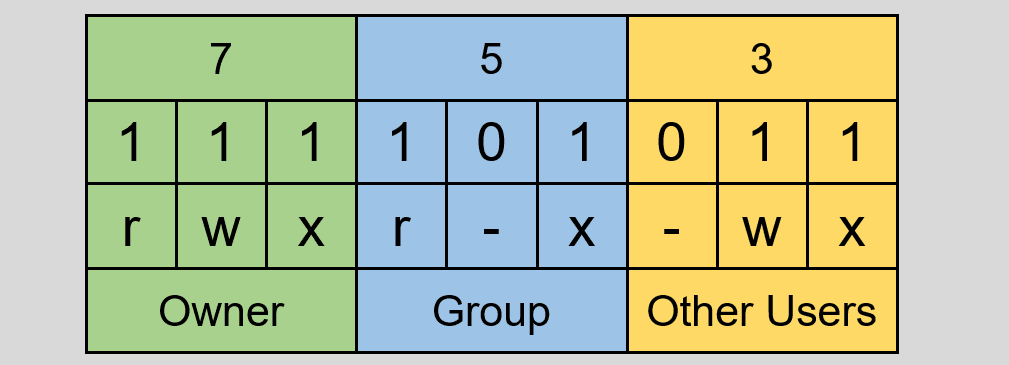
Linux/Unix 的文件调用权限分为三级 : 文件所有者( Owner )、用户组( Group )、其它用户( Other Users )。只有文件所有者和超级用户可以修改文件或目录的权限。

| file type | - | 代表文件 |
| d | 代表目录 | |
| Owner Group Other Users | r | read(可读) |
| w | write(可写) | |
| x | execute(可执行) | |
| - | 无权限 |

对于文件的权限还可以使用三位 8 进制数表示:
2. 基本函数
2.1 chmod()
在 linux 下可以使用 man 2 chmod命令查看该函数的帮助手册。
/* 需包含的头文件 */
#include <sys/stat.h>

/* 函数声明 */
int chmod(const char *pathname, mode_t mode);【函数说明】该函数用于修改文件权限。
【函数参数】
- pathname :需要修改权限的文件的文件名(可以包含路径)。
- mode :要修改的权限(一般为四位十六进制数,后三位代表要修改的权限)。
【返回值】返回值是 int 类型,成功时返回 0 ;出错时返回 EOF 。
【使用格式】一般情况下基本使用格式如下:
/* 需要包含的头文件 */
#include <sys/stat.h>

/* 至少应该有的语句 */
int fd;
char buff[32]={0};
int ret;
fd = open("02read_write.txt",O_RDWR | O_CREAT | O_APPEND, 0666);
ret = read(fd, buff, 32);【注意事项】
(1)在虚拟机中使用 Linux 时,修改共享文件夹 /mnt/hgfs/file_name 中的文件权限可能会无效,因为这里边的文件同时也是 Windows 下的文件。
(2)可以在终端使用: ll file_name 命令来单独查看某个文件的权限 。
2.2 fchmod()
在 linux 下可以使用 man 2 fchmod命令查看该函数的帮助手册。
/* 需包含的头文件 */
#include <sys/stat.h>

/* 函数声明 */
int fchmod(int fd, mode_t mode);【函数说明】该函数修改文件描述符 fd 指向文件的文件权限。
【函数参数】
- fd :文件描述符。
- mode :要修改的权限(一般为四位十六进制数,后三位代表要修改的权限)。
【返回值】 返回值是 int 类型,成功时返回 0 ;出错时返回 EOF 。
【使用格式】一般情况下基本使用格式如下:
/* 需要包含的头文件 */
#include

/* 至少应该有的语句 */【注意事项】 none
3. 使用实例
/* 头文件 */
#include <stdio.h>
/* chmod 函数 */
#include <sys/stat.h>

void test_chmod();

int main(int argc,char*argv[])
{
	test_chmod();
	return 0;
}

/**
 * @Function: int chmod(const char *path, mode_t mode);
 * @Description: 成功时返回0;出错时返回EOF
 */
void test_chmod()
{
	int ret;
	ret = chmod("/home/hk/3Test/test.vim",0444);
	if(ret < 0)
	{
		perror("chmod");
		return;
	}
}在终端执行以下命令编译程序:
gcc test.c -Wall # 生成可执行文件 a.out
./a.out # 执行可执行程序三、文件属性
1. stat 结构体
我们可以在linux内核源码的 include/uapi/asm-generic/stat.h中找到这个结构体。 这个结构体成员是文件的各种信息:
struct stat {
	unsigned long	st_dev;		/* Device.  */
	unsigned long	st_ino;		/* File serial number.  */
	unsigned int	st_mode;	/* File mode.  */
	unsigned int	st_nlink;	/* Link count.  */
	unsigned int	st_uid;		/* User ID of the file's owner.  */
	unsigned int	st_gid;		/* Group ID of the file's group. */
	unsigned long	st_rdev;	/* Device number, if device.  */
	unsigned long	__pad1;
	long		   st_size;	    /* Size of file, in bytes.  */
	int		       st_blksize;	/* Optimal block size for I/O.  */
	int		       __pad2;
	long		   st_blocks;	/* Number 512-byte blocks allocated. */
	long		   st_atime;	/* Time of last access.  */
	unsigned long  st_atime_nsec;
	long		   st_mtime;	/* Time of last modification.  */
	unsigned long  st_mtime_nsec;
	long		   st_ctime;	/* Time of last status change.  */
	unsigned long  st_ctime_nsec;
	unsigned int   __unused4;
	unsigned int   __unused5;
};其中主要就是st_mode这个成员,它包含了文件的类型和存取的权限。 st_mode 中有 9 位是代表文件的权限的,我们可以将 1 左移再与 st_mode 做 & 运算,即可判断每位为 1 或者为 0 。
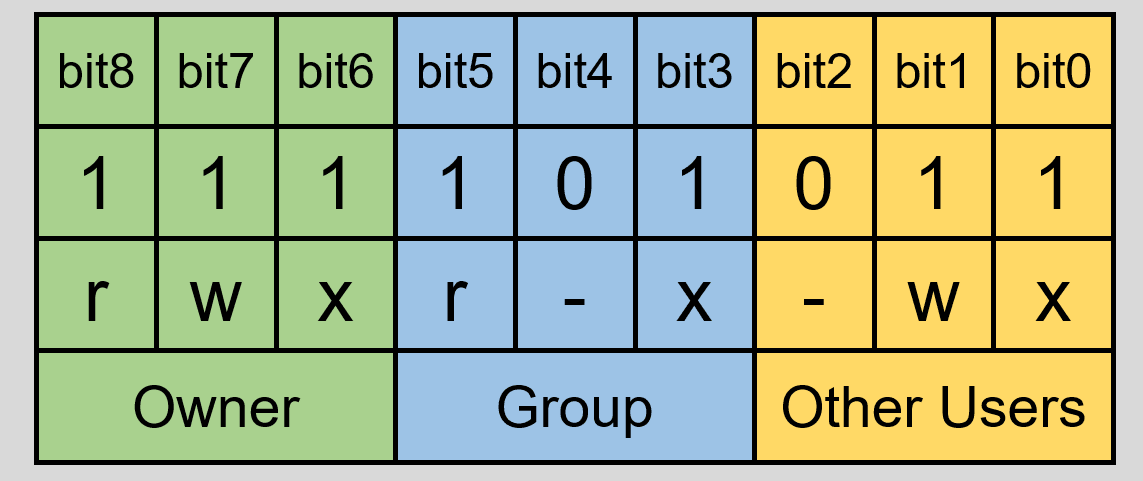
st_mode 文件权限部分如下:
| S_ISUID | 04000 | set-user-ID bit |
| S_ISGID | 02000 | set-group-ID bit |
| S_ISVTX | 01000 | sticky bit |
| S_IRWXU | 00700 | owner has read, write, and execute permission |
| S_IRUSR | 00400 | owner has read permission |
| S_IWUSR | 00200 | owner has write permission |
| S_IXUSR | 00100 | owner has execute permission |
| S_IRWXG | 00070 | group has read, write, and execute permission |
| S_IRGRP | 00040 | group has read permission |
| S_IWGRP | 00020 | group has write permission |
| S_IXGRP | 00010 | group has execute permission |
| S_IRWXO | 00007 | others (not in group) have read, write, and execute permission |
| S_IROTH | 00004 | others have read permission |
| S_IWOTH | 00002 | others have write permission |
| S_IXOTH | 00001 | others have execute permission |
stat(pathname, &sb);
if ((sb.st_mode & S_IFMT) == S_IFREG)
{
    /* Handle regular file */
}st_mode 文件类型的宏如下:
| S_IFMT | 0170000 | 文件类型位字段的位掩码 |
| S_IFSOCK | 0140000 | S_ISSOCK(st_mode) 是否SOCKET文件,是返回1,否则返回0 |
| S_IFLNK | 0120000 | S_ISLNK(st_mode) 是否链接文件,是返回1,否则返回0 |
| S_IFREG | 0100000 | S_ISREG(st_mode) 是否常规文件,是返回1,否则返回0 |
| S_IFBLK | 0060000 | S_ISBLK(st_mode) 是否块设备,是返回1,否则返回0 |
| S_IFDIR | 0040000 | S_ISDIR(st_mode) 是否目录,是返回1,否则返回0 |
| S_IFCHR | 0020000 | S_ISCHR(st_mode) 是否字符设备,是返回1,否则返回0 |
| S_IFIFO | 0010000 | S_ISFIFO(st_mode) 是否FIFO文件,是返回1,否则返回0 |
2. 基本函数
2.1 stat()
在 linux 下可以使用 man 2 stat 命令查看该函数的帮助手册。
/* 需包含的头文件 */
#include <sys/types.h>
#include <sys/stat.h>
#include <unistd.h>

/* 函数声明 */
int stat(const char *pathname, struct stat *statbuf);【函数说明】该函数用于获取文件信息。
【函数参数】
- pathname :文件名(可以包含路径)。
- statbuf : struct stat 类型的结构体,用于存放文件属性信息。
【返回值】返回值是 int 类型,成功时返回 0 ;出错时返回 EOF 。
【使用格式】一般情况下基本使用格式如下:
/* 需要包含的头文件 */
#include <sys/types.h>
#include <sys/stat.h>
#include <unistd.h>

/* 至少应该有的语句 */
struct stat file_attr;
int ret;
ret = stat("03file_attributes.c", &file_attr);【注意事项】 如果 pathname 是符号链接,那么 stat 获取的是目标文件的属性。
2.2 lstat()
在 linux 下可以使用 man 2 lstat 命令查看该函数的帮助手册。
/* 需包含的头文件 */
#include <sys/types.h>
#include <sys/stat.h>
#include <unistd.h>

/* 函数声明 */
int lstat(const char *pathname, struct stat *statbuf);【函数说明】该函数用于获取文件信息。
【函数参数】
- pathname :文件名(可以包含路径)。
- statbuf : struct stat 类型的结构体,用于存放文件属性信息。
【返回值】返回值是 int 类型,成功时返回 0 ;出错时返回 EOF 。
【使用格式】一般情况下基本使用格式如下:
/* 需要包含的头文件 */
#include <sys/types.h>
#include <sys/stat.h>
#include <unistd.h>

/* 至少应该有的语句 */
struct stat file_attr;
int ret;
ret = lstat("03file_attributes.c", &file_attr);【注意事项】 如果 pathname 是符号链接,那么 lstat 获取的是链接文件的属性。
2.3 fstat()
在 linux 下可以使用 man 2 fstat 命令查看该函数的帮助手册。
/* 需包含的头文件 */
#include <sys/types.h>
#include <sys/stat.h>
#include <unistd.h>

/* 函数声明 */
int fstat(int fd, struct stat *statbuf);【函数说明】该函数可以由文件描述符取得文件状态。
【函数参数】
- fd :已经打开文件的文件描述符。
- statbuf : struct stat 类型的结构体,用于存放文件属性信息。
【返回值】返回值是 int 类型,成功时返回 0 ;出错时返回 EOF 。
【使用格式】一般情况下基本使用格式如下:
/* 需要包含的头文件 */
#include <sys/types.h>
#include <sys/stat.h>
#include <unistd.h>

/* 至少应该有的语句 */
struct stat file_attr;
int ret;
int fd;
fd = open( "03file_attributes.c", O_RDONLY);
ret = fstat(fd, &file_attr);【注意事项】 none
3. 使用实例
/* 头文件 */
#include <stdio.h>
/* rstat lstat fstat函数函数 */
#include <sys/stat.h>
/* time */
#include <unistd.h>
#include <time.h>
void test_stat();

int main(int argc,char*argv[])
{
	test_stat();
	return 0;
}

/**
 * @Function: int  stat(const char *path, struct stat *buf);
 *		      int  lstat(const char *path, struct stat *buf);
 * @Description: 如果path是符号链接stat获取的是目标文件的属性;
 *               而lstat获取的是链接文件的属性
 */
void test_stat()
{
	/* 定义一个文件属性结构体变量 */
	struct stat file_attr;
	int ret;
	int i;
	struct tm *t;
	/* 1. 获取文件属性保存到结构体变量中 */
	ret = stat("03file_attributes.c", &file_attr);
	/* 2. 判断是否获取成功 */
	if(ret < 0)
	{
		perror("stat");
		return;
	}
	/* 3. 打印文件存取类型 */
	if(S_ISREG(file_attr.st_mode))
	{
		printf("-");
	}
	if(S_ISDIR(file_attr.st_mode))
	{
		printf("d");
	}
	if(S_ISCHR(file_attr.st_mode))
	{
		printf("c");
	}
	if(S_ISBLK(file_attr.st_mode))
	{
		printf("b");
	}
	if(S_ISFIFO(file_attr.st_mode))
	{
		printf("p");
	}
	if(S_ISSOCK(file_attr.st_mode))
	{
		printf("s");
	}
	/* 4. 打印文件权限 */
	for(i = 8; i >= 0; i--)
	{
		if(file_attr.st_mode & (1 << i))
		{
			switch(i % 3)
			{
				case 0:
					printf("x");
					break;
				case 1:
					printf("w");
					break;
				case 2:
					printf("r");
					break;
			}
		}
		else
		{
			printf("-");
		}
	}
	/* 5. 文件字节数(文件大小) */
	printf(" %d",(int)file_attr.st_size);
	/* 6. 打印文件修改时间 */
	t = localtime(&file_attr.st_ctime);
	printf(" %d-%d-%d %d:%d",t->tm_year+1900,t->tm_mon+1,t->tm_mday,t->tm_hour,t->tm_min);
	printf(" 03file_attributes.c\n");
}在终端执行以下命令编译程序:
gcc test.c -Wall # 生成可执行文件 a.out
./a.out # 执行可执行程序