
LV190-rangs属性
我们来深入了解一下 ranges 属性,它的作用是啥呢?为什么要有这个 ranges 属性?
一、ranges 属性介绍
ranges 属性是一种用于描述设备之间地址映射关系的属性。 它在设备树(Device Tree) 中使用, 用于描述子设备地址空间如何映射到父设备地址空间。 设备树是一种硬件描述语言, 用于描述嵌入式系统中的硬件组件和它们之间的连接关系。
设备树中的每个设备节点都可以具有 ranges 属性, 其中包含了地址映射的信息。 下面是一个常见的格式:
ranges = <child-bus-address parent-bus-address length>;
// 或者
ranges;- child-bus-address: 子设备地址空间的起始地址。 它指定了子设备在父设备地址空间中的位置。 具体的字长由 ranges 所在节点的 #address-cells 属性决定。
- parent-bus-address: 父设备地址空间的起始地址。 它指定了父设备中用于映射子设备的地址范围。 具体的字长由 ranges 的父节点的 #address-cells 属性决定。
- length: 映射的大小。 它指定了子设备地址空间在父设备地址空间中的长度。 具体的字长由 ranges 的父节点的 #size-cells 属性决定。
当 ranges 属性的值为空时, 表示子设备地址空间和父设备地址空间具有完全相同的映射,即 1:1 映射。 这通常用于描述内存区域, 其中子设备和父设备具有相同的地址范围。
当 ranges 属性的值不为空时, 按照指定的映射规则将子设备地址空间映射到父设备地址空间。 具体的映射规则取决于设备树的结构和设备的特定要求。
二、举个例子
1. 实例 1
1.1 设备树实例
/ {
    #address-cells = <1>;
    #size-cells = <1>;

    demo_level0 {
        compatible = "simple-bus";
        ranges = <0x0 0x3000000 0x3000>;
        #address-cells = <1>;
        #size-cells = <1>;

        range@0 {
            compatible = "range";
            reg = <0x100 0x200>;
            reg-names = "range0";
        };

        range@1 {
            compatible = "range";
            reg = <0x300 0x200>;
            reg-names = "range1";
        };

        range@2 {
            compatible = "range";
            reg = <0x600 0x200>;
            reg-names = "range2";
        };

        demo_level1 {
            compatible = "simple-bus";
            ranges = <0x0 0x1000 0x1000>;
            #address-cells = <1>;
            #size-cells = <1>;

            range@3 {
                compatible = "range";
                reg = <0x100 0x200>;
                reg-names = "range3";
            };

            demo_level1-1 {
                compatible = "simple-bus";
                ranges = <0x0 0x300 0x500>;
                #address-cells = <1>;
                #size-cells = <1>;

                range@4 {
                    compatible = "range";
                    reg = <0x100 0x200>;
                    reg-names = "range4";
                };

                range@5 {
                    compatible = "range";
                    reg = <0x300 0x100>;
                    reg-names = "range5";
                };

                demo_level1-1-1 {
                    compatible = "simple-bus";
                    ranges = <0x0 0x400 0x100>;
                    #address-cells = <1>;
                    #size-cells = <1>;

                    range@6 {
                        compatible = "range";
                        reg = <0x50 0x30>;
                        reg-names = "range6";
                    };

                    demo_level1-1-1-1 {
                        compatible = "simple-bus";
                        ranges = <0x0 0x20 0x20>;
                        #address-cells = <1>;
                        #size-cells = <1>;

                        range@7 {
                            compatible = "range";
                            reg = <0x10 0x10>;
                            reg-names = "range7";
                        };

                        range@8 {
                            compatible = "range";
                            reg = <0x0 0x10>;
                            reg-names = "range8";
                        };
                    };
                };
            };

            range@9 {
                compatible = "range";
                reg = <0x800 0x50>;
                reg-names = "range9";
            };

            demo_level1-2 {
                compatible = "simple-bus";
                ranges = <0x0 0x900 0x100>;
                #address-cells = <1>;
                #size-cells = <1>;

                range@10 {
                    compatible = "range";
                    reg = <0x0 0x50>;
                    reg-names = "range10";
                };

                demo_level1-2-1 {
                    compatible = "simple-bus";
                    ranges;
                    #address-cells = <1>;
                    #size-cells = <1>;

                    range@11 {
                        compatible = "range";
                        reg = <0x50 0x30>;
                        reg-names = "range11";
                    };
                };
            };
        };

        demo_level2 {
            compatible = "simple-bus";
            ranges;
            #address-cells = <1>;
            #size-cells = <1>;

            range@12 {
                compatible = "range";
                reg = <0x2000 0x1000>;
                reg-names = "range12";
            };
        };
    }
};1.2 驱动 demo
下面是一个简单的驱动,功能很简单,只是在 probe 函数中将 memory 资源的 start 和(end+1)打印出来.
//demo_range.c:
#include <linux/init.h>
#include <linux/module.h>
#include <linux/platform_device.h>
#include <linux/of.h>

static int demo_range_probe(struct platform_device *pdev)
{
    struct resource *res = platform_get_resource(pdev, IORESOURCE_MEM, 0);

    printk(KERN_INFO "%s start: 0x%x, end: 0x%x\n",
        res->name, res->start, res->end + 1);

    return 0;
}

static int demo_range_remove(struct platform_device *pdev)
{
    return 0;
}

static const struct of_device_id demo_range_of_match[]  = {
    { .compatible = "range"},
    {},
};

static struct platform_driver demo_range_driver = {
    .driver = {
        .name = "demo_range",
        .owner = THIS_MODULE,
        .of_match_table = demo_range_of_match,
    },
    .probe = demo_range_probe,
    .remove = demo_range_remove,
};
module_platform_driver(demo_range_driver);

MODULE_LICENSE("GPL v2");在驱动中会获得 memory 资源,然后将 start 和(end+1)打印出来,之所以这里用(end+1),仅仅是为了便于理解下面的 kernel log。
1.3 开发板测试
编译驱动,然后加载,可以看到下面的打印信息:
[root@vexpress mnt]# insmod demo_range.ko
[  382.940402] range0 start: 0x3000100, end: 0x3000300
[  382.940697] range1 start: 0x3000300, end: 0x3000500
[  382.941448] range2 start: 0x3000600, end: 0x3000800
[  382.941657] range3 start: 0x3001100, end: 0x3001300
[  382.941855] range4 start: 0x3001400, end: 0x3001600
[  382.942057] range5 start: 0x3001600, end: 0x3001700
[  382.942262] range6 start: 0x3001750, end: 0x3001780
[  382.942470] range7 start: 0x3001730, end: 0x3001740
[  382.942684] range8 start: 0x3001720, end: 0x3001730
[  382.949796] range9 start: 0x3001800, end: 0x3001850
[  382.950023] range10 start: 0x3001900, end: 0x3001950
[  382.950603] range11 start: 0x3001950, end: 0x3001980
[ 382.950805] range12 start: 0x3002000, end: 0x3003000画成框图帮助理解就是这样的:
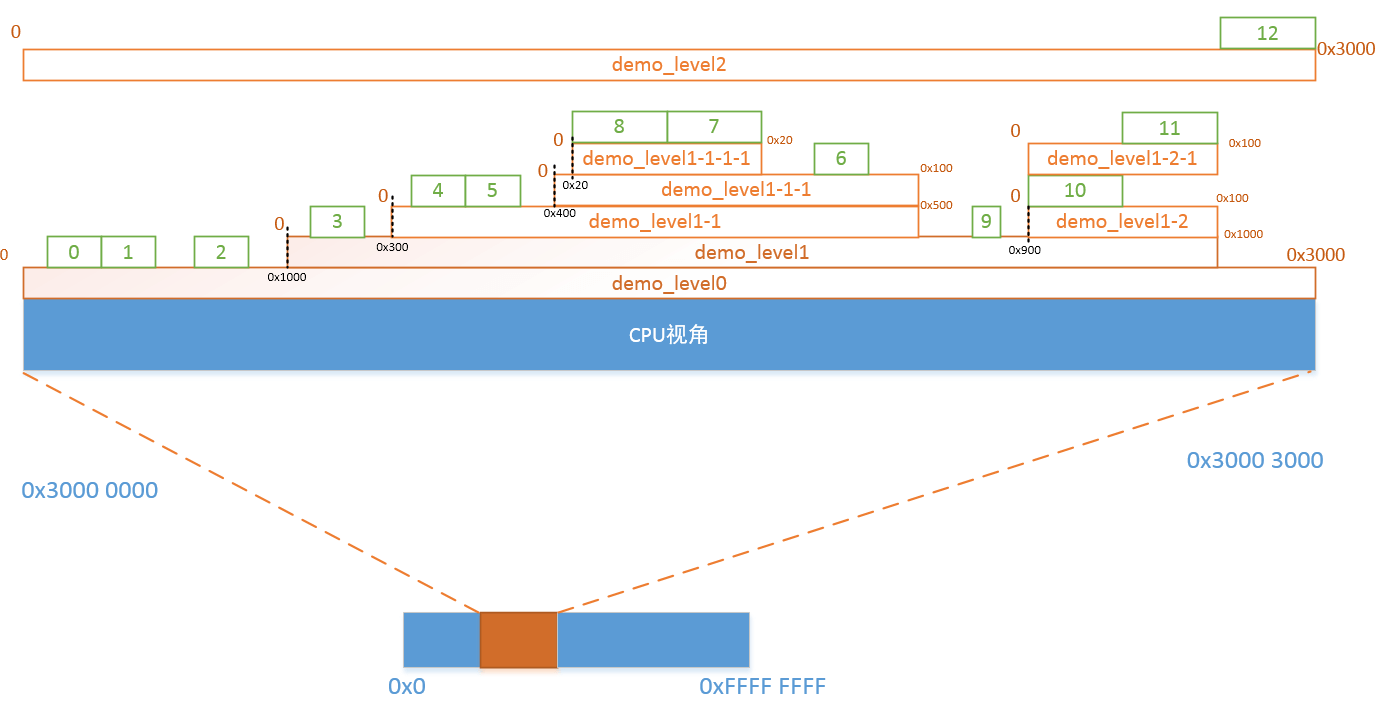
1.4 总结
- (1)ranges 属性值的格式 < local 地址 parent 地址 size >, 表示将 local 地址向 parent 地址的转换。
比如对于#address-cells 和#size-cells 都为 1 的话,以 <0x0 0x10 0x20> 为例,表示将 local 的从 0x0~(0x0 + 0x20)的地址空间映射到 parent 的 0x10~(0x10 + 0x20)
其中,local 地址 的个数取决于当前含有 ranges 属性的节点的#address-cells 属性的值,size 取决于当前含有 ranges 属性的节点的#size-cells 属性的值。而 parent 地址 的个数取决于当前含有 ranges 属性的节点的 parent 节点的#address-cells 的值。
- (2)对于含有 ranges 属性的节点的子节点来说,其 reg 都是基于 local 地址 的
- (3)ranges 属性值为空的话,表示 1:1 映射
- (4)对于没有 ranges 属性的节点,代表不是 memory map 区域。
2. 实例 2
以下面的设备树为例进行 ranges 属性的学习:
/dts-v1/;
/ {
    compatible = "acme,coyotes-revenge";
    #address-cells = <1>;
    #size-cells = <1>;
    //......
    external-bus {
        #address-cells = <2>;
        #size-cells = <1>;
        ranges = <0 0 0x10100000 0x10000
                  1 0 0x10160000 0x10000
                  2 0 0x30000000 0x30000000>;
        // Chipselect 1, Ethernet
        // Chipselect 2, i2c controller
        // Chipselect 3, NOR Flash
        //.......
};在 external-bus 节点中#address-cells 属性值为 2 表示 child-bus-address 由两个值表示, 也就是 0 和 0, 父节点的 #address-cells 属性值和#size-cells 属性值为 1, 表示 parent-bus-address 和 length 都由一个表示, 也就是 0x10100000 和 0x10000 , 该 ranges 值表示将子地址空间(0x0-0xFFFF) 映射到父地址空间 0x10100000 - 0x1010FFFF, 这里的例子为带参数 ranges 属性映射, 不带参数的 ranges 属性为 1: 1 映射, 较为简单。
3. 总结
在嵌入式系统中, 不同的设备可能连接到相同的总线或总线控制器上, 它们需要在物理地址空间中进行正确的映射, 以便进行数据交换和通信。 例如, 一个设备可能通过总线连接到主处理器或其他设备, 而这些设备的物理地址范围可能不同。 ranges 属性就是用来描述这种地址映射关系的。
三、设备分类
根据上面讲解的映射关系可以将设备分为两类: 内存映射型设备和非内存映射型设备。
1. 内存映射型设备
内存映射型设备是指可以通过内存地址进行直接访问的设备。 这类设备在物理地址空间中的一部分被映射到系统的内存地址空间中, 使得 CPU 可以通过读写内存地址的方式与设备进行通信和控制。有以下特点:
(1) 直接访问: 内存映射型设备可以被 CPU 直接访问, 类似于访问内存中的数据。 这种直接访问方式提供了高速的数据传输和低延迟的设备操作。
(2) 内存映射: 设备的寄存器、 缓冲区等资源被映射到系统的内存地址空间中, 使用读写内存的方式与设备进行通信。
(3) 读写操作: CPU 可以通过读取和写入映射的内存地址来与设备进行数据交换和控制操作。
在设备树中, 内存映射型设备的设备树例子如下:
/dts-v1/;
/ {
    #address-cells = <1>;
    #size-cells = <1>;
    ranges;
    serial@101f0000 {
        compatible = "arm,pl011";
        reg = <0x101f0000 0x1000>;
    };
    gpio@101f3000 {
        compatible = "arm,pl061";
        reg = <0x101f3000 0x1000
        0x101f4000 0x10>;
    };
    spi@10115000 {
        compatible = "arm,pl022";
        reg = <0x10115000 0x1000>;
    };
};第 5 行的 ranges 属性表示该设备树中会进行 1: 1 的地址范围映射。
2. 非内存映射型设备
非内存映射型设备是指不能通过内存地址直接访问的设备。 这类设备可能采用其他方式与 CPU 进行通信, 例如通过 I/O 端口、 专用总线或特定的通信协议。有以下特点:
(1) 非内存访问: 非内存映射型设备不能像内存映射型设备那样直接通过内存地址进行访问。 它们可能使用独立的 I/O 端口或专用总线进行通信。
(2) 特定接口: 设备通常使用特定的接口和协议与 CPU 进行通信和控制, 例如 SPI、 I2C、UART 等。
(3) 驱动程序: 非内存映射型设备通常需要特定的设备驱动程序来实现与 CPU 的通信和控制。
在设备树中, 非内存映射型设备的设备树例子如下:
/dts-v1/;
/ {
    compatible = "acme,coyotes-revenge";
    #address-cells = <1>;
    #size-cells = <1>;
    //......
    external-bus {
        #address-cells = <2>;
        #size-cells = <1>;
        ranges = <0 0 0x10100000 0x10000
                  1 0 0x10160000 0x10000
                  2 0 0x30000000 0x30000000>;
        // Chipselect 1, Ethernet
        // Chipselect 2, i2c controller
        // Chipselect 3, NOR Flash
        ethernet@0,0 {
        compatible = "smc,smc91c111";
            reg = <0 0 0x1000>;
        };
        i2c@1,0 {
            compatible = "acme,a1234-i2c-bus";
            #address-cells = <1>;
            #size-cells = <0>;
            reg = <1 0 0x1000>;
            rtc@58 {
                compatible = "maxim,ds1338";
                reg = <0x58>;
            };
        };
    };
};四、映射地址计算
接下来以上面列举的非内存映射型设备的设备树中的 ethernet@0 节点为例, 计算该网卡设备的映射地址。
首先, 找到 ethernet@0 所在的节点, 并查看其 reg 属性。 在给定的设备树片段中, ethernet@0 的 reg 属性为 <0 0 0x1000>。 在根节点中, #address-cells 的值为 1, 表示地址由一个单元格组成。
接下来, 根据 ranges 属性进行地址映射计算。 在 external-bus 节点的 ranges 属性中, 有三个映射条目:
第一个映射条目为“0 0 0x10100000 0x10000” , 表示外部总线的地址范围为 0x10100000 到 0x1010FFFF。 该映射条目的第一个值为 0, 表示与 external-bus 节点的第一个子节点(ethernet@0,0) 相关联。
第二个映射条目: “1 0 0x10160000 0x10000” , 表示外部总线的地址范围为 0x10160000 到 0x1016FFFF。该映射条目的第一个值为 1, 表示与 external-bus 节点的第二个子节点(i2c@1,0)相关联。
第三个映射条目:“2 0 0x30000000 0x30000000”, 表示外部总线的地址范围为 0x30000000 到 0x5FFFFFFF。 该映射条目的第一个值为 2, 表示与 external-bus 节点的第三个子节点相关联。
由于 ethernet@0 与 external-bus 的第一个子节点相关联, 并且它的 reg 属性为 <0 0 0x1000>,我们可以进行以下计算:
ethernet@0 的物理起始地址 = 外部总线地址起始值=0x10100000
ethernet@0 的物理结束地址 = 外部总线地址起始值 + (ethernet@0 的 reg 属性的第二个值-1)
                       = 0x10100000 + 0xFFF
= 0x10100FFF因此, ethernet@0 的物理地址范围为 0x10100000 - 0x10100FFF。
参考资料