
LV055-Buildroot配置简介
到后面我们肯定是要编译 Buildroot 源码,生成我们需要的根文件系统,这里我们先来了解一下这个 Buildroot 的一些基础知识。
一、准备工作
1. 依赖安装
Buildroot 的使用是需要依赖源码包的,它会去寻找要编译的源码包,我们可以选择网络上的的源码包也可以选择本地的源码包,那么在这里我们就只选择本地的 kernel 与 uboot 源码包,前面我们也编译了 kernel 与 uboot。
有一点要注意,更新了本地的源码包要用 git 记录,否则 Buildroot 不知道我们已经更新过的。
根据 Buildroot 官方文档说明,Buildroot 会强制性使用一些工具包(The Buildroot user manual):
sudo apt-get install -y sed make binutils build-essential gcc g++ bash patch gzip bzip2 perl tar cpio python unzip rsync file bc wget g++-multilib这是为了 Buildroot 能正常编译,因此我们在使用前尽量查看一下当前系统的环境下是否存在这些软件包,或者可以直接通过 sudo apt-get install 命令去下载它们。
2. 选择配置文件
Buildroot 为了方便用户使用,在 configs 目录下提前配置好了很多平台的配置,我们可以在这里找一个与我们开发板最符合的配置文件,然后根据文件中的配置来修改出我们开发板的配置文件即可。一般来说我们可以以 imx6ulevk_defconfig 这个文件为基础进行修改。我们现在不修改,直接以这个文件作为配置文件,我们可以运行以下命令将其写入到 .config 文件:
make imx6ulevk_defconfig很显然这操作过程与我们编译内核的过程是一样的,都是将配置文件的信息写入当前目录下的 .config 文件中,然后通过 make menuconfig 命令进行配置。
3. menuconfig 配置项说明
我们前面已经可以用命令打开图形配置界面了:
 /home/sumu/7Linux/buildroot-2024.08-rc3/.config - Buildroot 2024.08-rc3 Configuration
 ─────────────────────────────────────────────────────────────────────────────────────
  ┌───────────────────── Buildroot 2024.08-rc3 Configuration ──────────────────────┐
  │  Arrow keys navigate the menu.  <Enter> selects submenus ---> (or empty        │
  │  submenus ----).  Highlighted letters are hotkeys.  Pressing <Y> selects a     │
  │  feature, while <N> excludes a feature.  Press <Esc><Esc> to exit, <?> for     │
  │  Help, </> for Search.  Legend: [*] feature is selected  [ ] feature is        │
  │ ┌────────────────────────────────────────────────────────────────────────────┐ │
  │ │        Target options  --->                                                │ │
  │ │        Toolchain  --->                                                     │ │
  │ │        Build options  --->                                                 │ │
  │ │        System configuration  --->                                          │ │
  │ │        Kernel  --->                                                        │ │
  │ │        Target packages  --->                                               │ │
  │ │        Filesystem images  --->                                             │ │
  │ │        Bootloaders  --->                                                   │ │
  │ │        Host utilities  --->                                                │ │
  │ │        Legacy config options  --->                                         │ │
  │ │                                                                            │ │
  │ │                                                                            │ │
  │ └────────────────────────────────────────────────────────────────────────────┘ │
  ├────────────────────────────────────────────────────────────────────────────────┤
  │            <Select>    < Exit >    < Help >    < Save >    < Load >            │
└────────────────────────────────────────────────────────────────────────────────┘3.1 Target options --->
目标单板架构配置,在这里主要是选择要编译的平台架构,如 cortex-A7;选择 CPU 的大小端模式,选择支持浮点等等。
 /home/sumu/7Linux/buildroot-2024.08-rc3/.config - Buildroot 2024.08-rc3 Configuration
 → Target options ────────────────────────────────────────────────────────────────────
  ┌──────────────────────────────── Target options ────────────────────────────────┐
  │  Arrow keys navigate the menu.  <Enter> selects submenus ---> (or empty        │
  │  submenus ----).  Highlighted letters are hotkeys.  Pressing <Y> selects a     │
  │  feature, while <N> excludes a feature.  Press <Esc><Esc> to exit, <?> for     │
  │  Help, </> for Search.  Legend: [*] feature is selected  [ ] feature is        │
  │ ┌────────────────────────────────────────────────────────────────────────────┐ │
  │ │        Target Architecture (ARM (little endian))  --->                     │ │
  │ │        Target Architecture Variant (cortex-A7)  --->                       │ │
  │ │        Target ABI (EABIhf)  --->                                           │ │
  │ │        Floating point strategy (NEON/VFPv4)  --->                          │ │
  │ │        ARM instruction set (ARM)  --->                                     │ │
  │ │        Target Binary Format (ELF)  --->                                    │ │
  │ │                                                                            │ │
  │ │                                                                            │ │
  │ │                                                                            │ │
  │ │                                                                            │ │
  │ │                                                                            │ │
  │ │                                                                            │ │
  │ └────────────────────────────────────────────────────────────────────────────┘ │
  ├────────────────────────────────────────────────────────────────────────────────┤
  │            <Select>    < Exit >    < Help >    < Save >    < Load >            │
└────────────────────────────────────────────────────────────────────────────────┘3.2 Build options --->
编译相关的配置,主要是一些编译时用到的选项,比如设置当前配置的保存位置(Location to save buildroot config),根据自己的路径设置即可,设置 dl 的路径(下载代码包使用的路径:$(TOPDIR)/dl),多个线程编译的线程数量(如果设置为 0 则自动选择多个线程编译),是否使能编译器缓冲区;设置下载镜像 Mirrors and Download locations:一般来说 Buildroot 会默认从国外的网站下载镜像,而在国内下载则很慢,我们可以修改镜像源:
# 设置下载镜像 Mirrors and Download locations:
内核镜像源:https://mirror.bjtu.edu.cn/kernel
GNU镜像源:https://mirrors.tuna.tsinghua.edu.cn/gnu/
清华镜像站汇总:https://mirrors.tuna.tsinghua.edu.cn/

# 提示:用清华镜像站会找不到内核。
北京交通大学镜像站:https://mirror.bjtu.edu.cn/
中国科学技术大学镜像站:http://mirrors.ustc.edu.cn/Build options 具体配置如下:
 /home/sumu/7Linux/buildroot-2024.08-rc3/.config - Buildroot 2024.08-rc3 Configuration
 → Build options ─────────────────────────────────────────────────────────────────────
  ┌──────────────────────────────── Build options ─────────────────────────────────┐
  │  Arrow keys navigate the menu.  <Enter> selects submenus ---> (or empty        │
  │  submenus ----).  Highlighted letters are hotkeys.  Pressing <Y> selects a     │
  │  feature, while <N> excludes a feature.  Press <Esc><Esc> to exit, <?> for     │
  │  Help, </> for Search.  Legend: [*] feature is selected  [ ] feature is        │
  │ ┌────────────────────────────────────────────────────────────────────────────┐ │
  │ │        Commands  --->                                                      │ │
  │ │    (/home/sumu/7Linux/buildroot-2024.08-rc3/configs/imx6ulevk_defconfig) Lo│ │
  │ │    ($(TOPDIR)/dl) Download dir                                             │ │
  │ │    ($(BASE_DIR)/host) Host dir                                             │ │
  │ │        Mirrors and Download locations  --->                                │ │
  │ │    (0) Number of jobs to run simultaneously (0 for auto)                   │ │
  │ │    [ ] Enable compiler cache                                               │ │
  │ │    [ ] build packages with debugging symbols                               │ │
  │ │    [ ] build packages with runtime debugging info                          │ │
  │ │    [*] strip target binaries                                               │ │
  │ │    ()    executables that should not be stripped                           │ │
  │ │    ()    directories that should be skipped when stripping                 │ │
  │ │        gcc optimization level (optimization level 2)  --->                 │ │
  │ │    [ ] build packages with link-time optimisation                          │ │
  │ │        libraries (shared only)  --->                                       │ │
  │ │    ($(CONFIG_DIR)/local.mk) location of a package override file            │ │
  │ │    ()  global patch and hash directories                                   │ │
  │ │        Advanced  --->                                                      │ │
  │ │    [ ] Build Y2038-ready code                                              │ │
  │ │        *** Security Hardening Options ***                                  │ │
  │ │    -*- Build code with PIC/PIE                                             │ │
  │ │        Stack Smashing Protection (-fstack-protector-strong)  --->          │ │
  │ │        RELRO Protection (Full)  --->                                       │ │
  │ │        Buffer-overflow Detection (FORTIFY_SOURCE) (Conservative)  --->     │ │
  │ └────────────────────────────────────────────────────────────────────────────┘ │
  ├────────────────────────────────────────────────────────────────────────────────┤
  │            <Select>    < Exit >    < Help >    < Save >    < Load >            │
└────────────────────────────────────────────────────────────────────────────────┘Mirrors and Download locations ---> 配置项如下:
 /home/sumu/7Linux/buildroot-2024.08-rc3/.config - Buildroot 2024.08-rc3 Configuration
 → Build options → Mirrors and Download locations ────────────────────────────────────
  ┌──────────────────────── Mirrors and Download locations ────────────────────────┐
  │  Arrow keys navigate the menu.  <Enter> selects submenus ---> (or empty        │
  │  submenus ----).  Highlighted letters are hotkeys.  Pressing <Y> selects a     │
  │  feature, while <N> excludes a feature.  Press <Esc><Esc> to exit, <?> for     │
  │  Help, </> for Search.  Legend: [*] feature is selected  [ ] feature is        │
  │ ┌────────────────────────────────────────────────────────────────────────────┐ │
  │ │    ()  Primary download site                                               │ │
  │ │    (https://sources.buildroot.net) Backup download site                    │ │
  │ │    (https://cdn.kernel.org/pub) Kernel.org mirror                          │ │
  │ │    (http://ftpmirror.gnu.org) GNU Software mirror                          │ │
  │ │    (http://rocks.moonscript.org) LuaRocks mirror                           │ │
  │ │    (https://cpan.metacpan.org) CPAN mirror (Perl packages)                 │ │
  │ │                                                                            │ │
  │ │                                                                            │ │
  │ │                                                                            │ │
  │ │                                                                            │ │
  │ │                                                                            │ │
  │ │                                                                            │ │
  │ └────────────────────────────────────────────────────────────────────────────┘ │
  ├────────────────────────────────────────────────────────────────────────────────┤
  │            <Select>    < Exit >    < Help >    < Save >    < Load >            │
└────────────────────────────────────────────────────────────────────────────────┘3.3 Toolchain --->
工具链选项主要是让用户选择合适自己的交叉编译工具链,可以选择 Buildroot 提供的工具链(内部工具链 Buildroot toolchain ),也可以指定其他非 Buildroot 提供的工具链(外部工具链 External toolchain ),我们默认选择外部提供的工具链: arm-linux-gnueabihf-gcc ,C 库可以选择 uClibc-ng,、glibc 和 musl,我们选择 glibc,还有选择内核头文件版本(要求比目标内核版本新)、是否使能宽字符(WCHAR)支持(如果需要支持 Python 则需要使能)、选择 gcc 编译器版本、是否使能 c++等,具体配置如下:
 /home/sumu/7Linux/buildroot-2024.08-rc3/.config - Buildroot 2024.08-rc3 Configuration
 → Toolchain ─────────────────────────────────────────────────────────────────────────
  ┌────────────────────────────────── Toolchain ───────────────────────────────────┐
  │  Arrow keys navigate the menu.  <Enter> selects submenus ---> (or empty        │
  │  submenus ----).  Highlighted letters are hotkeys.  Pressing <Y> selects a     │
  │  feature, while <N> excludes a feature.  Press <Esc><Esc> to exit, <?> for     │
  │  Help, </> for Search.  Legend: [*] feature is selected  [ ] feature is        │
  │ ┌────────────────────────────────────────────────────────────────────────────┐ │
  │ │        Toolchain type (Buildroot toolchain)  --->                          │ │
  │ │        *** Toolchain Buildroot Options ***                                 │ │
  │ │    (buildroot) custom toolchain vendor name                                │ │
  │ │        C library (glibc)  --->                                             │ │
  │ │        *** Kernel Header Options ***                                       │ │
  │ │        Kernel Headers (Same as kernel being built)  --->                   │ │
  │ │        Custom kernel headers series (5.15.x)  --->                         │ │
  │ │        *** Glibc Options ***                                               │ │
  │ │    [ ] Enable compatibility shims to run on older kernels                  │ │
  │ │    [ ] Install glibc utilities                                             │ │
  │ │        *** Binutils Options ***                                            │ │
  │ │        Binutils Version (binutils 2.41)  --->                              │ │
  │ │    [ ] gprofng support                                                     │ │
  │ │    ()  Additional binutils options                                         │ │
  │ │        *** GCC Options ***                                                 │ │
  │ │        GCC compiler Version (gcc 13.x)  --->                               │ │
  │ │    ()  Additional gcc options                                              │ │
  │ │    [ ] Enable C++ support                                                  │ │
  │ │    [ ] Enable Fortran support                                              │ │
  │ │    [ ] Enable compiler OpenMP support                                      │ │
  │ │    [ ] Enable graphite support                                             │ │
  │ │        *** Host GDB Options ***                                            │ │
  │ │    [ ] Build cross gdb for the host                                        │ │
  │ │        *** Toolchain Generic Options ***                                   │ │
  │ │    [ ] Copy gconv libraries                                                │ │
  │ │    ()  Extra toolchain libraries to be copied to target                    │ │
  │ │    ()  Target Optimizations                                                │ │
  │ │    ()  Target linker options                                               │ │
  │ │        *** Bare metal toolchain ***                                        │ │
  │ │    [ ] Build a bare metal toolchain                                        │ │
  │ └────────────────────────────────────────────────────────────────────────────┘ │
  ├────────────────────────────────────────────────────────────────────────────────┤
  │            <Select>    < Exit >    < Help >    < Save >    < Load >            │
└────────────────────────────────────────────────────────────────────────────────┘3.4 System configuration --->
系统相关的配置,比如配置系统主机名,它的主要作用是:在一个局域网中,每台机器都有一个主机名,用于主机与主机之间的便于区分,就可以为每台机器设置主机名,以便于以容易记忆的方法来相互访问;设置登陆界面的欢迎信息。选择密码的加密方式,我们可以选择 SHA256 加密算法(sha-25),设置 root 登陆的密码、设置默认的命令行终端(我们默认选择 bash)、设置默认的登陆串口(开发板连接到电脑的输入/输出)、设置系统默认的环境变量(PATH)、以及选择构建系统镜像版本,根文件系统覆盖(野火的配置中就将一些脚本与相关内容放到 board/embedfire/ebf-imx6ull-pro/rootfs-overlay 目录下,在制作成文件系统时将这些文件添加到文件系统中)、以及一些运行的脚本(buildroot 官方为 imx6ull 制作的打包脚本: board/freescale/common/imx/post-image.sh )等,具体配置如下:
 /home/sumu/7Linux/buildroot-2024.08-rc3/.config - Buildroot 2024.08-rc3 Configuration
 → System configuration ──────────────────────────────────────────────────────────────
  ┌───────────────────────────── System configuration ─────────────────────────────┐
  │  Arrow keys navigate the menu.  <Enter> selects submenus ---> (or empty        │
  │  submenus ----).  Highlighted letters are hotkeys.  Pressing <Y> selects a     │
  │  feature, while <N> excludes a feature.  Press <Esc><Esc> to exit, <?> for     │
  │  Help, </> for Search.  Legend: [*] feature is selected  [ ] feature is        │
  │ ┌────────────────────────────────────────────────────────────────────────────┐ │
  │ │        Root FS skeleton (default target skeleton)  --->                    │ │
  │ │    (buildroot) System hostname                                             │ │
  │ │    (Welcome to Buildroot) System banner                                    │ │
  │ │        Passwords encoding (sha-256)  --->                                  │ │
  │ │        Init system (BusyBox)  --->                                         │ │
  │ │        /dev management (Dynamic using devtmpfs only)  --->                 │ │
  │ │    (system/device_table.txt) Path to the permission tables                 │ │
  │ │    [ ] support extended attributes in device tables                        │ │
  │ │    [ ] Use symlinks to /usr for /bin, /sbin and /lib                       │ │
  │ │    [*] Enable root login with password                                     │ │
  │ │    ()    Root password                                                     │ │
  │ │        /bin/sh (busybox' default shell)  --->                              │ │
  │ │    [*] Run a getty (login prompt) after boot  --->                         │ │
  │ │    [*] remount root filesystem read-write during boot                      │ │
  │ │    ()  Network interface to configure through DHCP                         │ │
  │ │    (/bin:/sbin:/usr/bin:/usr/sbin) Set the system's default PATH           │ │
  │ │    [*] Purge unwanted locales                                              │ │
  │ │    (C en_US) Locales to keep                                               │ │
  │ │    ()  Generate locale data                                                │ │
  │ │    [ ] Enable Native Language Support (NLS)                                │ │
  │ │    [ ] Install timezone info                                               │ │
  │ │    ()  Path to the users tables                                            │ │
  │ │    ()  Root filesystem overlay directories                                 │ │
  │ │    ()  Custom scripts to run before commencing the build                   │ │
  │ │    ()  Custom scripts to run before creating filesystem images             │ │
  │ │    ()  Custom scripts to run inside the fakeroot environment               │ │
  │ │    (board/freescale/common/imx/post-image.sh) Custom scripts to run after c│ │
  │ │    ()    Extra arguments passed to custom scripts                          │ │
  │ │    ()  Extra arguments passed to POST_IMAGE_SCRIPT                         │ │
  │ └────────────────────────────────────────────────────────────────────────────┘ │
  ├────────────────────────────────────────────────────────────────────────────────┤
  │            <Select>    < Exit >    < Help >    < Save >    < Load >            │
└────────────────────────────────────────────────────────────────────────────────┘- Root FS skeleton (default target skeleton) : 根文件系统框架 [默认目标框架]
建议选择默认的根文件系统框架,因为默认的框架是非常小的,可以适应绝大部分的场合,当然,占用资源小也代表功能仅有一点点,读者可以自己往文件系统添加需要的功能,这是可以的。除此之外也可以选择自己的根文件系统框架(custom target skeleton)。
- (buildroot) System hostname :系统主机名字(自取任意) [buildroot]
- (Welcome to ixm6ull Buildroot!) System banner:系统开机提示 [Welcome to ixm6ull Buildroot!]
- Passwords encoding (sha-256):密码编码 [sha-256 格式编码]
- Init system (busybox) →:初始化系统方案 [busybox]
初始化系统方案,目前 buildroot 中提供 2 种方案,一种是 BusyBox:系统的 init 程序将在启动时读取/etc/inittab 文件,以了解该做什么,默认 inittab 存储在./package/busybox/inittab 中;inittab 除了安装几个重要的文件系统之外 ,还要启动/etc/init.d/rcS 中的 shell 脚本,并启动一个 getty 程序(提供一个登录提示)。另一种是 systemV,使用传统 sysvinit 程序,之前大多数台式机 Linux 发行版都使用该方案,现在有些变为了 Upstart 或 Systemd,在构建文件系统的时候会在/ect 目录下会生成 in it.d、rc0.d、rc1.d、rc2.d、rc3.d、rc4.d、rc5.d、rc6.d、rc.loacl 等目录和脚本文件,init.d 目录下包含的是真正的脚本。
- /dev management (Dynamic using devtmpfs only) :dev 管理方案 [Dynamic using devtmpfs only],就是/dev 设备文件的管理方式,可选选项有四个:
(1)Static using device table: 使用静态的设备表,/dev 将根据 system/device_table_dev.txt 的内容创建设备,进入系统添加或删除设备时,无法自动更新;
(2)Dynamic using devtmpfs only: 在系统启动过程中,会动态生成/dev 文件,进入系统添加或删除设备时,无法自动更新;
(3)Dynamic using devtmpfs + mdev: 在前面 devtmpfs 的基础上加入 mdev 用户空间实用程序,进入系统添加或删除设备时,可以自动更新,自动创建规则在/etc/mdev.conf;
(4)Dynamic using devtmpfs + eudev: 在前面 devtmpfs 的基础上加入 eudev 用户空间守护程序,eudev 是 udev 的独立版本,是 Systemd 的一部分,提供更多的功能也更占用资源;
- (system/device_table.txt) Path to the permission tables :权限表路径
- [ ]support extended attributes in device tables:支持设备表中的扩展属性
- [ ]Use symlinks to /usr for /bin, /sbin and /lib:是否将/bin,/sbin,/lib 链接到/usr
- [*] Enable root login with password:使能 root 登陆密码
- () Root password:设置 root 密码
- /bin/sh (bash) :选择 shell 类型 [bash]
一般选择 bash 即可,用户的体验会很好。除了 bash 外,还有很多 shell 工具,比如这里可选 busybox 自带的 shell、小巧但功能很少的 dash、高效紧凑的 mksh、功能强大体积也稍大的 zsh。
- [*] Run a getty (login prompt) after boot:启动后运行 getty(登录提示)
- [*] remount root filesystem read-write during boot :在引导期间安装根文件系统支持读和写
- (eth0) Network interface to configure through DHCP:设置 DHCP 配置的网络接口 [eth0]
- (/bin:/sbin:/usr/bin:/usr/sbin) Set the system’s default PATH:设置系统的默认路径
- [*] Purge unwanted locales:清除不需要的区域设置
- (C en_US) Locales to keep:要保留的语言环境
- () Generate locale data:生成区域设置数据
- [ ]Enable Native Language Support (NLS) :启用本地语言支持(NLS)
- -*- Install timezone info :安装时区信息
- (default) timezone list:时区清单 [典型]
- (Etc/UTC) default local time :用户表的路径
- () Path to the users tables
- () Root filesystem overlay directories:根文件系统覆盖目录
根文件覆盖目录,如果想将某些文件添加到文件系统中,那么可以按照根文件的目录框架进行添加到对应的路径中,在文件系统构建的时候,会将对应的文件添加到文件系统中,如果出现相同的文件则覆盖。
- () Custom scripts to run before creating filesystem images:在创建文件系统映像之前运行的自定义脚本
- () Custom scripts to run inside the fakeroot environment:自定义脚本在 fakeroot(模拟 root 权限)环境中运行
- (board/……) Custom scripts to run after creating filesystem images :创建文件系统映像后运行的自定义脚本
- () Extra arguments passed to custom scripts:传递给自定义脚本的额外参数
3.5 Kernel --->
linux 内核相关的配置,用户可以选择要编译的内核版本及源码,可以从网上下载,除此之外也可以从本地导入(其实对 Buildroot 来说也算是下载,因为这些文件都会被下载到 dl 目录下),还可以指定编译内核的默认配置文件( 此处的配置文件不需要后缀名 defconfig)、内核二进制文件格式、选择是否编译设备树与指定编译的设备树(DTB)、以及其他的一些扩展。具体配置如下:
 /home/sumu/7Linux/buildroot-2024.08-rc3/.config - Buildroot 2024.08-rc3 Configuration
 → Kernel ────────────────────────────────────────────────────────────────────────────
  ┌──────────────────────────────────── Kernel ────────────────────────────────────┐
  │  Arrow keys navigate the menu.  <Enter> selects submenus ---> (or empty        │
  │  submenus ----).  Highlighted letters are hotkeys.  Pressing <Y> selects a     │
  │  feature, while <N> excludes a feature.  Press <Esc><Esc> to exit, <?> for     │
  │  Help, </> for Search.  Legend: [*] feature is selected  [ ] feature is        │
  │ ┌────────────────────────────────────────────────────────────────────────────┐ │
  │ │    [*] Linux Kernel                                                        │ │
  │ │          Kernel version (Custom version)  --->                             │ │
  │ │    (5.15.11) Kernel version                                                │ │
  │ │    ()    Custom kernel patches                                             │ │
  │ │          Kernel configuration (Using an in-tree defconfig file)  --->      │ │
  │ │    (imx_v6_v7) Defconfig name                                              │ │
  │ │    ()    Additional configuration fragment files                           │ │
  │ │    ()    Custom boot logo file path                                        │ │
  │ │          Kernel binary format (zImage)  --->                               │ │
  │ │          Kernel compression format (gzip compression)  --->                │ │
  │ │    [*]   Build a Device Tree Blob (DTB)                                    │ │
  │ │    [ ]     DTB is built by kernel itself                                   │ │
  │ │    (imx6ul-14x14-evk) In-tree Device Tree Source file names                │ │
  │ │    ()      Out-of-tree Device Tree Source file paths                       │ │
  │ │    [ ]     Keep the directory name of the Device Tree                      │ │
  │ │    [ ]     Build Device Tree with overlay support                          │ │
  │ │    [ ]   Install kernel image to /boot in target                           │ │
  │ │    [*]   Needs host OpenSSL                                                │ │
  │ │    [ ]   Needs host libelf                                                 │ │
  │ │    [ ]   Needs host pahole                                                 │ │
  │ │          Linux Kernel Extensions  --->                                     │ │
  │ │          Linux Kernel Tools  --->                                          │ │
  │ └────────────────────────────────────────────────────────────────────────────┘ │
  ├────────────────────────────────────────────────────────────────────────────────┤
  │            <Select>    < Exit >    < Help >    < Save >    < Load >            │
└────────────────────────────────────────────────────────────────────────────────┘3.6 Target packages --->
这个是 Buildroot 的包管理相关的配置选项,读者可以从这里选择自己需要的软件包,Buildroot 提供了海量软件包可选,只需在配置界面选中所需要的软件包,交叉编译后即可使用。比如添加音视频应用相关的软件包、添加压缩和解压缩相关的软件包、添加字体、游戏、图形库(QT)、语言和脚本(Python、PHP 等)、网络(蓝牙、wifi、http 工具包)等软件包,在我们开发板就添加了支持 QT 与 Python 的软件包,因此可以在开发板中使用 QT 与 Python,由于配置较多,就不再截图,根据配置文件查看即可。注意:Busybox 是必选的。
假设我们系统中缺失一些库,那么可以在这里选择有没有对应的软件包,如果没有则需要自己手动制作了。具体配置如下:
 /home/sumu/7Linux/buildroot-2024.08-rc3/.config - Buildroot 2024.08-rc3 Configuration
 → Target packages ───────────────────────────────────────────────────────────────────
  ┌─────────────────────────────── Target packages ────────────────────────────────┐
  │  Arrow keys navigate the menu.  <Enter> selects submenus ---> (or empty        │
  │  submenus ----).  Highlighted letters are hotkeys.  Pressing <Y> selects a     │
  │  feature, while <N> excludes a feature.  Press <Esc><Esc> to exit, <?> for     │
  │  Help, </> for Search.  Legend: [*] feature is selected  [ ] feature is        │
  │ ┌────────────────────────────────────────────────────────────────────────────┐ │
  │ │    -*- BusyBox                                                             │ │
  │ │    (package/busybox/busybox.config) BusyBox configuration file to use?     │ │
  │ │    ()    Additional BusyBox configuration fragment files                   │ │
  │ │    [ ]   Show packages that are also provided by busybox                   │ │
  │ │    [ ]   Individual binaries                                               │ │
  │ │    [ ]   Install the watchdog daemon startup script                        │ │
  │ │        Audio and video applications  --->                                  │ │
  │ │        Compressors and decompressors  --->                                 │ │
  │ │        Debugging, profiling and benchmark  --->                            │ │
  │ │        Development tools  --->                                             │ │
  │ │        Filesystem and flash utilities  --->                                │ │
  │ │        Fonts, cursors, icons, sounds and themes  --->                      │ │
  │ │        Games  --->                                                         │ │
  │ │        Graphic libraries and applications (graphic/text)  --->             │ │
  │ │        Hardware handling  --->                                             │ │
  │ │        Interpreter languages and scripting  --->                           │ │
  │ │        Libraries  --->                                                     │ │
  │ │        Mail  --->                                                          │ │
  │ │        Miscellaneous  --->                                                 │ │
  │ │        Networking applications  --->                                       │ │
  │ │        Package managers  --->                                              │ │
  │ │        Real-Time  --->                                                     │ │
  │ │        Security  --->                                                      │ │
  │ │        Shell and utilities  --->                                           │ │
  │ │        System tools  --->                                                  │ │
  │ │        Text editors and viewers  --->                                      │ │
  │ └────────────────────────────────────────────────────────────────────────────┘ │
  ├────────────────────────────────────────────────────────────────────────────────┤
  │            <Select>    < Exit >    < Help >    < Save >    < Load >            │
└────────────────────────────────────────────────────────────────────────────────┘3.7 Filesystem images --->
文件系统镜像配置。可以选择生成的文件系统镜像类型 ,如 tar、cpio、ext2/3/4、 jffs2、 yaffs2 和 ubifs 等。文件系统镜像可能会非常大,具体取决于我们选择的文件系统类型、软件包的数量以及是否配置的可用空间等,具体配置如下:
 /home/sumu/7Linux/buildroot-2024.08-rc3/.config - Buildroot 2024.08-rc3 Configuration
 → Filesystem images ─────────────────────────────────────────────────────────────────
  ┌────────────────────────────── Filesystem images ───────────────────────────────┐
  │  Arrow keys navigate the menu.  <Enter> selects submenus ---> (or empty        │
  │  submenus ----).  Highlighted letters are hotkeys.  Pressing <Y> selects a     │
  │  feature, while <N> excludes a feature.  Press <Esc><Esc> to exit, <?> for     │
  │  Help, </> for Search.  Legend: [*] feature is selected  [ ] feature is        │
  │ ┌────────────────────────────────────────────────────────────────────────────┐ │
  │ │    [ ] axfs root filesystem                                                │ │
  │ │    [ ] btrfs root filesystem                                               │ │
  │ │    [ ] cloop root filesystem for the target device                         │ │
  │ │    [ ] cpio the root filesystem (for use as an initial RAM filesystem)     │ │
  │ │    [ ] cramfs root filesystem                                              │ │
  │ │    [ ] erofs root filesystem                                               │ │
  │ │    [*] ext2/3/4 root filesystem                                            │ │
  │ │          ext2/3/4 variant (ext4)  --->                                     │ │
  │ │    (rootfs) filesystem label                                               │ │
  │ │    (60M) exact size                                                        │ │
  │ │    (0)   exact number of inodes (leave at 0 for auto calculation)          │ │
  │ │    (256) inode size                                                        │ │
  │ │    (5)   reserved blocks percentage                                        │ │
  │ │    (-O ^64bit) additional mke2fs options                                   │ │
  │ │          Compression method (no compression)  --->                         │ │
  │ │    [ ] f2fs root filesystem                                                │ │
  │ │    [ ] initial RAM filesystem linked into linux kernel                     │ │
  │ │    [ ] jffs2 root filesystem                                               │ │
  │ │    [ ] oci image                                                           │ │
  │ │    [ ] romfs root filesystem                                               │ │
  │ │    [ ] squashfs root filesystem                                            │ │
  │ │    [*] tar the root filesystem                                             │ │
  │ │          Compression method (no compression)  --->                         │ │
  │ │    ()    other random options to pass to tar                               │ │
  │ │    [ ] ubi image containing an ubifs root filesystem                       │ │
  │ │    [ ] ubifs root filesystem                                               │ │
  │ │    [ ] yaffs2 root filesystem                                              │ │
  │ └────────────────────────────────────────────────────────────────────────────┘ │
  ├────────────────────────────────────────────────────────────────────────────────┤
  │            <Select>    < Exit >    < Help >    < Save >    < Load >            │
└────────────────────────────────────────────────────────────────────────────────┘[ ]axfs root filesystem:XFS 格式根文件系统
[ ]btrfs root filesystem :btrfs 格式根文件系统
[ ]cloop root filesystem for the target device:clop 方式压缩根文件系统
[ ]cpio the root filesystem (for use as an initial RAM filesystem) :cpio 方式压缩根文件系统(用作初始 RAM 文件系统)
[ ]cramfs root filesystem:cramf 格式根文件系统
[*] ext2/3/4 root filesystem :ext2/3/4 格式根文件系统
ext2/3/4 variant (ext4) :ext4 格式根文件系统
() filesystem label :文件系统标签
(200M) exact size :根文件系统空间大小 [200M]
(0) exact number of inodes (leave at 0 for auto calculation) :确切的 inode 数(从 0 开始自动计算)
(5) reserved blocks percentage:保留块百分比 (保留的供 root 使用, 默认 5%)
(-O ^64bit) additional mke2fs options :额外的 mke2fs 选项 [禁用 64 位文件系统]
Compression method (no compression) :压缩方式 [无压缩]
[ ]f2fs root filesystem :f2fs 格式根文件系统
[ ]initial RAM filesystem linked into linux kernel:初始 RAM 文件系统链接到 Linux 内核
[ ]jffs2 root filesystem:jffs2 格式根文件系统
[ ]romfs root filesystem:romfs 格式根文件系统
[ ]squashfs root filesystem :squashfs 格式根文件系统
[*] tar the root filesystem:tar 压缩格式根文件系统
Compression method (no compression) :压缩方式 [无压缩]
() other random options to pass to tar:传递给 tar 的其他选项
[ ]ubi image containing an ubifs root filesystem:ubifs 格式根文件系统包含 ubi 镜像
[ ]ubifs root filesystem :ubifs 格式根文件系统
[ ]yaffs2 root filesystem:yaffs2 格式根文件系统
3.8 Bootloaders --->
Bootloaders 相关的配置,在这个配置选项中,读者可以选择要编译的 Bootloaders 引导程序(如 grub2、ts4800-mbrboot、uboot 等,我们默认选择 uboot),指定 uboot 的名字、下载的位置(可以是从网上下载,写入正确的 URL 即可;也可以从本地导入,写入本地路径即可),指定 uboot 的版本,我们默认使用野火的 uboot 仓库,使用最新发布的 uboot 版本,具体配置如下:
 /home/sumu/7Linux/buildroot-2024.08-rc3/.config - Buildroot 2024.08-rc3 Configuration
 → Bootloaders ───────────────────────────────────────────────────────────────────────
  ┌───────────────────────────────── Bootloaders ──────────────────────────────────┐
  │  Arrow keys navigate the menu.  <Enter> selects submenus ---> (or empty        │
  │  submenus ----).  Highlighted letters are hotkeys.  Pressing <Y> selects a     │
  │  feature, while <N> excludes a feature.  Press <Esc><Esc> to exit, <?> for     │
  │  Help, </> for Search.  Legend: [*] feature is selected  [ ] feature is        │
  │ ┌────────────────────────────────────────────────────────────────────────────┐ │
  │ │    [ ] afboot-stm32                                                        │ │
  │ │    [ ] AT91 Bootstrap 3+                                                   │ │
  │ │    [ ] ARM Trusted Firmware (ATF)                                          │ │
  │ │    [ ] Barebox                                                             │ │
  │ │    [ ] grub2                                                               │ │
  │ │    [ ] mxs-bootlets                                                        │ │
  │ │    [ ] optee_os                                                            │ │
  │ │    [ ] s500-bootloader                                                     │ │
  │ │    [ ] shim                                                                │ │
  │ │    [*] U-Boot                                                              │ │
  │ │          Build system (Legacy)  --->                                       │ │
  │ │    (mx6ul_14x14_evk) U-Boot board name                                     │ │
  │ │          U-Boot Version (Custom version)  --->                             │ │
  │ │    (2021.10) U-Boot version                                                │ │
  │ │    ()    Custom U-Boot patches                                             │ │
  │ │    [*]   U-Boot needs dtc                                                  │ │
  │ │    [ ]   U-Boot needs host python 3.x                                      │ │
  │ │    [ ]   U-Boot needs pylibfdt                                             │ │
  │ │    [ ]   U-Boot needs pyelftools                                           │ │
  │ │    [*]   U-Boot needs OpenSSL                                              │ │
  │ │    [ ]   U-Boot needs lzop                                                 │ │
  │ │    [ ]   U-Boot needs gnutls                                               │ │
  │ │    [ ]   U-Boot needs util-linux                                           │ │
  │ │    [ ]   U-Boot needs xxd                                                  │ │
  │ │    [ ]   U-Boot use binman                                                 │ │
  │ │          U-Boot binary format  --->                                        │ │
  │ │    [ ]   produce a .ift signed image (OMAP)                                │ │
  │ │    [*]   Install U-Boot SPL binary image                                   │ │
  │ │    (SPL)   U-Boot SPL/TPL binary image name(s)                             │ │
  │ │    [ ]   Install u-boot-initial-env                                        │ │
  │ │    [ ]   CRC image for Altera SoC FPGA (mkpimage)                          │ │
  │ │    ()    Custom make options                                               │ │
  │ └────────────────────────────────────────────────────────────────────────────┘ │
  ├────────────────────────────────────────────────────────────────────────────────┤
  │            <Select>    < Exit >    < Help >    < Save >    < Load >            │
└────────────────────────────────────────────────────────────────────────────────┘3.9 Host utilities --->
主机通用配置,使用默认配置即可。
3.10 Legacy config options --->
使用默认配置即可。
4. 保存配置文件
当配置完成,退出后会发现所有的配置都被写入当前目录下的 .config 文件。如果想将这次配置的文件保存起来,那么可以通过以下命令保存:
make savedefconfig这个命令我也不知道是存了什么东西,我自己就是直接保存.config 文件重命名一下就是了。
5. 编译命令
然后我们可以执行 make 命令进行编译操作, make 命令通常会执行以下步骤:
(1)根据配置需要下载源文件
(2)配置、构建和安装交叉编译工具链,或者只是导入外部工具链
(3)配置、构建和安装选定的目标软件包
(4)则构建内核镜像
(5)构建引导加载程序镜像
(6)以所选格式创建根文件系统
执行 make 命令后就等待它编译完成即可,在编译完成后可以在 output/images 目录下找到编译产生的镜像。里面会有编译生成的设备树、内核、文件系统等。
为什么可以直接 make?因为后面会在图形界面配置编译工具链的。
二、Buildroot 其他功能
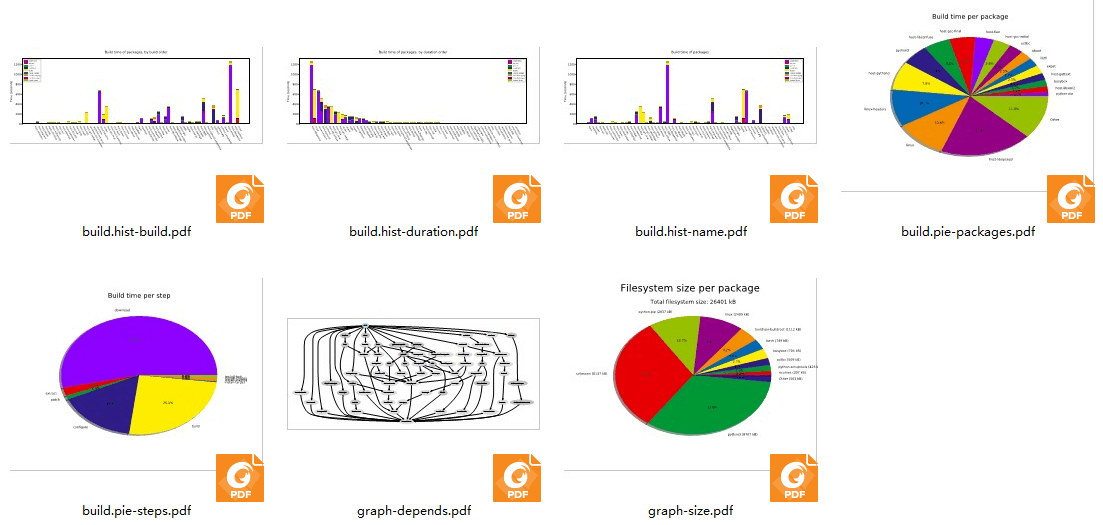
Buildroot 是一个非常强大的工具,它可以随意依赖第三方的库以及工具,能快速构建我们需要的内容,如果你想了解一下 Buildroot 编译生成的内容的一些时间、依赖、大小等情况,通过代码肯定是不方便,Buildroot 还提供可视化分析的工具,我们只需一句命令即可使用它们。
照官方文档的说明,需要在主机上安装必须的软件包 python-matplotlib 和 python-numpy,我们可以通过以下命令进行安装:
sudo apt-get install -y python-matplotlib python-numpyBuildroot 的工作之一是了解包之间的依赖关系,并确保它们以正确的顺序构建。 这些依赖关系有时可能非常复杂,对于给定的系统,通常不容易理解为什么这样或那样的包被 Buildroot 引入并且成功构建。为了帮助理用户解依赖关系,从而更好地理解嵌入式 Linux 系统中不同组件的作用,Buildroot 能够生成依赖关系图,通过 make graph-depends 命令即可生成对应的依赖文件(默认是 PDF 格式),具体情况如下:
# 命令
make graph-depends当然,Buildroot 还能生成关于编译时间与编译占用资源大小的分析图,只需要通过 make graph-build 与 make graph-size 命令生成即可,具体见(已删减输出信息):
make graph-build
make graph-size然后可以看到在 output/graphs 目录下多了一些 pdf 文件,这些就是 Buildroot 生成的可视化分析文件,可以直接打开他们,具体见:
三、软件包无法下载?
由于 buildroot 会在国外的网站下载很多东西,所以在下载时会很慢很慢,有可能出现下载失败的情况,那么可以根据日志信息手动去下载对应的软件包下载完毕后放在 dl 目录下即可。
