LV205-U-Boot启动内核
一、images 全局变量
不管是 bootz 还是 bootm 命令,在启动 Linux 内核的时候都会用到一个重要的全局变量:images,全局变量 images 会在 bootz 命令的执行中频繁使用到,相当于 Linux 内核启动的“灵魂”。images 变量在文件 cmd/bootm.c 中有如下定义:
bootm_headers_t images; /* pointers to os/initrd/fdt images */images 是 bootm_headers_t 类型的全局变量, bootm_headers_t 是个 boot 头结构体,在文件 include/image.h 中的定义如下(删除了一些条件编译代码):
typedef struct bootm_headers
{
	/*
	* Legacy os image header, if it is a multi component image
	* then boot_get_ramdisk() and get_fdt() will attempt to get
	* data from second and third component accordingly.
	*/
	image_header_t *legacy_hdr_os; /* image header pointer */
	image_header_t legacy_hdr_os_copy; /* header copy */
	ulong legacy_hdr_valid;

// 中间的省略 ...

#ifndef USE_HOSTCC
	image_info_t os; /* OS 镜像信息 */
	ulong ep; /* OS 入口点 */

	ulong rd_start, rd_end; /* ramdisk 开始和结束位置 */

	char *ft_addr; /* 设备树地址 */
	ulong ft_len; /* 设备树长度 */

	ulong initrd_start; /* initrd 开始位置 */
	ulong initrd_end; /* initrd 结束位置 */
	ulong cmdline_start; /* cmdline 开始位置 */
	ulong cmdline_end; /* cmdline 结束位置 */
	bd_t *kbd;
#endif

	int verify; /* getenv("verify")[0] != 'n' */

#define BOOTM_STATE_START (0x00000001)
#define BOOTM_STATE_FINDOS (0x00000002)
#define BOOTM_STATE_FINDOTHER (0x00000004)
#define BOOTM_STATE_LOADOS (0x00000008)
#define BOOTM_STATE_RAMDISK (0x00000010)
#define BOOTM_STATE_FDT (0x00000020)
#define BOOTM_STATE_OS_CMDLINE (0x00000040)
#define BOOTM_STATE_OS_BD_T (0x00000080)
#define BOOTM_STATE_OS_PREP (0x00000100)
#define BOOTM_STATE_OS_FAKE_GO (0x00000200)/*'Almost' run the OS*/
#define BOOTM_STATE_OS_GO (0x00000400)
	int state;

#ifdef CONFIG_LMB
	struct lmb lmb; /* 内存管理相关,不深入研究 */
#endif
} bootm_headers_t;第 15 行(第 335 行): os 成员变量是 image_info_t 类型的,为系统镜像信息。 结构体 image_info_t,也就是系统镜像信息结构体,此结构体在文件 include/image.h 中的定义如下:
typedef struct image_info {
	ulong		start, end;		/* start/end of blob */
	ulong		image_start, image_len; /* start of image within blob, len of image */
	ulong		load;			/* load addr for the image */
	uint8_t		comp, type, os;		/* compression, type of image, os type */
	uint8_t		arch;			/* CPU architecture */
} image_info_t;第 32 ~ 42 行(第 352 ~ 362 行):这 11 个宏定义表示 BOOT 的不同阶段。
二、do_bootz 函数
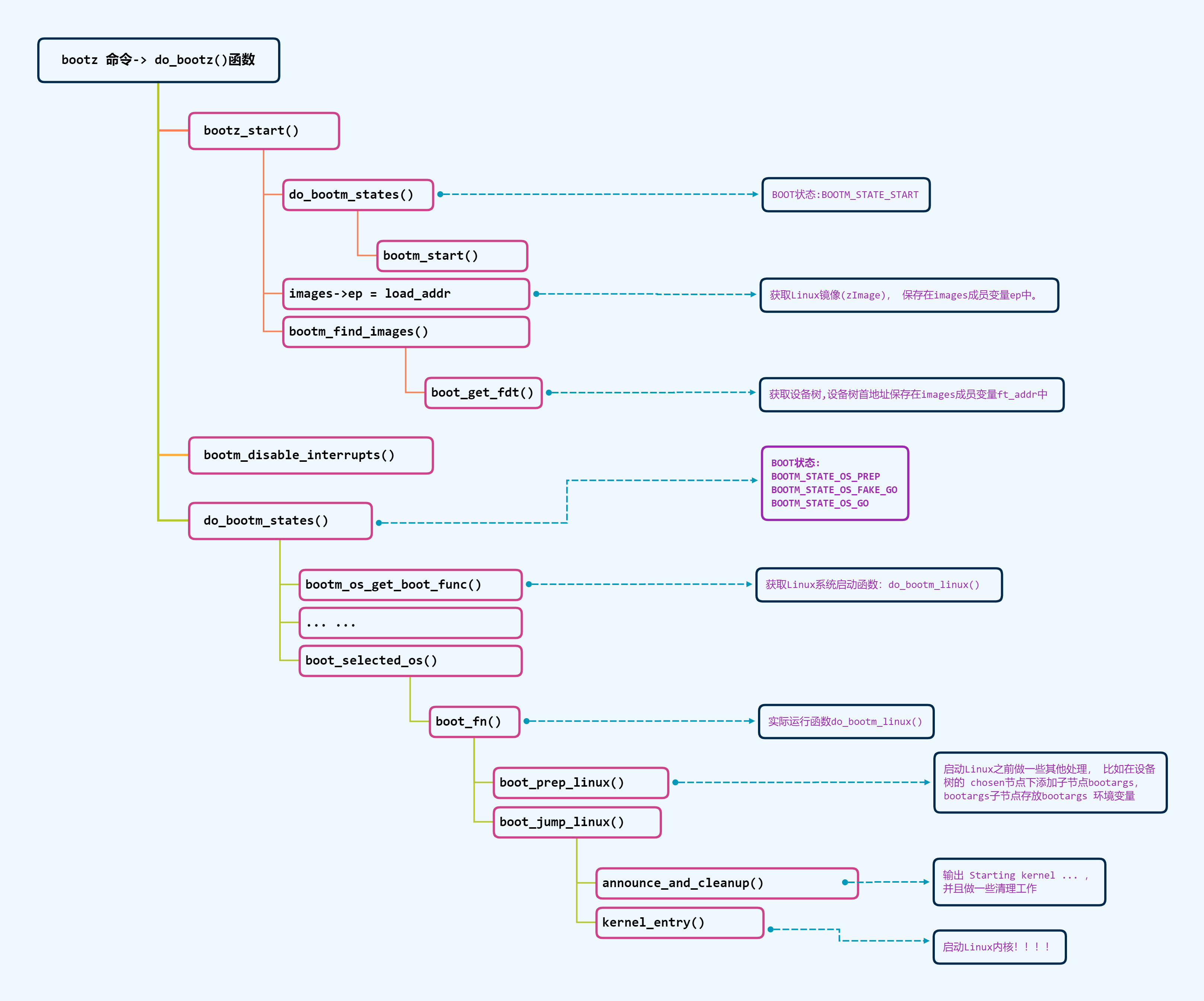
前边我们分析 uboot 启动流程的时候有分析过,每一个命令最后执行的都是命令对应的 do_xxx 函数。
1. do_bootz 在哪?
该函数在 cmd/bootm.c文件中定义。
2. 做了什么?
我们以下边的行号进行分析:
int do_bootz(cmd_tbl_t *cmdtp, int flag, int argc, char * const argv[])
{
	int ret;

	/* Consume 'bootz' */
	argc--; argv++;

	if (bootz_start(cmdtp, flag, argc, argv, &images))
		return 1;

	/*
	 * We are doing the BOOTM_STATE_LOADOS state ourselves, so must
	 * disable interrupts ourselves
	 */
	bootm_disable_interrupts();

	images.os.os = IH_OS_LINUX;
	ret = do_bootm_states(cmdtp, flag, argc, argv,
			      BOOTM_STATE_OS_PREP | BOOTM_STATE_OS_FAKE_GO |
			      BOOTM_STATE_OS_GO,
			      &images, 1);

	return ret;
}第 8 行(第 629 行):调用 bootz_start 函数, bootz_start 函数执行过程后边会再详细分析。
第 15 行(第 636 行):调用函数 bootm_disable_interrupts 关闭中断。
第 17 行(第 638 行):设置 images.os.os 为 IH_OS_LINUX,也就是设置系统镜像为 Linux,表示我们要启动的是 Linux 系统!后面会用到 images.os.os 来挑选具体的启动函数。
第 18 行(第 639 行):调用函数 do_bootm_states 来执行不同的 BOOT 阶段,这里要执行的 BOOT 阶段有:BOOTM_STATE_OS_PREP 、BOOTM_STATE_OS_FAKE_GO 和 BOOTM_STATE_OS_GO。
三、bootz_start 函数
bootz_start 主要用于初始化 images 的相关成员变量。
1. bootz_start 函数在哪?
bootz_start 函数也定义在文 cmd/bootm.c中,函数内容如下:
2. 做了什么?
我们以下边的行号进行分析:
static int bootz_start(cmd_tbl_t *cmdtp, int flag, int argc,
			char * const argv[], bootm_headers_t *images)
{
	int ret;
	ulong zi_start, zi_end;

	ret = do_bootm_states(cmdtp, flag, argc, argv, BOOTM_STATE_START,
			      images, 1);

	/* Setup Linux kernel zImage entry point */
	if (!argc) {
		images->ep = load_addr;
		debug("*  kernel: default image load address = 0x%08lx\n",
				load_addr);
	} else {
		images->ep = simple_strtoul(argv[0], NULL, 16);
		debug("*  kernel: cmdline image address = 0x%08lx\n",
			images->ep);
	}

	ret = bootz_setup(images->ep, &zi_start, &zi_end);
	if (ret != 0)
		return 1;

	lmb_reserve(&images->lmb, images->ep, zi_end - zi_start);

	/*
	 * Handle the BOOTM_STATE_FINDOTHER state ourselves as we do not
	 * have a header that provide this informaiton.
	 */
	if (bootm_find_images(flag, argc, argv))
		return 1;

#ifdef CONFIG_SECURE_BOOT
	extern uint32_t authenticate_image(
			uint32_t ddr_start, uint32_t image_size);
	if (authenticate_image(images->ep, zi_end - zi_start) == 0) {
		printf("Authenticate zImage Fail, Please check\n");
		return 1;
	}
#endif
	return 0;
}第 7 行(第 584 行):调用函数 do_bootm_states,执行 BOOTM_STATE_START 阶段。
第 16 行(第 593 行):设置 images 的 ep 成员变量,也就是系统镜像的入口点,使用 bootz 命令启动系统的时候就会设置系统在 DRAM 中的存储位置,这个存储位置就是系统镜像的入口点,因此 images-> ep = 0X80800000。
第 21 行(第 598 行)调用 bootz_setup 函数,此函数会判断当前的系统镜像文件是否为 Linux 的镜像文件,并且会打印出镜像相关信息, 这个函数后边会再详细说明。
第 31 行(第 608 行):调用函数 bootm_find_images 查找 ramdisk 和设备树(dtb)文件,但是我们没有用到 ramdisk,因此此函数在这里仅仅用于查找设备树(dtb)文件,此函数后边会详细说明。
3. bootz_setup 函数
bootz_setup 函数,此函数定义在文件 arch/arm/lib/bootm.c 中,函数内容如下:
#define	LINUX_ARM_ZIMAGE_MAGIC	0x016f2818

int bootz_setup(ulong image, ulong *start, ulong *end)
{
	struct zimage_header *zi;

	zi = (struct zimage_header *)map_sysmem(image, 0);
	if (zi->zi_magic != LINUX_ARM_ZIMAGE_MAGIC) {
		puts("Bad Linux ARM zImage magic!\n");
		return 1;
	}

	*start = zi->zi_start;
	*end = zi->zi_end;

	printf("Kernel image @ %#08lx [ %#08lx - %#08lx ]\n", image, *start,
	      *end);

	return 0;
}第 1 行(第 370 行):宏 LINUX_ARM_ZIMAGE_MAGIC 就是 ARM Linux 系统魔术数。
第 7 行(第 376 行):从传递进来的参数 image(也就是系统镜像首地址)中获取 zimage 头。 zImage 头结构体为 zimage_header。
第 8 ~ 11 行(第 377 ~ 380 行):判断 image 是否为 ARM 的 Linux 系统镜像,如果不是的话就直接返回,并且打印出“Bad Linux ARM zImage magic!”。
第 13、14 行(第 382、 383 行):初始化函数 bootz_setup 的参数 start 和 end。
第 16 行(第 385 行)打印启动信息,如果 Linux 系统镜像正常的话就会输出下图所示的信息:

4. bootm_find_images 函数
bootm_find_images 函数,此函数定义在文件 common/bootm.c 中 ,函数内容如下:
/**
 * bootm_find_images - wrapper to find and locate various images
 * @flag: Ignored Argument
 * @argc: command argument count
 * @argv: command argument list
 *
 * boot_find_images() will attempt to load an available ramdisk,
 * flattened device tree, as well as specifically marked
 * "loadable" images (loadables are FIT only)
 *
 * Note: bootm_find_images will skip an image if it is not found
 *
 * @return:
 *     0, if all existing images were loaded correctly
 *     1, if an image is found but corrupted, or invalid
 */
int bootm_find_images(int flag, int argc, char * const argv[])
{
	int ret;

	/* find ramdisk */
	ret = boot_get_ramdisk(argc, argv, &images, IH_INITRD_ARCH,
			       &images.rd_start, &images.rd_end);
	if (ret) {
		puts("Ramdisk image is corrupt or invalid\n");
		return 1;
	}

#if defined(CONFIG_OF_LIBFDT)
	/* find flattened device tree */
	ret = boot_get_fdt(flag, argc, argv, IH_ARCH_DEFAULT, &images,
			   &images.ft_addr, &images.ft_len);
	if (ret) {
		puts("Could not find a valid device tree\n");
		return 1;
	}
	set_working_fdt_addr((ulong)images.ft_addr);
#endif

#if defined(CONFIG_FIT)
	/* find all of the loadables */
	ret = boot_get_loadable(argc, argv, &images, IH_ARCH_DEFAULT,
			       NULL, NULL);
	if (ret) {
		printf("Loadable(s) is corrupt or invalid\n");
		return 1;
	}
#endif

	return 0;
}第 21 ~ 27 行(第 230~235 行):查找 ramdisk,但是我们没有用到 ramdisk,因此这部分代码就不用关心了。
第 29 ~ 36 行(第 237~244 行):查找设备树(dtb)文件,找到以后就将设备树的起始地址和长度分别写到 images 的 ft_addr 和 ft_len 成员变量中。我们使用 bootz 启动 Linux 的时候已经指明了设备树在 DRAM 中的存储地址,因此 images.ft_addr = 0X83000000,长度根据具体的设备树文件而定,比如我现在使用的设备树文件长度为 0X8C81 的话,images.ft_len 就为 0X8C81。
三、do_bootm_states 函数
do_bootz 最后调用的就是函数 do_bootm_states ,而且在 bootz_start 中也调用了 do_bootm_states 函数。
1. do_bootm_states 函数在哪?
do_bootm_states 函数定义在 common/bootm.c 中。
2. 做了什么?
函数 do_bootm_states 根据不同的 BOOT 状态执行不同的代码段,通过如下代码来判断 BOOT 状态:
states & BOOTM_STATE_XXX在 do_bootz 函数中会用到 BOOTM_STATE_OS_PREP 、BOOTM_STATE_OS_FAKE_GO 和 BOOTM_STATE_OS_GO 这三个 BOOT 状态,bootz_start 函数中会用到 BOOTM_STATE_START 这个 BOOT 状态。为了精简代码,方便分析,因此我们将上边的函数 do_bootm_states 进行精简,只留下下面这 4 个 BOOT 状态对应的处理代码:
int do_bootm_states(cmd_tbl_t *cmdtp, int flag, int argc, char *
                    const argv[],
                    int states, bootm_headers_t *images, int boot_progress)
{
	boot_os_fn *boot_fn;
	ulong iflag = 0;
	int ret = 0, need_boot_fn;

	images->state |= states;

	/*
	* Work through the states and see how far we get. We stop on
	* any error.
	*/
	if (states & BOOTM_STATE_START)
		ret = bootm_start(cmdtp, flag, argc, argv);
	// 中间部分省略 ......

	/* From now on, we need the OS boot function */
	if (ret)
		return ret;
	boot_fn = bootm_os_get_boot_func(images->os.os);
	need_boot_fn = states & (BOOTM_STATE_OS_CMDLINE |
	                         BOOTM_STATE_OS_BD_T | BOOTM_STATE_OS_PREP |
	                         BOOTM_STATE_OS_FAKE_GO | BOOTM_STATE_OS_GO);
	if (boot_fn == NULL && need_boot_fn)
	{
		if (iflag)
			enable_interrupts();
		printf("ERROR: booting os '%s' (%d) is not supported\n",
		       genimg_get_os_name(images->os.os), images->os.os);
		bootstage_error(BOOTSTAGE_ID_CHECK_BOOT_OS);
		return 1;
	}

	// 中间部分省略 ......
	if (!ret && (states & BOOTM_STATE_OS_PREP))
		ret = boot_fn(BOOTM_STATE_OS_PREP, argc, argv, images);

	#ifdef CONFIG_TRACE
	/* Pretend to run the OS, then run a user command */
	if (!ret && (states & BOOTM_STATE_OS_FAKE_GO))
	{
		char *cmd_list = getenv("fakegocmd");

		ret = boot_selected_os(argc, argv, BOOTM_STATE_OS_FAKE_GO,
		                       images, boot_fn);
		if (!ret && cmd_list)
			ret = run_command_list(cmd_list, -1, flag);
	}
	#endif

	/* Check for unsupported subcommand. */
	if (ret)
	{
		puts("subcommand not supported\n");
		return ret;
	}

	/* Now run the OS! We hope this doesn't return */
	if (!ret && (states & BOOTM_STATE_OS_GO))
		ret = boot_selected_os(argc, argv, BOOTM_STATE_OS_GO,
		                       images, boot_fn);
	// 中间部分省略 ......
	return ret;
}第 15、16 行(第 604、 605 行):处理 BOOTM_STATE_START 阶段, bootz_start 会执行这一段代码,这里调用函数 bootm_start。函数定义在文件 common/bootm.c 中,函数内容如下:
static int bootm_start(cmd_tbl_t *cmdtp, int flag, int argc,
		       char * const argv[])
{
	memset((void *)&images, 0, sizeof(images));
	images.verify = getenv_yesno("verify");

	boot_start_lmb(&images);

	bootstage_mark_name(BOOTSTAGE_ID_BOOTM_START, "bootm_start");
	images.state = BOOTM_STATE_START;

	return 0;
}第 22 行(第 658 行):通过函数 bootm_os_get_boot_func 来查找系统启动函数,参数 images-> os.os 就是系统类型,根据这个系统类型来选择对应的启动函数,在 do_bootz 中设置 images.os.os = IH_OS_LINUX。函数返回值就是找到的系统启动函数,这里找到的 Linux 系统启动函数为 do_bootm_linux,关于此函数查找系统启动函数的过程后边会再单独分析(第四节)。因此 boot_fn = do_bootm_linux ,后面执行 boot_fn 函数的地方实际上是执行的 do_bootm_linux 函数。
第 37 行(第 676 行):处理 BOOTM_STATE_OS_PREP 状态,调用函数 do_bootm_linux, do_bootm_linux 也是调用 boot_prep_linux 来完成具体的处理过程。 boot_prep_linux 主要用于处理环境变量 bootargs, bootargs 保存着传递给 Linux kernel 的参数。
第 40 ~ 51 行(第 679 ~ 689 行):是处理 BOOTM_STATE_OS_FAKE_GO 状态的,但是要我们没有使能 TRACE 功能,因此 CONFIG_TRACE 也就没有定义,所以这段程序不会编译。
第 62 行(第 699 行):调用函数 boot_selected_os 启动 Linux 内核,此函数第 4 个参数为 Linux 系统镜像头,第 5 个参数就是 Linux 系统启动函数 do_bootm_linux。boot_selected_os 函数定义在文件 common/bootm_os.c 中,函数内容如下:
int boot_selected_os(int argc, char * const argv[], int state,
		     bootm_headers_t *images, boot_os_fn *boot_fn)
{
	arch_preboot_os();
	boot_fn(state, argc, argv, images); // 调用 boot_fn 函数,也就是 do_bootm_linux 函数来启动 Linux 内核。

	/* Stand-alone may return when 'autostart' is 'no' */
	if (images->os.type == IH_TYPE_STANDALONE ||
	    state == BOOTM_STATE_OS_FAKE_GO) /* We expect to return */
		return 0;
	bootstage_error(BOOTSTAGE_ID_BOOT_OS_RETURNED);
#ifdef DEBUG
	puts("\n## Control returned to monitor - resetting...\n");
#endif
	return BOOTM_ERR_RESET;
}四、bootm_os_get_boot_func 函数
do_bootm_states 会调用 bootm_os_get_boot_func 来查找对应系统的启动函数 。
1. bootm_os_get_boot_func 函数在哪?
bootm_os_get_boot_func 函数定义在文件 common/bootm_os.c 中。
2. 做了什么
我们使用下边的行号进行分析:
boot_os_fn *bootm_os_get_boot_func(int os)
{
#ifdef CONFIG_NEEDS_MANUAL_RELOC
	static bool relocated;

	if (!relocated) {
		int i;

		/* relocate boot function table */
		for (i = 0; i < ARRAY_SIZE(boot_os); i++)
			if (boot_os[i] != NULL)
				boot_os[i] += gd->reloc_off;

		relocated = true;
	}
#endif
	return boot_os[os];
}第 3 ~ 16 行(第 495~508 行):条件编译,在我们使用的这个 uboot 中没有用到,因此这段代码无效。
第 17 行(第 509 行):boot_os 是个数组,这个数组里面存放着不同的系统对应的启动函数。boot_os 定义在文件 common/bootm_os.c 中,如下所示:
static boot_os_fn *boot_os[] = {
	[IH_OS_U_BOOT] = do_bootm_standalone,
#ifdef CONFIG_BOOTM_LINUX
	[IH_OS_LINUX] = do_bootm_linux, // 是 Linux 系统对应的启动函数 do_bootm_linux 。
#endif
	//...
};五、do_bootm_linux 函数
1. do_bootm_linux 函数在哪?
do_bootm_linux 就是最终启动 Linux 内核的函数,此函数定义在文件 arch/arm/lib/bootm.c,函数内容如下:
2. 做了什么?
我们以下边的行号进行分析:
int do_bootm_linux(int flag, int argc, char * const argv[],
		   bootm_headers_t *images)
{
	/* No need for those on ARM */
	if (flag & BOOTM_STATE_OS_BD_T || flag & BOOTM_STATE_OS_CMDLINE)
		return -1;

	if (flag & BOOTM_STATE_OS_PREP) {
		boot_prep_linux(images);
		return 0;
	}

	if (flag & (BOOTM_STATE_OS_GO | BOOTM_STATE_OS_FAKE_GO)) {
		boot_jump_linux(images, flag);
		return 0;
	}

	boot_prep_linux(images);
	boot_jump_linux(images, flag);
	return 0;
}第 13 行(第 351 行):如果参数 flag 等于 BOOTM_STATE_OS_GO 或者 BOOTM_STATE_OS_FAKE_GO 的话就执行 boot_jump_linux 函数。 boot_selected_os 函数在调用 do_bootm_linux 的时候会将 flag 设置为 BOOTM_STATE_OS_GO。
第 14 行(第 352 行):执行函数 boot_jump_linux,这个函数可以看下一小节。
3. boot_jump_linux
此函数定义在文件 arch/arm/lib/bootm.c 中,函数内容如下:
static void boot_jump_linux(bootm_headers_t *images, int flag)
{
#ifdef CONFIG_ARM64
	void (*kernel_entry)(void *fdt_addr, void *res0, void *res1,
			void *res2);
	int fake = (flag & BOOTM_STATE_OS_FAKE_GO);

	kernel_entry = (void (*)(void *fdt_addr, void *res0, void *res1,
				void *res2))images->ep;

	debug("## Transferring control to Linux (at address %lx)...\n",
		(ulong) kernel_entry);
	bootstage_mark(BOOTSTAGE_ID_RUN_OS);

	announce_and_cleanup(fake);

	if (!fake) {
		do_nonsec_virt_switch();
		kernel_entry(images->ft_addr, NULL, NULL, NULL);
	}
#else
	unsigned long machid = gd->bd->bi_arch_number;
	char *s;
	void (*kernel_entry)(int zero, int arch, uint params);
	unsigned long r2;
	int fake = (flag & BOOTM_STATE_OS_FAKE_GO);

	kernel_entry = (void (*)(int, int, uint))images->ep;

	s = getenv("machid");
	if (s) {
		if (strict_strtoul(s, 16, &machid) < 0) {
			debug("strict_strtoul failed!\n");
			return;
		}
		printf("Using machid 0x%lx from environment\n", machid);
	}

	debug("## Transferring control to Linux (at address %08lx)" \
		"...\n", (ulong) kernel_entry);
	bootstage_mark(BOOTSTAGE_ID_RUN_OS);
	announce_and_cleanup(fake);

	if (IMAGE_ENABLE_OF_LIBFDT && images->ft_len)
		r2 = (unsigned long)images->ft_addr;
	else
		r2 = gd->bd->bi_boot_params;

	if (!fake) {
#ifdef CONFIG_ARMV7_NONSEC
		if (armv7_boot_nonsec()) {
			armv7_init_nonsec();
			secure_ram_addr(_do_nonsec_entry)(kernel_entry,
							  0, machid, r2);
		} else
#endif
			kernel_entry(0, machid, r2);
	}
#endif
}第 3 ~ 21 行(第 274~292 行):是 64 位 ARM 芯片对应的代码, Cortex-A7 是 32 位芯片,因此用不到。
第 22 行(第 293 行):变量 machid 保存机器 ID,如果不使用设备树的话这个机器 ID 会被传递给 Linux 内核, Linux 内核会在自己的机器 ID 列表里面查找是否存在与 uboot 传递进来的 machid 匹配的项目,如果存在就说明 Linux 内核支持这个机器,那么 Linux 就会启动!如果使用设备树的话这个 machid 就无效了,设备树存有一个“兼容性”这个属性, Linux 内核会比较“兼容性”属性的值(字符串)来查看是否支持这个机器。】、
第 24 行(第 295 行)函数 kernel_entry,看名字“内核_进入”,说明此函数是进入 Linux 内核的,也就是最终的启动内核函数。此函数有三个参数: zero, arch, params,第一个参数 zero 同样为 0;第二个参数为机器 ID; 第三个参数 ATAGS 或者设备树(DTB)首地址,ATAGS 是传统的方法,用于传递一些命令行信息,如果使用设备树的话就要传递设备树(DTB)。
第 28 行(第 299 行):获取 kernel_entry 函数,函数 kernel_entry 并不是 uboot 定义的,而是 Linux 内核定义的, Linux 内核镜像文件的第一行代码就是函数 kernel_entry,而 images-> ep 保存着 Linux 内核镜像的起始地址,起始地址保存的正是 Linux 内核第一行代码。
第 42 行(第 313 行):调用函数 announce_and_cleanup 来打印一些信息并做一些清理工作。此函数定义在文件 arch/arm/lib/bootm.c 中,函数内容如下:
static void announce_and_cleanup(int fake)
{
	printf("\nStarting kernel ...%s\n\n", fake ?
		"(fake run for tracing)" : "");
	bootstage_mark_name(BOOTSTAGE_ID_BOOTM_HANDOFF, "start_kernel");
#ifdef CONFIG_BOOTSTAGE_FDT
	bootstage_fdt_add_report();
#endif
#ifdef CONFIG_BOOTSTAGE_REPORT
	bootstage_report();
#endif

#ifdef CONFIG_USB_DEVICE
	udc_disconnect();
#endif
	cleanup_before_linux(); // 调用 cleanup_before_linux 函数做一些清理工作。
}该函数在启动 Linux 之前输出“Starting kernel ...”信息 。

第 44 ~ 47 行(第 315 ~ 318 行):是设置寄存器 r2 的值,Linux 内核一开始是汇编代码,因此函数 kernel_entry 就是个汇编函数。向汇编函数传递参数要使用 r0、 r1 和 r2(参数数量不超过 3 个的时候),所以 r2 寄存器就是函数 kernel_entry 的第三个参数。
第 45 行(第 316 行):如果使用设备树的话, r2 应该是设备树的起始地址,而设备树地址保存在 images 的 ftd_addr 成员变量中。
第 46 行(第 317 行):如果不使用设备树的话, r2 应该是 uboot 传递给 Linux 的参数起始地址,也就是环境变量 bootargs 的值。
第 57 行(第 328 行):调用 kernel_entry 函数进入 Linux 内核, uboot 的使命也就完成了。
六、bootz 命令总结