
LV010-U-Boot源码编译
一、uboot 源码的下载
1. 源码版本选择
1.1 ALPHA-I.MX6ULL 开发板
我使用的是 ALPHA-I.MX6ULL 开发板,正点原子官方有维护一个版本 uboot,可以直接使用的,正点原子使用的 NXP 的 uboot 是 rel_imx_4.1.15_2.1.0_ga · nxp-imx/uboot-imx · GitHub 这个版本,这个版本的基础版本是 2016.03,在 Makefile 中有说明:uboot-imx/Makefile。
1.2 自定义一个
Tips:因为还是想自己学习一下,但是又感觉 2016.03 这个版本太老了,而且对于新版本的 ubuntu 系统,编译的时候可能会有一些问题,就自己重新选择了一个。
由于我使用的是 ubuntu 是 20.04,所以太老版本的 uboot 编译的时候会报错,这是老版本的 uboot 因为用到的一些库在新版本的 ubuntu 中更新了,不再适用,这里我们直接下载一个比较新的版本,这里我选择 uboot 的 2019.04 版本(其实也尝试了更新的,但是吧,能力有限,后面更新的变化会更大一点,老的东西都没明白,新的更不明白了,还是暂时先用这个,熟练了再说更新的版本),我们可以去 nxp 的 nxp-imx/uboot-imx: i.MX U-Boot 仓库找一下:
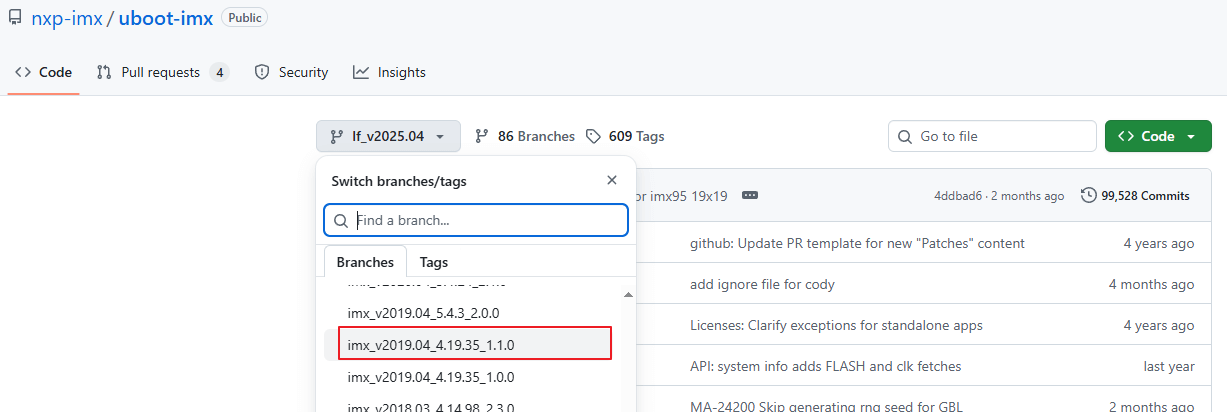
我们找到这个分支:nxp-imx/uboot-imx at imx_v2019.04_4.19.35_1.1.0 (github.com),我们打开提交记录来看一下:
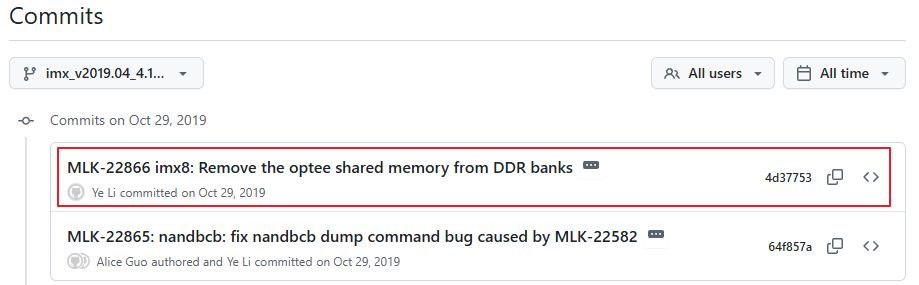
可以发现最新提交为:4d377539a1190e838eae5d8b8a794dde0696d572,我们就以这个版本为基础。我们看一下有没有 tag,这样后面也好搞,我们去 tag 里翻一下,发现是有一个 rel_imx_4.19.35_1.1.0 的:
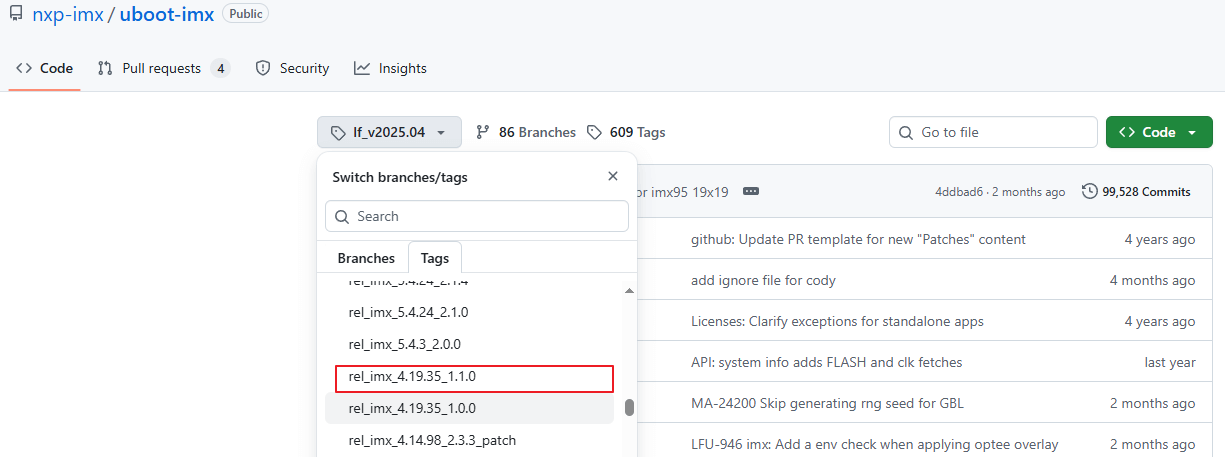
我们点开看一下,从这里点开会发现它就是刚才的分支,那么 tag 页面怎么去?我们直接用下面这个地址:
https://github.com/nxp-imx/uboot-imx/releases/tag/<tag_name>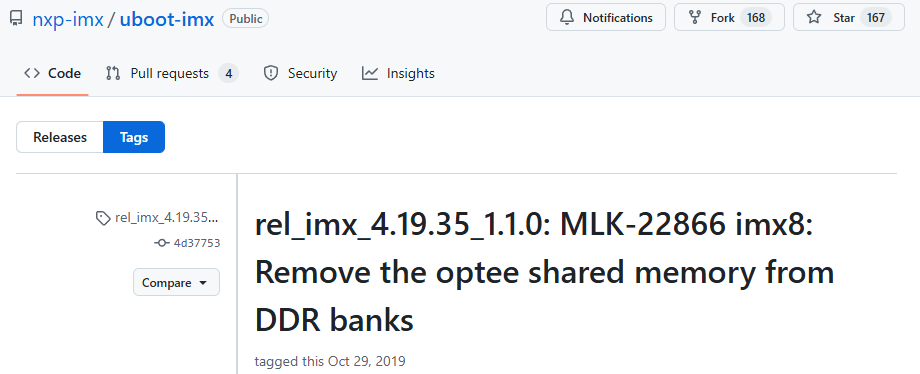
会发现这里的简短的提交记录和刚才是一样的,所以我们以后可以通过 tag 和提交记录或者分支来拉取这个版本的代码。是哪个版本的 uboot?我们可以看一下里面的 makefile 文件:uboot-imx/Makefile at rel_imx_4.19.35_1.1.0 · nxp-imx/uboot-imx (github.com):
# SPDX-License-Identifier: GPL-2.0+

VERSION = 2019
PATCHLEVEL = 04
SUBLEVEL =
EXTRAVERSION =
NAME =会发现版本就是 2019.04 的。
2. 下载源码
我们可以使用下面的命令来下载:
git clone -b rel_imx_4.19.35_1.1.0 --depth=1 https://github.com/nxp-imx/uboot-imx.git
git clone -b rel_imx_4.19.35_1.1.0 --depth=1 git@github.com:nxp-imx/uboot-imx.git这里我们加上 --depth 参数,毕竟我们对以往的提交记录并不怎么感兴趣,另外,以往上万条提交记录,这里全下载的话要很久的。拉取完毕后我们进入对应的目录,看一下提交记录:
D:\Temp\dtof_data\uboot-imx [(rel_imx_4.19.35_1.1.0)]> git log
commit 4d377539a1190e838eae5d8b8a794dde0696d572 (grafted, HEAD, tag: rel_imx_4.19.35_1.1.0)
Author: Ye Li <ye.li@nxp.com>
Date:   Tue Oct 29 00:11:33 2019 -0700

    MLK-22866 imx8: Remove the optee shared memory from DDR banks

    Optee has 4MB shared memory at its top space which was assigned to
    non-secure OS partition in ATF. By default this memory is added to
    u-boot DDR banks and will pass to kernel. This means kernel has possibility
    to allocate from this memory for system usage. At same time this memory is
    used by optee and mem-remapped by optee kernel driver. So it is possible to
    have conflict and cause kernel crash.

    Fix the issue by removing the shared memory from u-boot DDR banks. Then it
    is not visible for both u-boot and kernel and can avoid such issue.

    Signed-off-by: Ye Li <ye.li@nxp.com>
    Reviewed-by: Anson Huang <Anson.Huang@nxp.com>
(cherry picked from commit 164279c42de0d058b7abe198cc154ee683087e6a)会发现只有这一条,且就是我们所需要的那次提交。其实我们也可以直接去 tag 页面点击 Source Code 下载压缩包。我这里直接搞完上传到自己的 gitee 仓库了,所以我这里从自己的 gitee 仓库拉一下:更新NXP官方uboot版本(2016.03-->2019.04) · 20e4580 · linux-dev-org/imx6ull-uboot - Gitee.com
git clone https://gitee.com/linux-dev-org/imx6ull-uboot.git
git checkout -b 201904 20e4580 # 用指定提交创建分支拉取分支后,切换到下图这次提交:
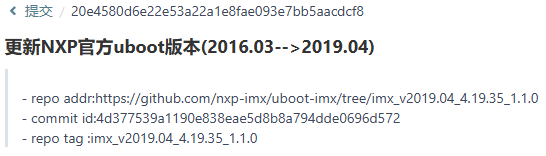
这一次提交的时候仅仅是更新了 nxp 的官方 uboot 2019.04 源码,还未做任何移植和适配。其实直接拉取最新的也一样,这里后面适配会添加支持包的,原版的不会动。只是这里和原版的文件稍微有些区别:
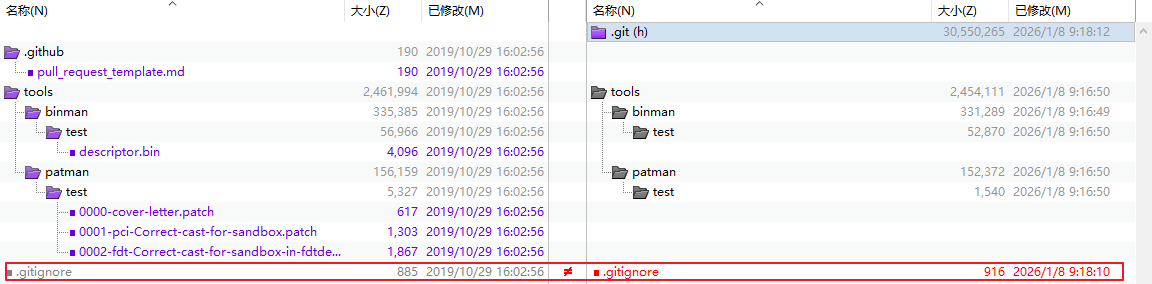
我的仓库中左侧设这几个文件没有,好像并不影响,这是因为这几个文件被 .gitignore 忽略了,nxp官方仓库的.gitignore也忽略了这些文件,但是文件还存在于仓库,应该是这些文件在.gitignore添加对应忽略规则前被git跟踪,所以后来就一直存在。
二、编译源码
1. 更新交叉编译工具链
这里是因为使用正点原子提供的资料中的交叉编译工具链的话后面编译的时候有警告:

我们这次直接到 ARM 官网去找:Downloads | GNU-A Downloads – Arm Developer
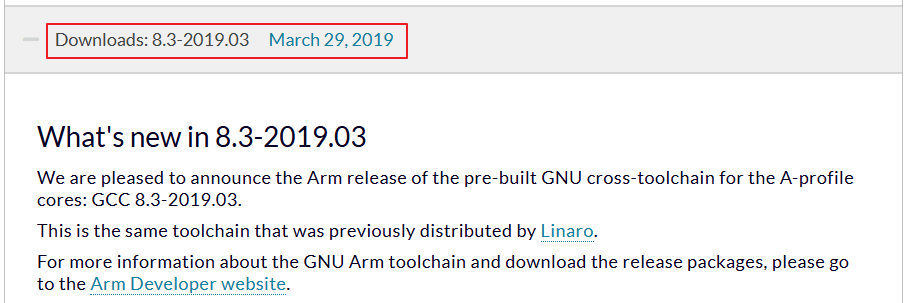
我这里选了一个和uboot相同年份的版本,即这个 2019 年的版本。往下找到在 linux 中使用的版本:

可以用下面的脚本来下载安装,或者看这里 develop/arm-gcc.sh · 苏木/linux-shell-script - 码云 - 开源中国 (gitee.com):
#!/bin/sh

HOST=arm-linux-gnueabihf
SCRIPT_PATH=$(pwd)

#修改源码包解压后的名称
MAJOR_NAME=gcc-arm-linux-gnueabihf

#修改需要下载的源码版本前缀和后缀
OPENSRC_VER_PREFIX=8.3
OPENSRC_VER_SUFFIX=.0

PACKAGE_NAME=${MAJOR_NAME}-${OPENSRC_VER_PREFIX}${OPENSRC_VER_SUFFIX}

#定义压缩包名称
COMPRESS_PACKAGE=gcc-arm-8.3-2019.03-x86_64-arm-linux-gnueabihf.tar.xz

#定义编译后安装--生成的文件, 文件夹位置路径
INSTALL_PATH=/opt/${PACKAGE_NAME}

#无需修改--下载地址
DOWNLOAD_LINK=https://developer.arm.com/-/media/Files/downloads/gnu-a/8.3-2019.03/binrel/${COMPRESS_PACKAGE}

#下载源码包
do_download_src () {
   echo "\033[1;33mstart download ${COMPRESS_PACKAGE}...\033[0m"
   if [ ! -f "${COMPRESS_PACKAGE}" ];then
      if [ ! -d "${PACKAGE_NAME}" ];then
        wget -c ${DOWNLOAD_LINK}
      fi
   fi
   echo "\033[1;33mdone...\033[0m"
}

#解压源码包
do_tar_package () {
   echo "\033[1;33mstart unpacking the ${PACKAGE_NAME} package ...\033[0m"

   mkdir -p ${INSTALL_PATH}

   if [ ! -d "${PACKAGE_NAME}" ];then
      tar -xf ${COMPRESS_PACKAGE} -C ${INSTALL_PATH} --strip-components=1
   fi
   echo "\033[1;33mdone...\033[0m"
}

#删除下载的文件
do_delete_file () {
   cd ${SCRIPT_PATH}
   if [ -f "${PACKAGE_NAME}" ];then
      sudo rm -f ${PACKAGE_NAME}
   fi
}

do_download_src
do_tar_package
# do_delete_file

exit $?安装完毕后记得添加环境变量,然后看一下版本信息:
sumu@sumu-virtual-machine:~$ arm-linux-gnueabihf-gcc -v
使用内建 specs。
COLLECT_GCC=arm-linux-gnueabihf-gcc
COLLECT_LTO_WRAPPER=/home/sumu/2software/gcc-arm-linux-gnueabihf-8.3.0/bin/../libexec/gcc/arm-linux-gnueabihf/8.3.0/lto-wrapper
目标:arm-linux-gnueabihf
配置为:/tmp/dgboter/bbs/rhev-vm8--rhe6x86_64/buildbot/rhe6x86_64--arm-linux-gnueabihf/build/src/gcc/configure --target=arm-linux-gnueabihf --prefix= --with-sysroot=/arm-linux-gnueabihf/libc --with-build-sysroot=/tmp/dgboter/bbs/rhev-vm8--rhe6x86_64/buildbot/rhe6x86_64--arm-linux-gnueabihf/build/build-arm-linux-gnueabihf/install//arm-linux-gnueabihf/libc --with-bugurl=https://bugs.linaro.org/ --enable-gnu-indirect-function --enable-shared --disable-libssp --disable-libmudflap --enable-checking=release --enable-languages=c,c++,fortran --with-gmp=/tmp/dgboter/bbs/rhev-vm8--rhe6x86_64/buildbot/rhe6x86_64--arm-linux-gnueabihf/build/build-arm-linux-gnueabihf/host-tools --with-mpfr=/tmp/dgboter/bbs/rhev-vm8--rhe6x86_64/buildbot/rhe6x86_64--arm-linux-gnueabihf/build/build-arm-linux-gnueabihf/host-tools --with-mpc=/tmp/dgboter/bbs/rhev-vm8--rhe6x86_64/buildbot/rhe6x86_64--arm-linux-gnueabihf/build/build-arm-linux-gnueabihf/host-tools --with-isl=/tmp/dgboter/bbs/rhev-vm8--rhe6x86_64/buildbot/rhe6x86_64--arm-linux-gnueabihf/build/build-arm-linux-gnueabihf/host-tools --with-arch=armv7-a --with-fpu=neon --with-float=hard --with-arch=armv7-a --with-pkgversion='GNU Toolchain for the A-profile Architecture 8.3-2019.03 (arm-rel-8.36)'
线程模型:posix
gcc 版本 8.3.0 (GNU Toolchain for the A-profile Architecture 8.3-2019.03 (arm-rel-8.36))2. 安装一些库
sudo apt-get install lib32ncurses5 lib32tinfo5 libc6-i386 # 野火的教程中需要安装的
sudo apt-get install libncurses5-dev # 正点原子教程需要安装的我看了两个教程,他们安装的库名字有点不太一样,我安装的是 libncurses5-dev 这个,也没什么问题。
3. 编译源码
3.1 清理工程
make ARCH=arm CROSS_COMPILE=arm-linux-gnueabihf- distclean # 清除生成的所有文件
make ARCH=arm CROSS_COMPILE=arm-linux-gnueabihf- clean # 清除部分文件为什么有两个?他们有什么区别?(这里为方便演示,直接对工程编译后再清除,其实首次下载完源码不需要清除也没啥问题)编译完成的时候源码目录下文件如下:

- make clean
命令主要清除的是编译过程中生成的可执行文件以及配置文件。这些文件是具体编译任务的产物,例如.exe 文件、.o 文件等。清除这些文件有助于保持构建环境的干净,避免可能因残留文件导致的问题。然而,make clean 并不会清除其他一些可能存在的文件,如日志文件、中间编译结果等,这使得它在彻底性上有所不足。

- make distclean
这个命令则更为彻底。它不仅清除可执行文件和配置文件,还会清除所有由 make 命令生成的文件。这包括了编译过程中产生的中间文件、日志文件、缓存文件等。通过执行 make distclean,我们能够确保构建环境的完全清洁,为后续的构建过程提供一个干净、无残留的环境。然而,这也意味着清除了一些可能需要保留的文件,比如版本控制系统的缓存文件等。
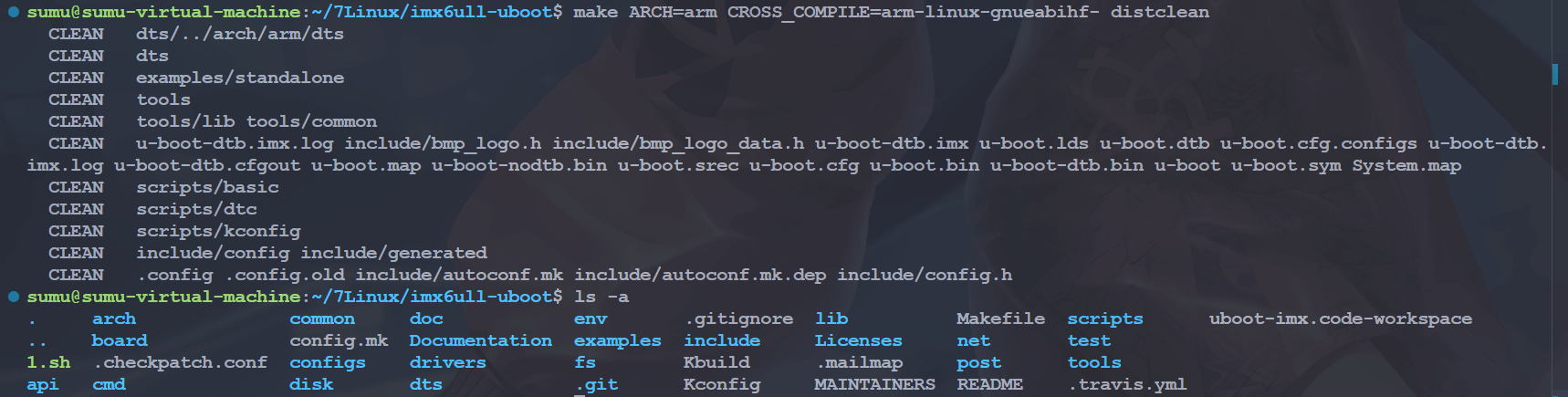
总结来说,make clean 和 make distclean 的使用场景有所不同。make clean 适用于在编译过程中需要局部清理,以排除残留文件影响的情况;而 make distclean 则适用于构建环境需要彻底清洁的情况,以准备进行新版本的构建或测试。在实际使用中,选择合适的命令可以提高构建过程的效率和准确性。
3.2 配置工程
#make ARCH = arm CROSS_COMPILE = arm-linux-gnueabihf- mx6ull_14x14_evk_emmc_defconfig
make ARCH=arm CROSS_COMPILE=arm-linux-gnueabihf- mx6ull_14x14_evk_defconfig在编译 uboot 的时候需要我们自定义配置,而 nxp 官方会提供一些默认配置,这些配置在 uboot /configs/目录下,如:
mx6ull_14x14_evk_defconfig
mx6ull_14x14_evk_emmc_defconfig
mx6ull_14x14_evk_nand_defconfig这一些就是 nxp 官方为 imx6ull 提供的配置文件,可以编译生成从 SD 卡启动的 uboot、从 emmc 启动的 uboot 以及从 nand 启动的 uboot,我们可以根据需求选择不同的配置文件从而编译不同的 uboot。
在运行以上配置命令后,Makefile 会根据对应的配置文件的内容将配置更新到当前目录下的 .config 文件中,接下来的编译则是根据 .config 文件的配置进行编译的。

3.3 开始编译
# V=0,显示简短的编译信息;V=1,显示详细的编译信息
make V=0 ARCH=arm CROSS_COMPILE=arm-linux-gnueabihf- -j16编译完成后,会得到这些文件:
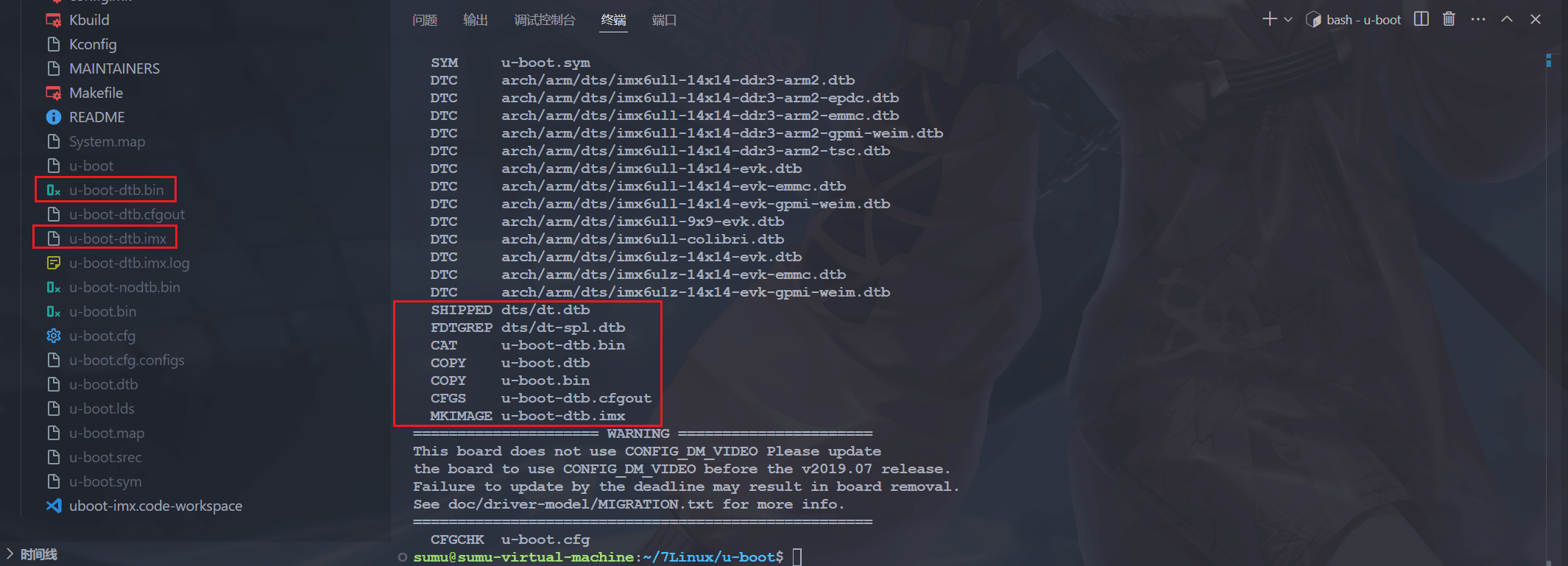
这里我们主要是用带有-dtb 的这两个文件,imx 文件就是 bin 文件在头部加入了 IVT 信息得到的,我们烧写到 SD 卡的时候也是用的 imx 文件。
u-boot.bin 是 U-Boot 的主要可执行文件。
u-boot.dtb 是描述硬件信息的设备树文件。
u-boot-dtb.bin 是包含了 U-Boot 和设备树的合并二进制文件。
u-boot-dtb.imx 是为 NXP i.MX 系列处理器生成的特定格式的启动镜像,包含了头部 IVT DCD 信息。
三、源码目录
上边那么多目录,都有什么用?我们来分析一下:
| 类型 | 名称 | 描述 | 备注 |
| 文件夹 | api | 与硬件无关的 API 函数。 | uboot 自带 |
| arch | 与架构体系有关的代码。 | ||
| board | 不同板子(开发板)的定制代码。 | ||
| cmd | 命令相关代码。 | ||
| common | 通用代码。 | ||
| configs | 配置文件。 | ||
| disk | 磁盘分区相关代码 | ||
| doc | 文档。 | ||
| drivers | 驱动代码。 | ||
| dts | 设备树。 | ||
| examples | 示例代码。 | ||
| fs | 文件系统。 | ||
| include | 头文件。 | ||
| lib | 库文件。 | ||
| Licenses | 许可证相关文件。 | ||
| net | 网络相关代码。 | ||
| post | 上电自检程序。 | ||
| scripts | 脚本文件。 | ||
| test | 测试代码目录 | ||
| tools | 工具文件夹,从bin文件生成imx文件的工具就在这里。 | ||
| 文件 | .config | 配置文件,重要的文件。 | 编译生成的文件 |
| .gitignore | git 工具相关文件。 | uboot 自带 | |
| .mailmap | 邮件列表。 | ||
| .u-boot.xxx.cmd(一系列) | 这是一系列的文件,用于保存着一些命令。 | 编译生成的文件 | |
| config.mk | 某个 Makefile 会调用此文件。 | uboot 自带 | |
| Kbuild | 用于生成一些和汇编有关的文件。 | uboot 自带 | |
| Kconfig | 图形配置界面描述文件。 | ||
| MAINTAINERS | 维护者联系方式文件。 | ||
| MAKEALL | 一个 shell 脚本文件,帮助编译uboot 的。 | ||
| Makefile | 主 Makefile,重要文件! | ||
| README | 相当于帮助文档。 | uboot 自带 | |
| snapshot.commint | 暂时不清楚 | ||
| System.map | 系统映射文件。 | 编译出来的文件 | |
| u-boot | 编译出来的 u-boot 文件。 | ||
| u-boot.xxx(一系列) | 生成的一些 u-boot 相关文件,包括u-boot.bin、 u-boot.imx.等。 |
1. arch 文件夹
这个文件夹里面存放着和架构有关的文件 :

比如 arm、 avr32、 m68k 等,我们现在用的是 ARM 芯片,所以只需要关心 arm 文件夹即可,打开 arm 文件夹里面内容如图 :
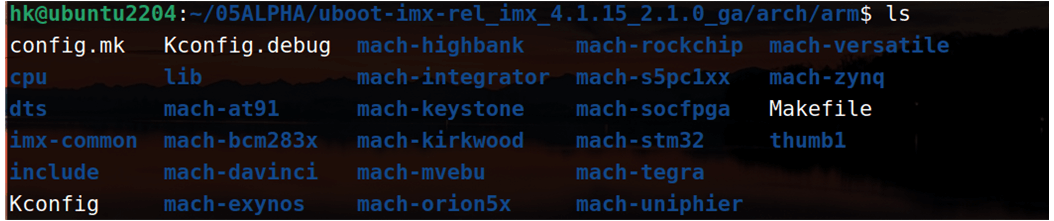
mach 开头的文件夹是跟具体的设备有关的,比如“mach-exynos”就是跟三星的 exyons 系列 CPU 有关的文件。我们使用的是 I.MX6ULL,所以要关注“imx-common”这个文件夹。另外“cpu”这个文件夹也是和 cpu 架构有关的,打开以后如图所示:

可以看出有多种 ARM 架构相关的文件夹, I.MX6ULL 使用的 Cortex-A7 内核,Cortex-A7 属于 armv7,所以我们要关心“armv7”这个文件夹。 cpu 文件夹里面有个名为“uboot.lds”的链接脚本文件,这个就是 ARM 芯片所使用的 u-boot 链接脚本文件! armv7 这个文件夹里面的文件都是跟 ARMV7 架构有关的是我们分析 uboot 启动源码的时候需要重点关注的。
2. board 文件夹
board 文件夹就是和具体的板子有关的,打开此文件夹,里面全是不同的板子,毫无疑问正点原子的开发板肯定也在里面(正点原子添加的),NXP官方的评估板也在里边。 borad 文件夹里面有个名为“freescale”的文件夹:
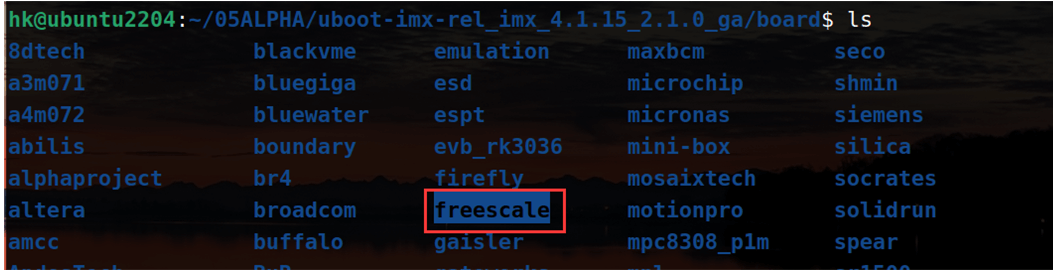
有使用 freescale 芯片的板子都放到此文件夹中, I.MX 系列以前属于 freescale,只是freescale 后来被 NXP 收购了。打开此 freescale 文件夹,在里面找到和 mx6u(I.MX6UL/ULL)有关的文件夹,如下图:
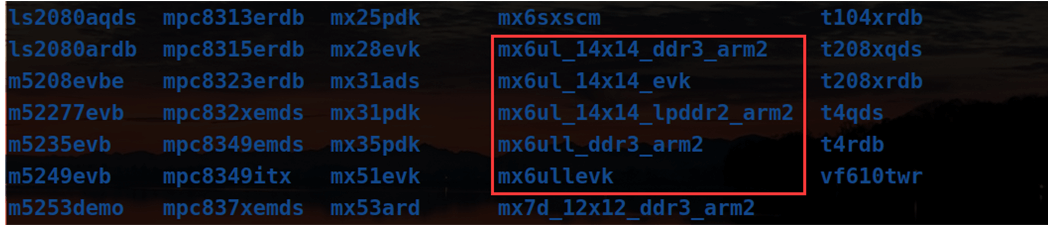
有 5 个文件夹,这 5 个文件夹对应 5 种板子,以“mx6ul”开头的表示使用I.MX6UL 芯片的板子,以 mx6ull 开头的表示使用 I.MX6ULL 芯片的板子。mx6ullevk 是 NXP官方的I.MX6ULL开发板,正点原子的ALPHA开发板就是在这个基础上开发的。我们后面移植uboot 到时候就是参考 NXP 官方的开发板,也就是要参考 mx6ullevk 这个文件夹来定义我们的板子。
3. configs 文件夹
此文件夹为 uboot 配置文件, uboot 是可配置的,但是你要是自己从头开始一个一个项目的配置,那就太麻烦了,因此一般半导体或者开发板厂商都会制作好一个配置文件。我们可以在这个做好的配置文件基础上来添加自己想要的功能,这些半导体厂商或者开发板厂商制作好的配置文件统一命名为 “ xxx_defconfig ” , xxx 表示开发板名字,这些 defconfig 文件都存放在 configs文件夹,因此, NXP 官方开发板的开发板配置文件肯定也在这个文件夹中

图中这 4 个文件中的mx6ull_14x14_evk_emmc_defconfig就是NXPimu6ull evk评估开发板所对应的 uboot 默认配置文件。使用“make xxx_defconfig”命令即可配置 uboot,比如 :
make ARCH=arm CROSS_COMPILE=arm-linux-gnueabihf- mx6ull_14x14_evk_emmc_defconfig上述命令就是配置NXP官方的imx6ull evk评估板所使用的 uboot。在编译 uboot 之前一定要使用 defconfig 来配置 uboot!
4. .u-boot.xxx_cmd 文件
.u-boot.xxx_cmd 是一系列的文件,这些文件都是编译生成的,都是一些命令文件,比如文件.u-boot.bin.cmd,看名字应该是和 u-boot.bin 有关的,此文件的内容如下:
cmd_u-boot.bin := cp u-boot-dtb.bin u-boot.binu-boot.bin.cmd 里面定义了一个变量: cmd_u-boot.bin,此变量的值为“cp u-boot-nodtb.binu-boot.bin”,也就是拷贝一份 u-boot-nodtb.bin 文件,并且重命名为 u-boot.bin,这个就是 u-boot.bin的来源,来自于文件 u-boot-nodtb.bin。 那 么 u-boot-nodtb.bin 是 怎 么 来 的 呢 ? 文 件 .u-boot-nodtb.bin.cmd 就 是 用 于 生 成 uboot.nodtb.bin 的,此文件内容如下:
cmd_u-boot-nodtb.bin := arm-linux-gnueabihf-objcopy --gap-fill=0xff -j .text -j .secure_text -j .secure_data -j .rodata -j .hash -j .data -j .got -j .got.plt -j .u_boot_list -j .rel.dyn -j .binman_sym_table -j .text_rest -j .dtb.init.rodata -j .efi_runtime -j .efi_runtime_rel -O binary u-boot u-boot-nodtb.bin这里用到了 arm-linux-gnueabihf-objcopy,使用 objcopy 将 ELF 格式的 u-boot 文件转换为二进制的 u-boot-nodtb.bin 文件。文件 u-boot 是 ELF 格式的文件,文件.u-boot.cmd 用于生成 u-boot,文件内容如下:
cmd_u-boot := arm-linux-gnueabihf-ld.bfd -pie --gc-sections -Bstatic -Ttext 0x87800000 -o u-boot -T u-boot.lds arch/arm/cpu/armv7/start.o --start-group arch/arm/cpu/built-in.o arch/arm/cpu/armv7/built-in.o arch/arm/lib/built-in.o arch/arm/mach-imx/built-in.o board/freescale/common/built-in.o board/freescale/mx6ullevk/built-in.o cmd/built-in.o common/built-in.o disk/built-in.o drivers/built-in.o drivers/dma/built-in.o drivers/gpio/built-in.o drivers/i2c/built-in.o drivers/mtd/built-in.o drivers/mtd/onenand/built-in.o drivers/mtd/spi/built-in.o drivers/net/built-in.o drivers/net/phy/built-in.o drivers/power/built-in.o drivers/power/battery/built-in.o drivers/power/domain/built-in.o drivers/power/fuel_gauge/built-in.o drivers/power/mfd/built-in.o drivers/power/pmic/built-in.o drivers/power/regulator/built-in.o drivers/serial/built-in.o drivers/spi/built-in.o drivers/usb/cdns3/built-in.o drivers/usb/common/built-in.o drivers/usb/dwc3/built-in.o drivers/usb/emul/built-in.o drivers/usb/eth/built-in.o drivers/usb/gadget/built-in.o drivers/usb/gadget/udc/built-in.o drivers/usb/host/built-in.o drivers/usb/musb-new/built-in.o drivers/usb/musb/built-in.o drivers/usb/phy/built-in.o drivers/usb/ulpi/built-in.o env/built-in.o fs/built-in.o lib/built-in.o net/built-in.o --end-group arch/arm/lib/eabi_compat.o arch/arm/lib/lib.a -Map u-boot.map; trueu-boot.cmd 使用到了 arm-linux-gnueabihf-ld.bfd,也就是链接工具,使用 ld.bfd 将各个 builtin.o 文件链接在一起就形成了 u-boot 文件。 uboot 在编译的时候会将同一个目录中的所有.c 文件都编译在一起,并命名为 built-in.o,相当于将众多的.c 文件对应的.o 文件集合在一起,这个就是 u-boot 文件的来源。
如果我们要用 NXP 提供的 MFGTools 工具向开发板烧写 uboot,此时烧写的是 u-boot.imx文件,而不是 u-boot.bin 文件。 u-boot.imx 是在 u-boot.bin 文件的头部添加了 IVT、 DCD 等信息。这个工作是由文件.u-boot.imx.cmd 来完成的,此文件内容如下:

我用的2019.04版本的uboot编译后出现的是 u-boot-dtb.imx文件,对应的是 .u-boot-dtb.imx.cmd
可以看出,这里用到了工具 tools/mkimage,而 IVT、 DCD 等数据保存在了文件 board/freescale/mx6ullevk/imximage.cfg.cfgtmp 中,工具 mkimage 就是读取文件 imximage-ddr512.cfg.cfgtmp 里面的信息,然后将其添加到文件 u-boot.bin 的头部,最终生成 u-boot.imx。
文件.u-boot.lds.cmd 就是用于生成 u-boot.lds 链接脚本的,由于.u-boot.lds.cmd 文件内容太多,这里就不列出来了。 uboot 根目录下的 u-boot.lds 链接脚本就是来源于 arch/arm/cpu/u-boot.lds文件。
5. Makefile 文件
这个是顶层 Makefile 文件, Makefile 是支持嵌套的,也就是顶层 Makefile 可以调用子目录中的 Makefile 文件。 Makefile 嵌套在大项目中很常见,一般大项目里面所有的源代码都不会放到同一个目录中,各个功能模块的源代码都是分开的,各自存放在各自的目录中。每个功能模块目录下都有一个 Makefile,这个 Makefile 只处理本模块的编译链接工作,这样所有的编译链接工作就不用全部放到一个 Makefile 中,可以使得 Makefile 变得简洁明了。
uboot 源码根目录下的 Makefile 是顶层 Makefile,他会调用其它的模块的 Makefile 文件,比如 drivers/adc/Makefile。当然了,顶层 Makefile 要做的工作可远不止调用子目录 Makefile 这么简单。
6. u-boot.xxx 文件
u-boot.xxx 同样也是一系列文件,包括 u-boot、 u-boot.bin、 u-boot.cfg、 u-boot.imx、 u-boot.lds、u-boot.map、 u-boot.srec、 u-boot.sym 和 u-boot-nodtb.bin,这些文件的含义如下:
| u-boot | 编译出来的 ELF 格式的 uboot 镜像文件。 |
| u-boot.bin | 编译出来的二进制格式的 uboot 可执行镜像文件。 |
| u-boot.cfg | uboot 的另外一种配置文件。 |
| u-boot.imx | u-boot.bin 添加头部信息以后的文件, NXP 的 CPU 专用文件。 |
| u-boot.lds | 链接脚本。 |
| u-boot.map | uboot 映射文件,通过查看此文件可以知道某个函数被链接到了哪个地址上。 |
| u-boot.srec | S-Record 格式的镜像文件。 |
| u-boot.sym | uboot 符号文件。 |
| u-boot-nodtb.bin | 和 u-boot.bin 一样,u-boot.bin 就是 u-boot-nodtb.bin 的复制文件。 |
7. .config 文件
uboot 配置文件,使用命令“make xxx_defconfig”配置 uboot 以后就会自动生成, .config 内容如下:
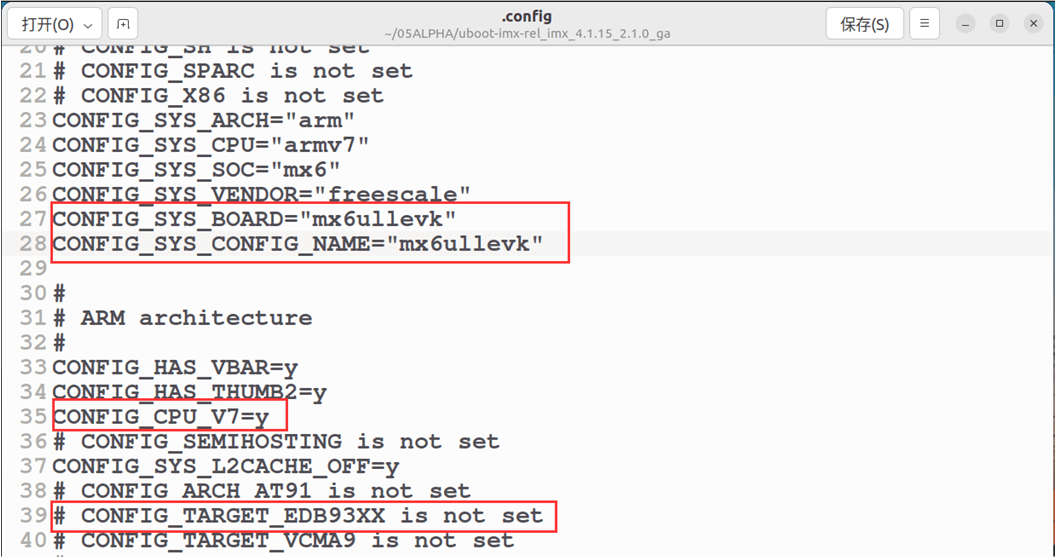
可以看出.config 文件中都是以“CONFIG_”开始的配置项,这些配置项就是 Makefile 中的变量,因此后面都跟有相应的值, uboot 的顶层 Makefile 或子 Makefile 会调用这些变量值。在.config 中会有大量的变量值为‘y’,这些为‘y’的变量一般用于控制某项功能是否使能,为‘y’的话就表示功能使能,比如:
CONFIG_CMD_BOOTM=y如果使能了 bootd 这个命令的话, CONFIG_CMD_BOOTM 就为‘y’。在 cmd/Makefile 中有如下代码:
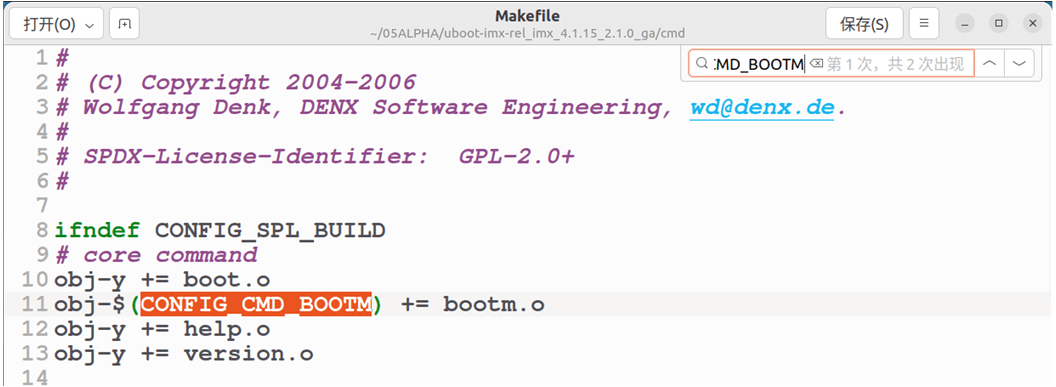
上边代码中有这么一句:
obj-$(CONFIG_CMD_BOOTM) += bootm.oCONFIG_CMD_BOOTM=y,将其展开就是:
obj-y += bootm.o也就是给 obj-y 追加了一个“bootm.o”, obj-y 包含着所有要编译的文件对应的.o 文件,这里表示需要编译文件 cmd/bootm.c。相当于通过 “ CONFIG_CMD_BOOTD=y ” 来使能 bootm 这个命令,进而编译 cmd/bootm.c 这个文件,这个文件实现了命令 bootm。在 uboot 和 Linux 内核中都是采用这种方法来选择使能某个功能,编译对应的源码文件。
4. 创建VScode工程
4.1 屏蔽文件和目录?
我是通过windows下的VScode的SSH插件远程登录ubuntu来进行开发,使用VScode还是比较方便的,怎么用SSH插件连接ubuntu?可以看这篇笔记《📝 LV01-vscode基础应用》。然后我们可以创建一个工作区:

工作区文件内容如下所示,后边会用到这个文件。
{
	"folders": [
		{
			"path": "."
		}
	]
}然后一定要打开这个工作区,后边的操作才能生效。这样一个完整的 VSCode 工程就建立起来了。但是这个 VSCode 工程包含了 uboot 的所有文件, uboot 中有些文件是不需要的,比如 arch 目录下是各种架构的文件夹 :
在 arch 目录下,我们只需要 arm 文件夹,所以需要将其它的目录从 VSCode 中给屏蔽掉,比如将 arch/avr32 这个目录给屏蔽掉。我们修改工程工作区文件:
{
	"folders": [
		{
			"path": "."
		}
	],
	"settings": {
		// 搜索时不想显示的文件可按以下格式屏蔽(为 true 时屏蔽)
		"search.exclude": {
			"arch/avr32": true,

		},
		// 不想在工作区显示的文件可按以下格式屏蔽(为 true 时屏蔽)
		"files.exclude": {
			"arch/avr32": true,
		},
	}
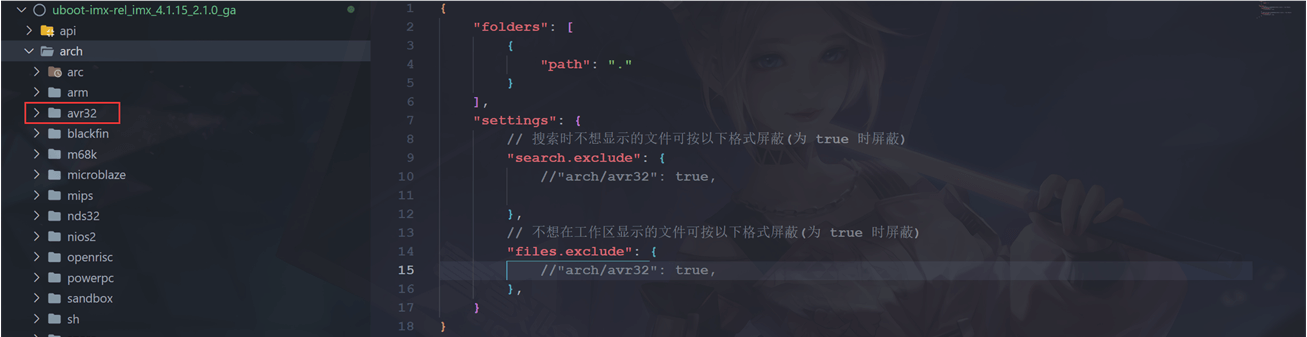
}其中"search.exclude"里面是需要在搜索结果中排除的文件或者文件夹, "files.exclude"是工程目录中需要排除的文件或者文件夹。我们需要将arch/avr32 文件夹下的所有文件从搜索结果和左侧的工程目录中都排除掉,就可以按上边的写法,"arch/avr32": true,冒号前面的是要排除的文件或者文件夹,冒号后面为是否将文件排除, true 表示排除, false 表示不排除。 。我们可以看一下效果,这是屏蔽掉上边添加的内容的情况:
当把那两行去掉的时候,这个文件夹就会消失:
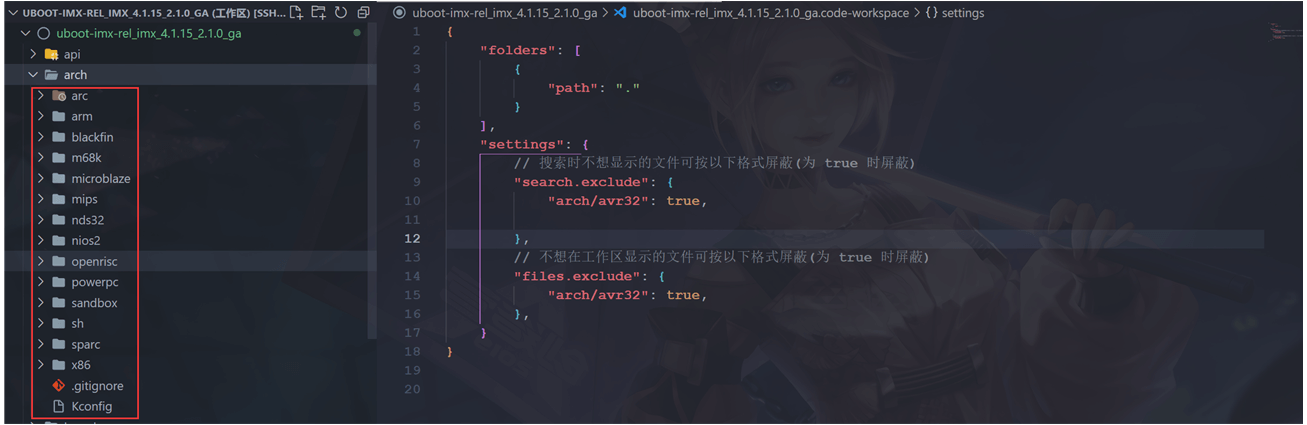
会发现,arch/avr32这个目录在工程中消失了,但是文件夹其实还在,只是不在工程中,这样我们屏蔽掉一些不用的文件以及目录,阅读工程源码的时候就会很方便啦。
4.2 工作区文件内容
我们把不需要的文件和目录都从工作区剔除,我们在工作区文件中添加以下内容即可:
{
	"folders": [
		{
			"path": "."
		}
	],
	"settings": {
		// 搜索时不想显示的文件可按以下格式屏蔽(为 true 时屏蔽)
		"search.exclude": {
            "**/*.o":true,
            "**/*.su":true,
            "**/*.cmd":true,
            "arch/arc":true,
            "arch/avr32":true,
            "arch/blackfin":true,
            "arch/m68k":true,
            "arch/microblaze":true,
            "arch/mips":true,
            "arch/nds32":true,
            "arch/nios2":true,
            "arch/openrisc":true,
            "arch/powerpc":true,
            "arch/sandbox":true,
            "arch/sh":true,
            "arch/sparc":true,
            "arch/x86":true,
            "arch/arm/mach*":true,
            "arch/arm/cpu/arm11*":true,
            "arch/arm/cpu/arm720t":true,
            "arch/arm/cpu/arm9*":true,
            "arch/arm/cpu/armv7m":true,
            "arch/arm/cpu/armv8":true,
            "arch/arm/cpu/pxa":true,
            "arch/arm/cpu/sa1100":true,
            "board/[a-e]*":true,
            "board/[g-z]*":true,
            "board/[0-9]*":true,
            "board/[A-Z]*":true,
            "board/fir*":true,
            "board/freescale/b*":true,
            "board/freescale/l*":true,
            "board/freescale/m5*":true,
            "board/freescale/mp*":true,
            "board/freescale/c29*":true,
            "board/freescale/cor*":true,
            "board/freescale/mx7*":true,
            "board/freescale/mx2*":true,
            "board/freescale/mx3*":true,
            "board/freescale/mx5*":true,
            "board/freescale/p*":true,
            "board/freescale/q*":true,
            "board/freescale/t*":true,
            "board/freescale/v*":true,
            "configs/[a-l]*":true,
            "configs/[n-z]*":true,
            "configs/[A-Z]*":true,
            "configs/M[a-z]*":true,
            "configs/M[A-Z]*":true,
            "configs/M[0-9]*":true,
            "configs/m[a-w]*":true,
            "configs/m[0-9]*":true,
            "configs/[0-9]*":true,
            "include/configs/[a-l]*":true,
            "include/configs/[n-z]*":true,
            "include/configs/[A-Z]*":true,
            "include/configs/m[a-w]*":true,
		},
		// 不想在工作区显示的文件可按以下格式屏蔽(为 true 时屏蔽)
		"files.exclude": {
			"**/*.o":true,
            "**/*.su":true,
            "**/*.cmd":true,
            "arch/arc":true,
            "arch/avr32":true,
            "arch/blackfin":true,
            "arch/m68k":true,
            "arch/microblaze":true,
            "arch/mips":true,
            "arch/nds32":true,
            "arch/nios2":true,
            "arch/openrisc":true,
            "arch/powerpc":true,
            "arch/sandbox":true,
            "arch/sh":true,
            "arch/sparc":true,
            "arch/x86":true,
            "arch/arm/mach*":true,
            "arch/arm/cpu/arm11*":true,
            "arch/arm/cpu/arm720t":true,
            "arch/arm/cpu/arm9*":true,
            "arch/arm/cpu/armv7m":true,
            "arch/arm/cpu/armv8":true,
            "arch/arm/cpu/pxa":true,
            "arch/arm/cpu/sa1100":true,
            "board/[a-e]*":true,
            "board/[g-z]*":true,
            "board/[0-9]*":true,
            "board/[A-Z]*":true,
            "board/fir*":true,
            "board/freescale/b*":true,
            "board/freescale/l*":true,
            "board/freescale/m5*":true,
            "board/freescale/mp*":true,
            "board/freescale/c29*":true,
            "board/freescale/cor*":true,
            "board/freescale/mx7*":true,
            "board/freescale/mx2*":true,
            "board/freescale/mx3*":true,
            "board/freescale/mx5*":true,
            "board/freescale/p*":true,
            "board/freescale/q*":true,
            "board/freescale/t*":true,
            "board/freescale/v*":true,
            "configs/[a-l]*":true,
            "configs/[n-z]*":true,
            "configs/[A-Z]*":true,
            "configs/M[a-z]*":true,
            "configs/M[A-Z]*":true,
            "configs/M[0-9]*":true,
            "configs/m[a-w]*":true,
            "configs/m[0-9]*":true,
            "configs/[0-9]*":true,
            "include/configs/[a-l]*":true,
            "include/configs/[n-z]*":true,
            "include/configs/[A-Z]*":true,
            "include/configs/m[a-w]*":true,
		},
	}
}上述代码用到了通配符“*”,比如“*/.o”表示所有.o 结尾的文件。“configs/[a-l]*”表示 configs 目录下所有以‘ a ’ ~ ‘ l ’开头的文件或者文件夹。 上述配置只是排除了一部分文件夹,我们在实际的使用中可以根据自己的实际需求来选择将哪些文件或者文件夹排除掉。排除以后我们的工程就会清爽很多,搜索的时候也不会跳出很多文件了。